Alternative zu uBlock Origin
AdGuard browser extension

Ad blocker with advanced privacy protection features
AdGuard is a fast and lightweight ad blocking browser extension
that effectively blocks all types of ads and trackers.
Website |
Reddit |
X |
Telegram


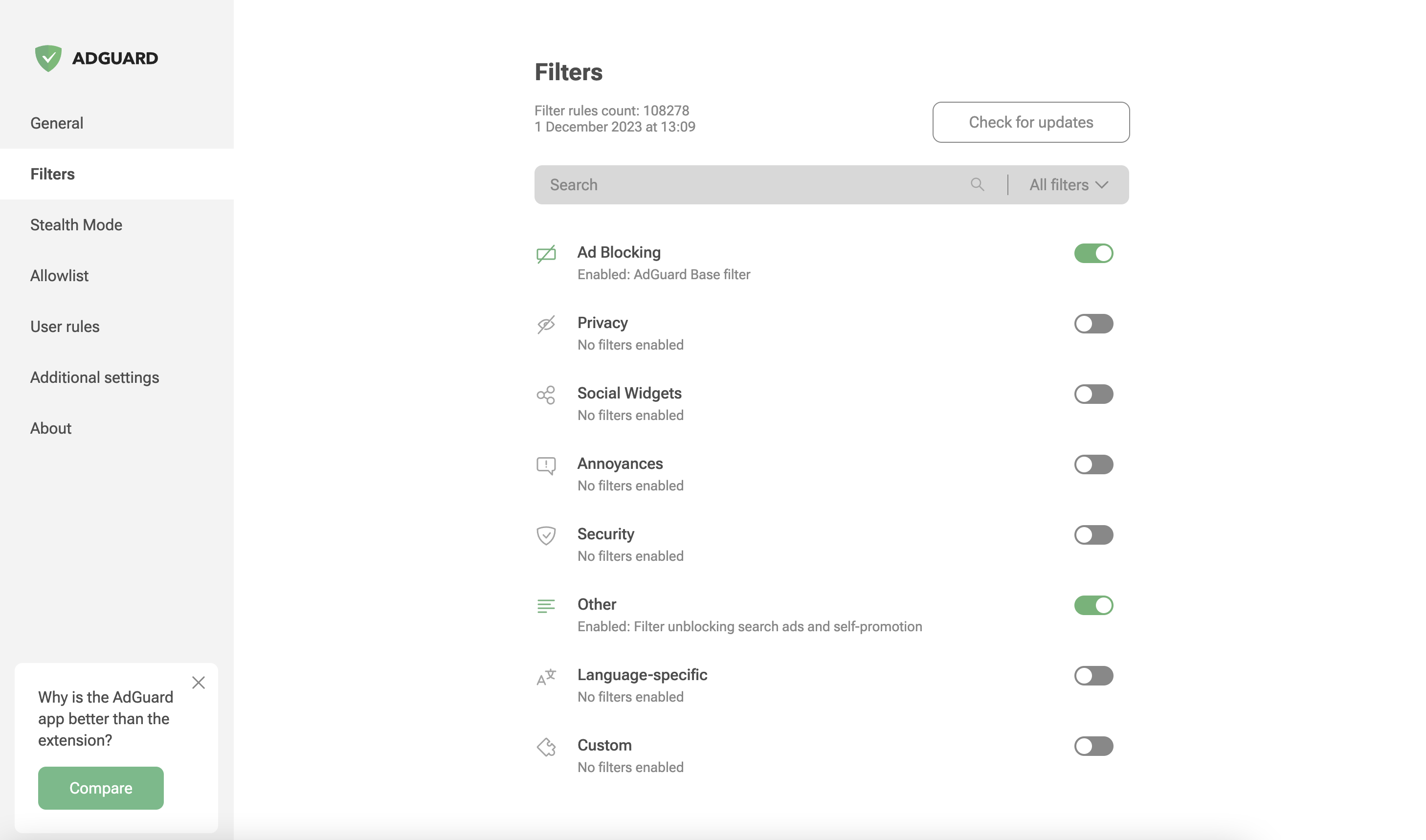
AdGuard is a fast and lightweight ad blocking browser extension that effectively blocks all types of ads and trackers on all web pages. We focus on advanced privacy protection features to not just block known trackers, but prevent web sites from building your shadow profile. Unlike its standalone counterparts (AdGuard for Windows, Mac), the browser extension is completely free and open source. You can learn more about the difference here.
AdGuard does not collect any information about you, and does not participate in any acceptable ads program. The only source of income we have is selling premium versions of our software, and we intend to keep it that way.
- Installation
- Contribution
- Development
- Deployment
- Getting Started
- Permissions
- Auto-publish builds
- Versioning Schema
- Minimum supported browser versions
- Documentation
Installation
Chrome and Chromium-based browsers
Install from the Chrome Web Store.
Firefox
Install from the Mozilla Add-ons website.
Opera
Install from the Opera Add-ons store.
Microsoft Edge
Install from the Microsoft Store.
Contribution
We are blessed to have a community that does not only love AdGuard, but also gives back. A lot of people volunteer in various ways to make other users' experience with AdGuard better, and you can join them!
We, on our part, can only be happy to reward the most active members of the community. So, what can you do?
Translating AdGuard
If you want to help with AdGuard translations, please learn more about translating our products here.
Testing AdGuard
You can get a beta version of AdGuard Browser Extension for any browser. All necessary information on this topic can be found on a dedicated page on our website.
Reporting issues
GitHub can be used to report a bug or to submit a feature request. To do so, go to this page and click the New issue button.
[!NOTE] For the filter-related issues (missed ads, false positives etc.) use our reporting tool.
Other options
Here is a dedicated page for those who are willing to contribute.
Getting Started
After installing the extension from your browser's store:
- Click the AdGuard icon in the browser toolbar to open the popup. Ad blocking is enabled by default with a recommended set of filter lists.
- Toggle protection on or off for the current website using the main switch in the popup.
- Open settings by clicking the gear icon in the popup to access the full options page.
- Use the Assistant by clicking the AdGuard icon, then selecting "Block ads manually" to visually pick and block unwanted page elements.
The extension works out of the box with sensible defaults.
Permissions required
Common permissions for all browsers and manifest versions
tabs- required to get the URL of the options page tabwebRequest- required to apply cosmetic rules, detect and remove tracking cookies, and count blocked resourcescookies- required to delete cookies from requests or change their lifetimecontextMenus- required to create a context menustorage- required to save user settings, user rules, and custom filtersunlimitedStorage- required to save large filter listswebNavigation- required to catch the moment for injecting scriptletsprivacy- allows access to browser privacy settings; required in Firefox, optional in Chrome/Edge/Opera
Permissions for MV2 only
<all_urls>- grants access to all websites to apply content scripts and filtering ruleswebRequestBlocking- required to block or modify HTTP requests synchronously
Permissions for MV3 only
host_permissions- grants access to all websites (MV3 uses this instead of<all_urls>)userScripts- required to let the user subscribe to custom filter lists and evaluate rules from these listsscripting- required to inject the assistant script into pagesdeclarativeNetRequest- required to block, redirect, and modify URL requestsdeclarativeNetRequestFeedback- required to create a log of the blocked, redirected, or modified URL requests
Auto-publish builds
Due to the transition from MV2 to MV3, we cannot update our filters remotely. To keep the filters as fresh as possible, we have configured automated tasks in our CI plans. These tasks will build a new version of the extension with only the updated @adguard/dnr-rulesets package, which contains new static rulesets.
Auto-update cycle
We have set up an automated update cycle that regularly syncs with fresh releases from the @adguard/dnr-rulesets npm package. The update frequency is configured in our CI build schedule. This ensures our extension stays up-to-date with the latest filter rules.
To deploy new releases as soon as possible, we have implemented all the steps outlined in Chrome's Skip Review documentation. This allows us to publish updates to the Chrome Web Store without waiting for the full review cycle.
Review modes
Auto-builds are published with one of two review modes:
- Other days — the Chrome package gets only a declarative-rulesets update
(the declarative rulesets of every MV3 target are still refreshed), so it is
eligible for the expedited (skip review) publishing and is submitted with
expedited=true(the Edge package still refreshes its local script rules, see Edge submission). The store comparison still runs, but it allows only the safe rule resources the expedited mode may change. - Mondays and Thursdays — these builds collect the filter fixes made since
the previous full update, so they perform a full resources update (including
local script rules) and are submitted for the standard review
(
expedited=false). Before such a build is published, the auto-build compares it with the extension currently in the Chrome Web Store and skips the CWS publish if any file outside the builtfilters/directory changed. This guarantees that a manually reviewed submission never ships unexpected code changes. The check ignores the CWS_metadata/folder, the expectedversionbump made by the build, and theupdate_urlfield CWS adds to the publishedmanifest.json.
When the comparison finds changes outside the allowed scope, the auto-build skips the CWS publish for the affected channel instead of failing the build. The build itself is valid, and the Edge submission is not bound by the Chrome Web Store skip-review restrictions, so it is still submitted to Edge (see Edge submission). The run is still reported as failed, because the Chrome Web Store keeps serving the previous build until a standard-review submission ships the changes; see the recovery notes in DEPLOYMENT.md.
A failed expedited publish is never escalated to the standard review automatically: if the expedited submission fails, the build may contain changes that must not be published without the regular release process. Since the Chrome Web Store sometimes answers HTTP 502 on the publish call after the upload already succeeded, the auto-build verifies the store state after such a failure and tells the outcomes apart: the failure was benign when the store holds the build, real when it does not, and a check error when the store state cannot be determined (e.g. expired credentials or an API outage).
Skip review restrictions
However, there is an important restriction when using the "skip review" option: we cannot update the extension with skip review if it contains changes to filtering script rules. This is because all script rules are collected during build time into a file called local_script_rules.js (for safe use them with the scripting API).
Therefore, any updates that include changes to script rules will require the full review cycle in the Chrome Web Store as usual.
Build process
These automated tasks will run all necessary checks: unit tests, translation checks, and linter. After that, they will update resources, including filters and local script rules, create a build, and run integration tests to ensure the update is safe.
Finally, the new version of the extension will be published to the Chrome Web Store, and the Edge MV3 release build will be submitted to Edge Add-ons.
Edge submission
Edge Add-ons reviews every submission and has no skip-review mode, so the auto-build submits the Edge MV3 release build on every run. Edge is not bound by the Chrome Web Store skip-review restriction either, so the auto-build refreshes the Edge local script rules (local_script_rules.js, see Skip review restrictions) and the filter translations (filters_i18n.json) on every run, including the expedited days, and the Edge package always ships the JS rules matching the current declarative rulesets. The Edge submission is not gated by the CWS scope check either: a build that the Chrome Web Store cannot take without a full review is still submitted to Edge, which reviews every submission. The Edge API has no endpoint that reports the review state: an upload only replaces the draft, and a publish while a submission is in review is refused with InProgressSubmission. The auto-build passes skip-if-in-progress: true, so such a run reports the submission as skipped (state=skipped) instead of failing; every other failure still fails the job. The scheduled auto-build is the only job that submits to Edge: manual releases upload the package as a draft (publish: false), and the submission is made from Partner Center. Edge has a single store listing; there is no Edge beta channel.
Versioning Schema
The extension uses the following versioning schema:
major.minor.patch+autoBuildIncrementVersion.buildTag.dnrRulesetsVersion
- major.minor.patch: Standard semantic versioning for the extension codebase.
- autoBuildIncrementVersion: An incrementing number used as the fourth part of the manifest version (e.g.,
88in5.2.1.88). - buildTag: A delimiter indicating the build's readiness.
- dnrRulesetsVersion: The patch version of the DNR rulesets, which includes the build date for those rulesets.
Example: 5.2.1+88.beta.20251014
But for build versions we will use following format: major.minor.patch.autoBuildIncrementVersion to comply with the browser requirements for version.
Minimum supported browser versions
The extension supports both Manifest V2 (MV2) and Manifest V3 (MV3) platforms. MV3 is the newer extension platform required by Chrome and other Chromium-based browsers going forward.
| Browser | Version |
|---|---|
| Chromium-based browsers MV2 | ✅ 106 |
| Chromium-based browsers MV3 | ✅ 121 |
| Firefox | ✅ 78 |
| Firefox Mobile | ✅ 113 |
| Opera | ✅ 67 |
| Opera MV3 | ✅ 107 |
| Edge Chromium MV2 | ✅ 80 |
| Edge Chromium MV3 | ✅ 121 |
| Edge Legacy | ❌ |
Documentation
- Development — development setup and build instructions
- Changelog — version history
- LLM agent rules — guidance for AI coding assistants