AgentsMesh/Pivo
TypeScriptalternative to Cursor
Task-focused programming environment designed for the right vibe.
↓ Download
All releases →Pivo - Task-focused programming environment designed for the right vibe


Task-focused programming environment designed for the right vibe.
Pivo is built with Tauri, React, and Rust, providing a seamless experience for managing Git-based projects with integrated AI assistance and terminal capabilities.
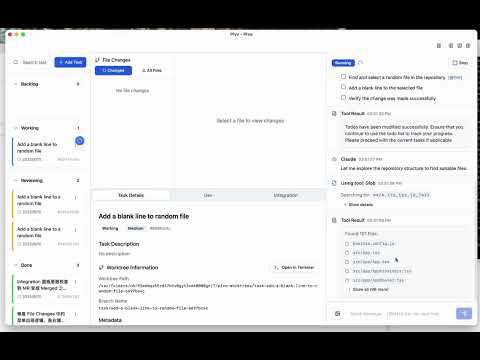
Watch the demo video showing task management, file changes, and AI conversation features
✨ Key Features
🎯 Project Management
- Git Integration: Native Git repository support with automatic project detection
- Multi-Project Workspace: Manage multiple projects simultaneously
- Branch Management: Advanced Git worktree support for task isolation
📋 Task Management
- Kanban Board: Visual task management with drag-and-drop functionality
- Task Hierarchy: Support for parent-child task relationships
- Status Tracking: Comprehensive task status and priority management
- Task Attempts: Isolated execution environments for each task attempt
🤖 AI Integration
- Claude Assistant: Integrated Claude AI for intelligent task assistance
- Gemini Support: Alternative AI model support for diverse workflows
- Conversation History: Persistent AI conversation tracking per task
- Context-Aware: AI understands project structure and task context
🖥️ Terminal Integration
- Embedded Terminal: Built-in terminal with xterm.js
- Process Management: Track and manage running processes
- Command History: Persistent command execution history
- Multi-Session: Support for multiple terminal sessions
🔧 Advanced Features
- MCP Server Support: Model Control Protocol for extensible AI capabilities
- File Watching: Real-time file system monitoring
- Diff Viewer: Built-in code diff visualization
- Merge Request Integration: GitLab and GitHub integration support
- Multi-language: English and Chinese interface support
🚀 Quick Start
Prerequisites
- Node.js (v18 or higher)
- Rust (latest stable)
- pnpm (recommended package manager)
- Git
Installing on macOS
Install Node.js:
# Using Homebrew
brew install node

# Or download from nodejs.org
# https://nodejs.org/en/download/
Install Rust:
# Using rustup (recommended)
curl --proto '=https' --tlsv1.2 -sSf https://sh.rustup.rs | sh

# Follow the on-screen instructions, then reload your shell
source $HOME/.cargo/env
Install pnpm:
# Using npm
npm install -g pnpm

# Or using Homebrew
brew install pnpm
Installation
Clone the repository
git clone https://github.com/12Particles/Pivo.git
cd pivo
Install dependencies
pnpm installInstall Rust dependencies
cd src-tauri
cargo build
cd ..
Run in development mode
pnpm tauri dev
Building for Production
# Build the application
pnpm tauri build

# The built application will be in src-tauri/target/release/bundle/
🛠️ Development
Project Structure
pivo/
├── src/                    # React frontend source
│   ├── components/         # React components
│   ├── lib/               # Utility libraries
│   ├── hooks/             # Custom React hooks
│   ├── types/             # TypeScript type definitions
│   └── locales/           # i18n translations
├── src-tauri/             # Tauri/Rust backend
│   ├── src/               # Rust source code
│   ├── migrations/        # Database migrations
│   └── capabilities/      # Tauri capabilities
├── public/                # Static assets
└── docs/                  # Documentation
Development Scripts
# Start development server
pnpm dev

# Build frontend only
pnpm build

# Run Tauri development mode
pnpm tauri dev

# Build Tauri application
pnpm tauri build

# Run tests (if available)
pnpm test

# Lint code
pnpm lint
Database
Pivo uses SQLite for data persistence. The database is automatically initialized on first run with the following tables:
projects: Project information and Git repository detailstasks: Task management and hierarchytask_attempts: Task execution attempts with isolated environmentsexecution_processes: Process execution tracking
Configuration
The application stores configuration in the system's app data directory:
- macOS:
~/Library/Application Support/com.living.pivo/ - Windows:
%APPDATA%\com.living.pivo\ - Linux:
~/.local/share/com.living.pivo/
🔧 Integration
Git Platform Integration
Configure Git platform integrations for merge request support:
- GitLab: Personal access token with
apiscope - GitHub: Personal access token with
reposcope
📖 Usage
- Create a Project: Select a Git repository directory to create a new project
- Manage Tasks: Use the Kanban board to create and organize tasks
- AI Assistance: Click on any task to start an AI conversation for guidance
- Execute Tasks: Use the integrated terminal or AI to execute task-related commands
- Track Progress: Monitor task attempts and execution history
🤝 Community
Discord
Join our Discord community for discussions, support, and updates:

🤝 Contributing
We welcome contributions! Please see our Contributing Guide for details.
Development Setup
- Fork the repository
- Create a feature branch:
git checkout -b feature/amazing-feature - Make your changes and test thoroughly
- Commit your changes:
git commit -m 'Add amazing feature' - Push to the branch:
git push origin feature/amazing-feature - Open a Pull Request
📝 License
This project is licensed under the MIT License - see the LICENSE file for details.
🙏 Acknowledgments
- Tauri for the excellent desktop app framework
- Radix UI for accessible UI components
- Anthropic Claude for AI capabilities
- xterm.js for terminal emulation
⭐ Star History
💬 Support
If you find this project helpful, please consider giving it a ⭐ on GitHub!
For support, please open an issue.