ByteAtATime/flare
Sveltealternative to Raycast
Raycast-compatible launcher for Linux
↓ Download
All releases →[!WARNING] This project is no longer actively maintained.
I started Flare in high school as a proof of concept to show that a Raycast-compatible launcher could exist on Linux. It was a fun experiment, but between school, burnout, and honestly just moving on to other things, I no longer have the time or energy to keep it going.
To everyone who starred, shared, or contributed: thank you. The response to this project genuinely blew me away.
Looking back, I consider Flare a success, not for what it became, but for what it taught me. The biggest lesson is probably to always dogfood your projects. I never used Flare as my daily driver, and that disconnect showed. I also went in with a lot of naïvete and made some architectural decisions I'd do very differently today.
If you're looking for an actively maintained alternative, check out Vicinae.
Flare Launcher
An open-source, Raycast-compatible launcher for Linux.
For more background on this project, I have a post here.
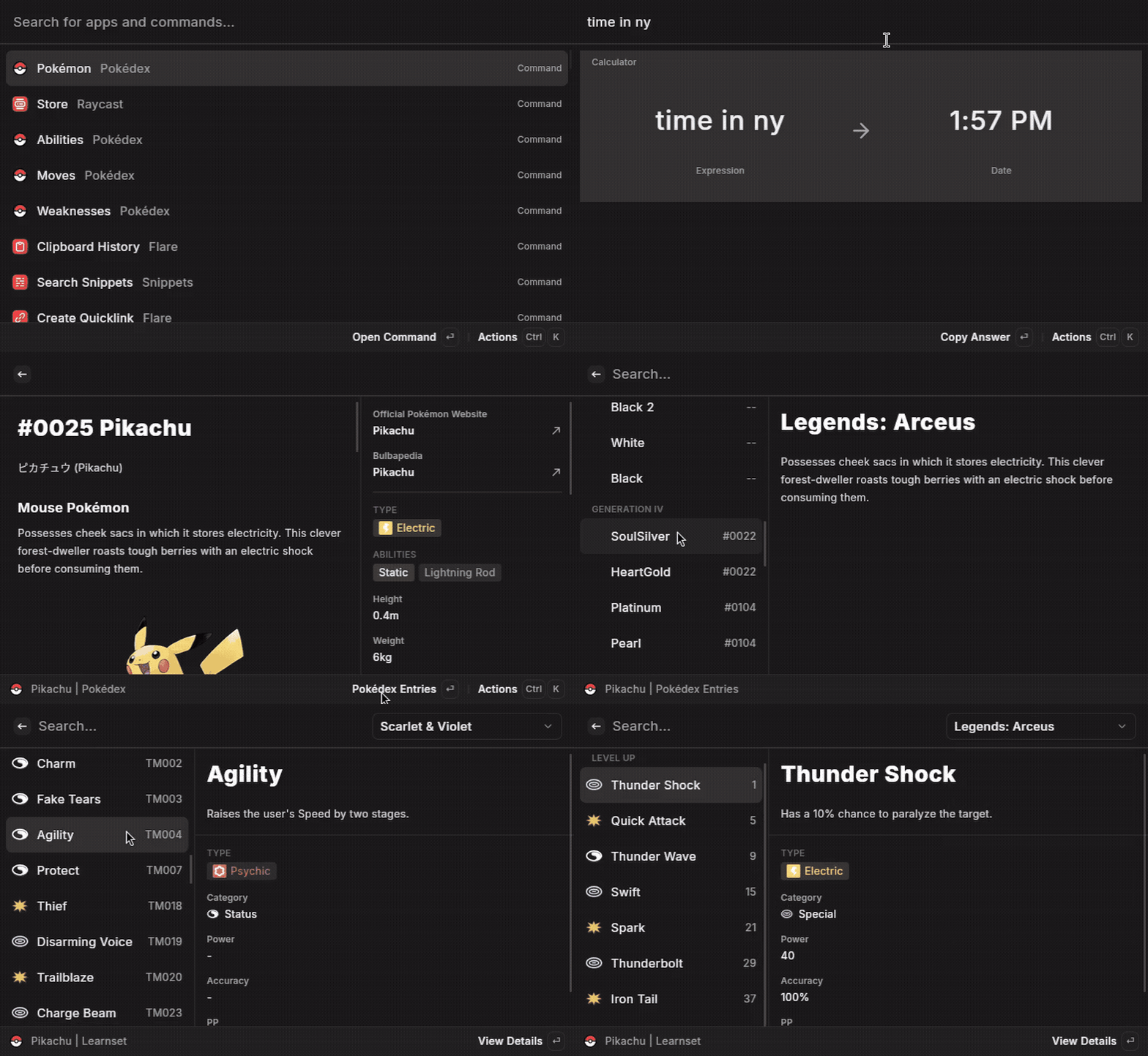
Disclaimer: This is a hobby project and is not affiliated with, nor endorsed by, the official Raycast team.
✨ Features
This launcher aims to recreate most of Raycast's core features on Linux:
- Extensible Command Palette: The core of the application. Search for and launch applications, run commands, execute quicklinks, and more.
- Extension Support: Run extensions built Raycast's API. Features a built-in store to browse and install extensions from the official Raycast Store.
- Powerful Calculator: A smart calculator integrated directly into the search bar, powered by SoulverCore. It handles unit conversions, currency, and complex math expressions.
- Clipboard History: A searchable history of everything you've copied, with support for text, images, links, and colors.
- Snippets: Create and manage text snippets that can be expanded anywhere on your system. Supports dynamic placeholders for dates, clipboard content, and more.
- AI Integration: Connects to OpenRouter to bring the power of various AI models directly into the launcher.
- And more to come!
🧩 Extension Compatibility
While the goal is to support a wide range of Raycast extensions, there are some inherent limitations due to the differences between macOS and Linux. Common reasons an extension might not work include:
- macOS-specific APIs: Many extensions rely on native macOS features like AppleScript (
runAppleScript), hardcoded paths (/Applications/), or specific system libraries that do not exist on Linux. - Native Binaries: Extensions that bundle pre-compiled binaries for macOS will not work. Similarly, extensions that use Swift to interact with the operating system won't work either.
- Assumed Permissions: Extensions may assume they have access to macOS-specific permissioned data (like Contacts or Calendars) which have no direct equivalent.
🚀 Installation
You can download the latest release from the GitHub Releases page.
Currently, only an .AppImage is provided. After downloading, make it executable:
chmod +x <downloaded-file-name>.AppImage
./<downloaded-file-name>.AppImage
This will open a long-running process in the background. To toggle the visibility of the window, simply run it again.
Depending on your environment, you may be able to bind the script to a hotkey. For example, on Hyprland:
bind = ALT, Space, exec, /path/to/flare.AppImage
System Requirements
The application requires glibc version 2.38, which is installed by default on Ubuntu 24.04, Fedora 40, and recent versions of Arch Linux.
Wayland users: For the global snippet expansion feature to work, the application needs permission to read keyboard events. The recommended and most secure method is to add a udev rule.
Create the
udevrule file:sudo nano /etc/udev/rules.d/99-flare.rulesAdd the following line to the file: This rule grants the user at the physical console access to keyboard devices.
KERNEL=="event*", ENV{ID_INPUT_KEYBOARD}=="1", TAG+="uaccess"Reload the
udevrules to apply the changes:sudo udevadm control --reload-rules && sudo udevadm trigger
🛠️ Building from Source
If you prefer to build the project from its source code, you'll need to set up the development environment.
Prerequisites
- Rust: Install via
rustup. - Node.js: Use a recent LTS version.
pnpmis the package manager for this project (npm i -g pnpm). - Tauri Prerequisites: Follow the official Tauri guide to install system dependencies.
- Swift Toolchain: The calculator feature uses a Swift wrapper around SoulverCore.
Installation & Running
Clone the repository:
git clone https://github.com/ByteAtATime/flare.git
cd flare
Install dependencies: This project uses a pnpm workspace. Install all dependencies from the root directory.
pnpm installBuild the Node.js sidecar binary: This step compiles the JavaScript plugin host into a binary that Tauri can execute.
pnpm --filter sidecar buildCompile SoulverCore Wrapper: This step compiles the wrapper around SoulverCore into a shared object file.
swift build -c release --package-path src-tauri/SoulverWrapperRun in development mode: This command will launch the Tauri application with hot-reloading for the frontend. Note that you may need to tweak
LD_LIBRARY_PATHto point to the SoulverWrapper.export LD_LIBRARY_PATH="$(pwd)/src-tauri/SoulverWrapper/Vendor/SoulverCore-linux:$(pwd)/src-tauri/SoulverWrapper/.build/release" pnpm tauri dev
🙏 Acknowledgements
This project stands on the shoulders of giants:
- A huge thank you to the team behind the original Raycast.
- The powerful calculator is powered by SoulverCore by Acqualia. Special thanks to Zac for getting me a Linux build -- on his vacation, no less!
📜 License
This project is licensed under the MIT License.