JaKooLit/Fedora-Hyprland
ShellFor automated installation of Hyprland on Fedora (latest release) or any Fedora based distros
IMPORTANT! Beginning of March 2026, This project will be archived and it will be maintained by Dwilliams
💌 ** KooL's Fedora - Hyprland Install Script ** 💌





 KooL Hyprland-Dotfiles Showcase
Gallery and Videos
🎥 Feb 2025 Video explanation of installation with preset
🪧🪧🪧 ANNOUNCEMENT 🪧🪧🪧
- This Repo does not contain Hyprland Dots or configs! Dotfiles can be checked here
Hyprland-Dots. During installation, if you opt to copy pre-configured dots, it will be downloaded from that centralized repo. - Hyprland-Dots use are constantly evolving / improving. you can check CHANGELOGS here
Hyprland-Dots-Changelogs - Since the Hyprland-Dots are evolving, some of the screenshots maybe old
- the wallpaper offered to be downloaded towards the end is from this
REPO
[!IMPORTANT] install a backup tool like
snapperortimeshift. and Backup your system before installing hyprland using this script (HIGHLY RECOMMENDED).
[!CAUTION] Download this script on a directory where you have write permissions. ie. HOME. Or any directory within your home directory. Else script will fail
✨ Some notes on installation / Pre-requisites
- This install script was tested on Minimal Fedora using Fedora Everything
Link - This script is meant to install in any Fedora Work stations and its Spins.
- If starting from scratch, recommended spin to install is the Sway Spin. However, I have tested this script in Fedora Workstation (gnome), Plasma Spin and Sway
- I have not tested in any other spin. However, if you decided to try, recommend to install SDDM. Apart from GDM and SDDM, any other Login Manager may not work nor launch Hyprland. However, hyprland can be launched through tty by type Hyprland
- If you have nvidia, and wanted to use proprietary drivers, uninstall nouveau first (if installed). This script will be installing proprietary nvidia drivers and will not deal with removal of nouveau.
🚩 Switching to SDDM assuming you have GDM installed and running
- if you really want switch to SDDM from GDM, you need to disable the gdm first.
sudo systemctl disable gdm.servicethen reboot- after reboot, need to ran the install script via tty. So suggest download the install script first. Then disable gdm. reboot and once logged in, cd into Distro-Hyprland then
./install.shand then choose SDDM and SDDM theme in the options. - NOTE: Distro-Hyprland is Arch-Hyprland, or Fedora-Hyprland .. depends on which install scripts you downloaded.
✨ Costumize the packages and COPR Repos
- inside the install-scripts directory, you can edit 00-hypr-pkgs.sh, copr.sh, etc. Care though as the Hyprland Dots might not work properly
💫 SDDM and GTK Themes offered
- If you opted to install SDDM theme, here's the
LINKwhich is a modified fork ofLINK - If you opted to install GTK Themes, Icons, here's the
LINK. This also includes Bibata Modern Ice cursor.
🔔 NOTICE TO NVIDIA OWNERS
- by default it is installing the latest and newest nvidia drivers. If you have an older nvidia-gpu (GTX 800 series and older), check out nvidia-fedora website
LINKand edit nvidia.sh in install-scripts directory to install proper gpu driver
[!IMPORTANT] If you want to use nouveau driver, dont choose nvidia in the option. This is because the nvidia installer part, it will blacklist nouveau. Hyprland will still be installed but it will skip blacklisting nouveau.
✨ Auto clone and install
[!CAUTION] If you are using FISH SHELL, DO NOT use this function. Clone and ran install.sh instead
- you can use this command to automatically clone the installer and ran the script for you
- NOTE:
curlpackage is required before running this command
sh <(curl -L https://raw.githubusercontent.com/JaKooLit/Fedora-Hyprland/main/auto-install.sh)
✨ to use this script
clone this repo (latest commit only) to reduce file size download by using git. Change directory, make executable and run the script
git clone --depth=1 https://github.com/JaKooLit/Fedora-Hyprland.git ~/Fedora-Hyprland
cd ~/Fedora-Hyprland
chmod +x install.sh
./install.sh
💥 💥 UNINSTALL SCRIPT / Removal of Config Files
11 March 2025, due to popular request, created a guided
uninstall.shscript. USE this with caution as it may render your system unstable.I will not be responsible if your system breaks
The best still to revert to previous state of your system is via timeshift of snapper
The old uninstall.sh is renamed to uninstall-old.sh . This is made by other party. I DO NOT GUARANTEE that it will not mess up your system. USE with caution.
✨ for ZSH and OH-MY-ZSH installation
installer should auto change your default shell to zsh. However, if it does not, do this
chsh -s $(which zsh)
zsh
source ~/.zshrc
- reboot or logout
- by default
agnosterzaktheme is installed. Which is from external oh-my-zsh theme. You can find more themes from thisOH-MY-ZSH-THEMES - to change the theme,
SUPER SHIFT O, choose desired theme, and close and open terminal. - or manually edit
~/.zshrc. Look for ZSH_THEME="desired theme"
🎞️ AGS Overview DEMO
- in case you wonder, here is a short demo of AGS overview Youtube LINK
✨ TO DO once installation done and dotfiles copied
- SUPER H for HINT or click on the waybar HINT! Button
- Head over to KooL Hyprland WIKI
🙋 Got a questions regarding the Hyprland Dots or configurations? 🙋
- Head over to wiki Link
WIKI
⌨ Keybinds
- Keybinds
CLICK
[!TIP] KooL Hyprland has a searchable keybind function via rofi. (SUPER SHIFT K) or right click the
HINTSwaybar button
🙋 👋 Having issues or questions?
- for the install part, kindly open issue on this repo
- for the Pre-configured Hyprland dots / configuration, submit issue
here
🔧 Proper way to re-installing a particular script from install-scripts directory
- CD into Fedora-Hyprland directory and then ran the below command.
- i.e.
./install-scripts/gtk-themes.sh- For reinstall GTK Themes or ./install-scripts/sddm.sh- For reinstall sddm
[!IMPORTANT] DO NOT cd into install-scripts directory as script will most likely to fail
🛠️ Optional system monitor scripts (cross-distro compatible)
These installer helpers will set up user-level services and install required packages automatically.
Works on Fedora, Arch, and other distributions using standard tools.
Re-run any time from the repo root (do not
cdintoinstall-scripts)../install-scripts/battery-monitor.sh- Installs:
acpi,libnotify - Creates:
~/.config/hypr/scripts/battery-monitor.shand user servicebattery-monitor.service - Manage:
systemctl --user status|start|stop battery-monitor
- Installs:
./install-scripts/disk-monitor.sh- Installs:
libnotify - Creates:
~/.config/hypr/scripts/disk-monitor.shand user servicedisk-monitor.service - Manage:
systemctl --user status|start|stop disk-monitor
- Installs:
./install-scripts/temp-monitor.sh- Installs:
lm_sensors,libnotify - Detects sensors (runs
sudo sensors-detect --autoonce) - Creates:
~/.config/hypr/scripts/temp-monitor.shand user servicetemp-monitor.service - Manage:
systemctl --user status|start|stop temp-monitor
- Installs:
Packages above are installed by the respective installer scripts; no manual action is required. If you prefer package pre-install via the main package list, ensure
acpi,lm_sensors, andlibnotifyare present in your setup.
🛣️ Roadmap:
- possibly adding gruvbox themes, cursors, icons
❗ some known issues for nvidia
- reports from members of my discord, states that some users of nvidia are getting stuck on sddm login. credit to @Kenni Fix stated was
 while in sddm press ctrl+alt+F2 or F3
log into your account
`lspci -nn`, find the id of your nvidia card
`ls /dev/dri/by-path` find the matching id
`ls -l /dev/dri/by-path` to check where the symlink points to
)
add "env = WLR_DRM_DEVICES,/dev/dri/cardX" to the ENVvariables config
~/.config/hypr/UserConfigs/ENVariables.conf; X being where the symlink of the gpu points tomore info from the hyprland wiki
Hyprland Wiki Linkreports from a member of discord for Nvidia for additional env's
remove # from the following env's on
env = GBM_BACKEND,nvidia-drm
env = WLR_RENDERER_ALLOW_SOFTWARE,1
- If you having issues with installation and you have nvidia,
THIS STEPmight help
❗ other known issues
[!NOTE] Auto start of Hyprland after login (no SDDM or GDM or any login managers)
This was disabled a few days ago. (19 May 2024). This was because some users, after they used the Distro-Hyprland scripts with other DE (gnome-wayland or plasma-wayland), if they choose to login into gnome-wayland for example, Hyprland is starting.
to avoid this, I disabled it. You can re-enable again by editing
~/.zprofile. Remove all the # on the first linesNote that Fedora 39 and older, waybar was not updated. Hyprland and older waybar build than 0.10.3, you will have no workspace
ROFI issues (scaling, unexplained scaling etc). This is most likely to experience if you are installing on a system where rofi is currently installed. To fix it uninstall rofi and install rofi-wayland .
sudo dnf autoremove rofi. Install rofi-wayland withsudo dnf install rofi-wayland. Rofi-wayland is compatible with x11 so no need to worry.If you use Brave or any Chrome based browsers, you may want to add
exec-once = gnome-keyring-daemon --startto~/.config/hypr/UserConfigs/Startup_Apps.confif you don't want to get asked for your password each time you reboot your machine and want to access Brave. Obviously, you need to install gnome-keyringIf you want to have a Fedora minimal installation, suggest to install using Fedora Everything. See
THIS
🫥 Improving performance for Older Nvidia Cards using driver 470
📒 Final Notes
- join my discord channel
Discord - Feel free to copy, re-distribute, and use this script however you want. Would appreciate if you give me some loves by crediting my work :)
✍️ Contributing
- As stated above, these script does not contain actual config files. These are only the installer of packages
- If you want to contribute and/or test the Hyprland-Dotfiles (development branch),
Hyprland-Dots-Development - Want to contribute on KooL-Hyprland-Dots Click
HEREfor a guide how to contribute - Want to contribute on This Installer? Click
HEREfor a guide how to contribute
👍👍👍 Thanks and Credits!
HyprlandOf course to Hyprland and @vaxerski for this awesome Dynamic Tiling Manager.HYPRLAND COPR REPO- a shout out to the one who created and maintaining Hyprland COPR Repo
💖 Support
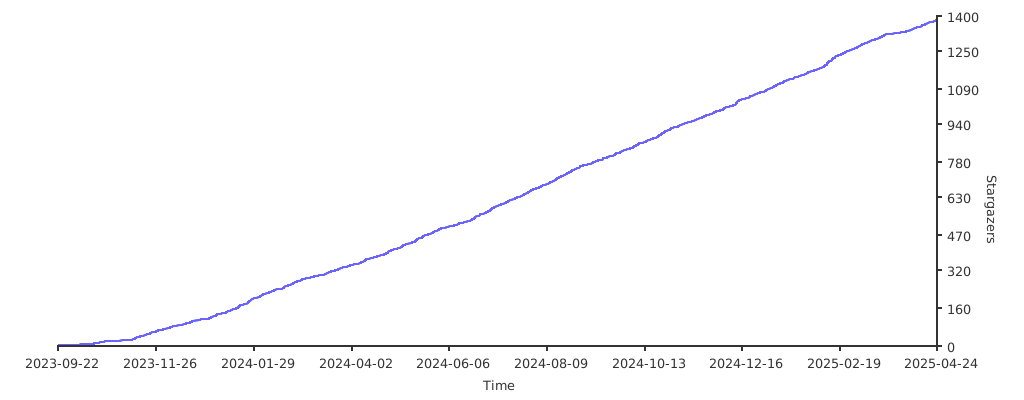
a Star on my Github repos would be nice 🌟
Subscribe to my Youtube Channel YouTube
you can also give support through coffee's or btc 😊

or

Or you can donate cryto on my btc wallet :)
1N3MeV2dsX6gQB42HXU6MF2hAix1mqjo8i
📹 📹 Youtube videos (Click to view and watch the playlist)
🥰🥰 💖💖 👍👍👍