A modern Docker LAMP stack and MEAN stack for local development
composer require cytopia/devilbox
The Devilbox

Quickstart | Examples | Features | The Devilbox Stack | Community | Contributing | Logos | License





The Devilbox is a versatile and highly customisable zero-conf PHP Docker stack supporting LEMP and MEAN as well as Websockets, Node, Python and Golang via automated Reverse Proxy integraton.
The main goal is to provide a reproducible development environment that runs on all major platforms and is able to switch and combine any version you need.
It supports an unlimited number of projects for which vhosts, SSL certificates and DNS records are created automatically.
Email interception and popular development tools will be at your service as well. Configuration is not necessary, as everything is already pre-setup.
All created projects (frontend or backend) will be able to communicate with one another to support the emulation of a complete microservice architecture or an API landscape.
Available Architectures: amd64, arm64
Available PHP Versions: 5.2, 5.3, 5.4, 5.5, 5.6, 7.0, 7.1, 7.2, 7.3, 7.4, 8.0, 8.1, 8.2
🚀 Quickstart
❗ System Requirements
The Devilbox runs on all major operating systems and its only requirement is
Docker and Docker Compose:


Be up and running in 2 minutes.
🚀 Install and Run: Linux
Linux: Install
- Download the Devilbox
git clone https://github.com/cytopia/devilbox - Enter the Devilbox git directory
cd devilbox - Copy the default environment file
cp env-example .env
Linux: Run
:warning: Important: Ensure that nothing is listening on port
80and443on your host system. These ports are required by the Devilbox webserver.
- Start
httpd,phpandmysqlcontainer# This step may take a few minutes as required # Docker images have to be pulled initially. # Inside the Devilbox git directory docker-compose up httpd php mysql - Visit http://localhost in your browser
🚀 Install and Run: MacOS
MacOS: Install
- Download the Devilbox
git clone https://github.com/cytopia/devilbox - Enter the Devilbox git directory
cd devilbox - Copy the default environment file
cp env-example .env
MacOS: Run
:warning: Important: Ensure that nothing is listening on port
80and443on your host system. These ports are required by the Devilbox webserver.
- Start
httpd,phpandmysqlcontainer# This step may take a few minutes as required # Docker images have to be pulled initially. # Inside the Devilbox git directory docker-compose up httpd php mysql - Visit http://localhost in your browser
🚀 Install and Run: Windows
Note: If you are using
WSL2, refer to the Linux guide instead.
Windows: Install
- Clone
https://github.com/cytopia/devilboxtoC:\devilboxwith Git for Windows - Copy
C:\devilbox\env-exampletoC:\devilbox.env
Windows: Run
:warning: Important: Ensure that nothing is listening on port
80and443on your host system. These ports are required by the Devilbox webserver.
Open a terminal on Windows and start httpd, php and mysql container:
- Start
httpd,phpandmysqlcontainer# This step may take a few minutes as required # Docker images have to be pulled initially. # Inside the Devilbox git directory docker-compose up httpd php mysql - Visit http://localhost in your browser
💻 Enter the work container
Enter the work container
The Devilbox allows you to work on your projects on the host system as well as inside the work container. Your project files will be available at both locations. The workflow ususally is:
- Use your prefered IDE (e.g. PhpStorm) on your host system to add and alter files
- Work inside the container to run common cli tools such as
node,composer,npm,phpcs,webpackand many more.
To enter the work container, simply run ./shell.sh
- On Linux, MacOS and Windows with WSL2
# Inside the Devilbox git directory ./shell.sh - On Windows without WSL2
# Inside the Devilbox git directory
./shell.bat
💡 Examples
Create your first project:
Example: Dummy Project
- Start the container you need:
docker-compose up httpd php mysql - Enter the work container:
./shell.sh - Navigate to
/shared/httpd:cd /shared/httpd - Create your project directory
mkdir dummy-project - Visit http://localhost/vhosts.php
You will notice that you need to create ahtdocs/directory
- Create
htdocs/directory# Navigate to your project directory cd /shared/httpd/dummy-project # Create htdocs dir mkdir htdocs - Visit http://localhost/vhosts.php
You will see that everything is now setup and your project is created and available
- Create an
index.phpfile# Navigate to your project htdocs directory cd /shared/httpd/dummy-project/htdocs # Create a simple index.php file echo '<?php echo "it works";' > index.php - View your project in the browser: http://dummy-project.dvl.to
Example: PHP Framework
Find all the examples in the documentation:


:star: Features
The Devilbox tries to be a zero-configuration stack out of the box and has automated all the boring tasks. Additionally it provides common feature required for everyday work.
|
Automation :star: Automated Project creation:star: Automated SSL:star: Automated DNS:star: Host permission sync |
Modes :star: Static files:star: PHP files:star: Reverse Proxy:star: Websockets |
Backends :star: PHP-FPM:star: NodeJS:star: Python:star: Golang:star: ... |
Profiling :star: Blackfire:star: Xdebug:star: XHProf |
|
Projects :star: Unlimited Projects:star: Inter-Project Communication:star: Custom Project domains:star: Valid browser HTTPS |
Intranet :star: Virtual Hosts:star: C&C:star: Email Reader:star: OpCache Gui |
Batteries :star: Adminer:star: phpMyAdmin:star: phpPgAdmin:star: phpRedMind |
Services :star: SQL:star: NoSQL:star: Cache:star: ... |
 The Devilbox Stack
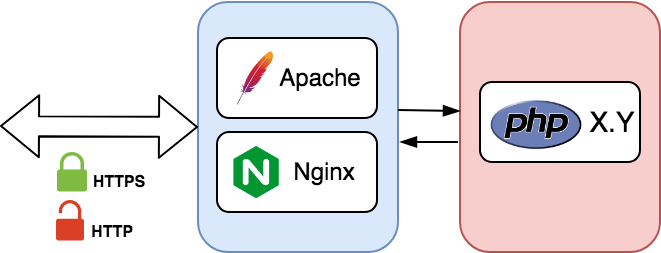
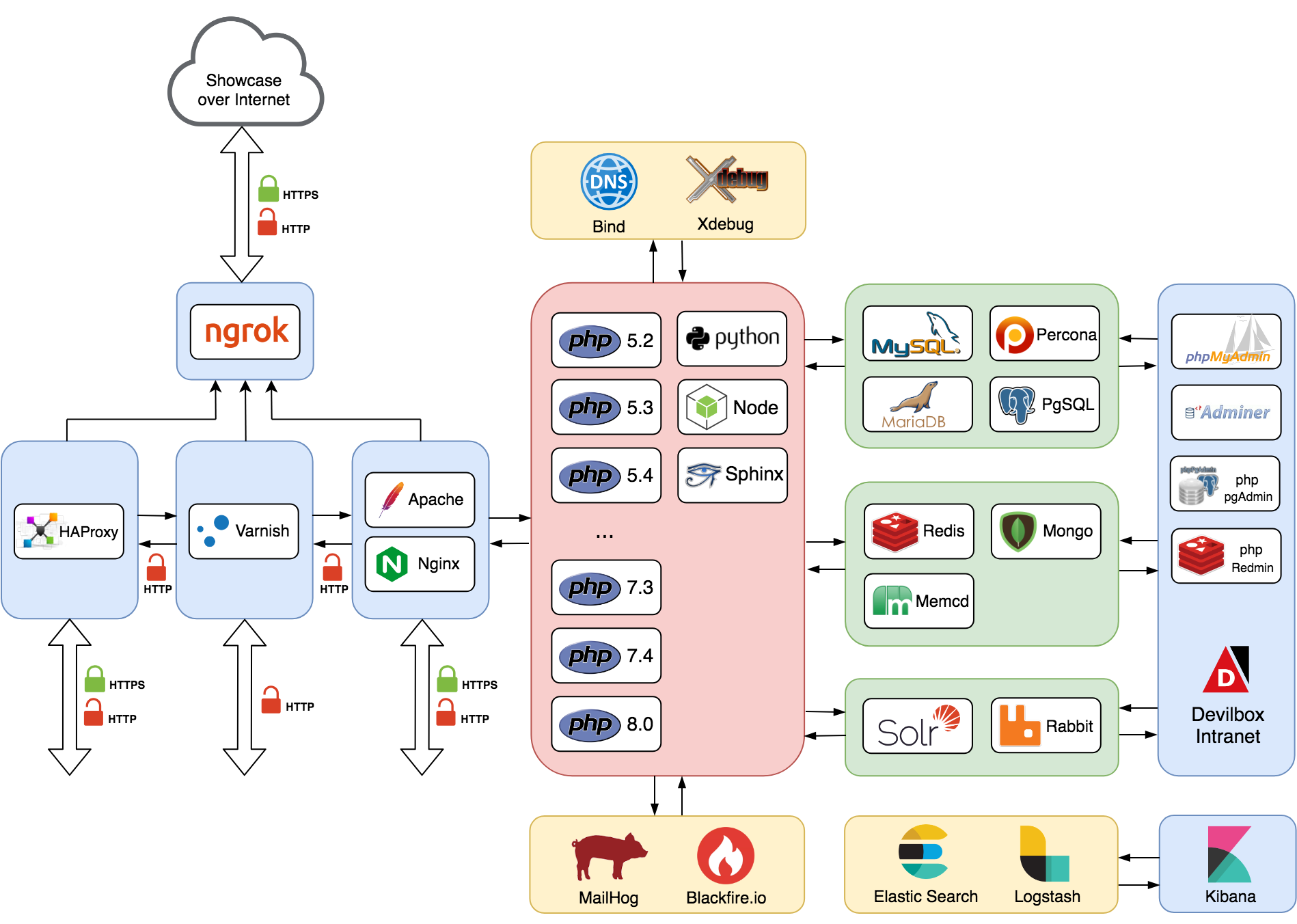
The Devilbox aims to be a swiss army knife for local development by providing you all the services you would ever need. To get an idea about the architecture behind it and to also see what's available have a look at its components and usage.
Smallest stackThis is the smallest possible and fully functional stack you can run |
Full stackTo better understand what is actually possible have a look at the full example |
|
|
💻 Modes of operation
Modes of operation
You can startup and operate the Devilbox in three different ways via docker-compose:
- Selective startup
- On Demand (add/remove container while running)
- Full startup
Selective startup
If you already know what kind of container you need before starting the Devilbox, you can just specify them explicitly.
# Inside the Devilbox git directory start httpd php mysql and redis
docker-compose up httpd php mysql redis
The Intranet will show you what container you have currently running:

On Demand
If the Devilbox is already started you can attach more container on-the-fly,
# Inside the Devilbox git directory attach mongo and memcached
docker-compose up mongo memcd
You can also shut down specific containers that you do not need
# Inside the Devilbox git directory shutdown redis
docker-compose stop redis
Full startup
If you just want to start everything, run docker-compose up without any arguments
# Inside the Devilbox git directory start them all
docker-compose up
The Intranet will show you what container you have currently running:
If you prefer a visual guide, have a look at the two introduction videos on Youtube:


Documentation: Install the Devilbox | Start the Devilbox | .env file
🐋 Available Container
Available Container
The following table lists all integrated and pre-configured Docker container shipped by the Devilbox. Only the webserver and PHP container are mandatory, all others are optional and don't need to be started.
Each of them is also available in multiple different versions in order to reflect your exact desired environment.
| Accel | Web | App | SQL | NoSQL | Queue / Search | ELK | Utils |
|---|---|---|---|---|---|---|---|
| HAProxy | Apache | PHP | MariaDB | Memcached | RabbitMQ | ElasticSearch | Bind |
| Varnish | Nginx | Python (Flask) | MySQL | MongoDB | Solr | Logstash | Blackfire |
| PerconaDB | Redis | Kibana | MailHog | ||||
| PostgreSQL | Ngrok |
Documentation: Available Container
📌 Version Matrix
Version Matrix
Every single attachable container comes with many different versions. In order to select the desired version for a container, simply edit the .env file and uncomment the version of choice. Any combination is possible.
Run different versions
| Apache | Nginx | PHP | MySQL | MariaDB | Percona | PgSQL | Redis | Memcached | MongoDB |
|---|---|---|---|---|---|---|---|---|---|
| 2.2 | stable | 5.2[1] | 5.5 | 5.5 | 5.5 | 9.0 | 2.8 | 1.4 | 2.8 |
| 2.4 | mainline | 5.3 | 5.6 | 10.0 | 5.6 | 9.1 | 3.0 | 1.5 | 3.0 |
| 5.4 | 5.7 | 10.1 | 5.7 | 9.2 | 3.2 | 1.6 | 3.2 | ||
| 5.5 | 8.0 | 10.2 | 8.0 | 9.3 | 4.0 | latest | 3.4 | ||
| 5.6 | 10.3 | 9.4 | 5.0 | 3.6 | |||||
| 7.0 | 10.4 | 9.5 | 6.0 | 4.0 | |||||
| 7.1 | 10.5 | 9.6 | 6.2 | 4.2 | |||||
| 7.2 | 10.6 | 10 | 7.0 | 4.4 | |||||
| 7.3 | 10.7 | 11 | latest | 5.0 | |||||
| 7.4 | 10.8 | 12 | latest | ||||||
| 8.0 | 10.9 | ... | |||||||
| 8.1 | 10.10 | 15 | |||||||
| 8.2 | latest |
[1] PHP 5.2 is available to use, but it is not officially supported. The Devilbox intranet does not work with this version as PHP 5.2 does not support namespaces. Furthermore PHP 5.2 does only work with Apache 2.4, Nginx stable and Nginx mainline. It does not work with Apache 2.2. Use at your own risk.
Documentation: Change container versions
Additional services
Additionally to the default stack, there are a variety of other services that can be easily enabled and started.
| Python (Flask) | Blackfire | ELK | MailHog | Ngrok | RabbitMQ | Solr | HAProxy | Varnish |
|---|---|---|---|---|---|---|---|---|
| 2.7 | 1.8 | 5.x.y | v1.0.0 | 2.x | 3.6 | 5 | 1.x | 4 |
| ... | ... | 6.x.y | latest | 3.7 | 6 | 5 | ||
| 3.7 | 1.18.0 | 7.x.y | latest | 7 | 6 | |||
| 3.8 | latest | latest | latest |
Documentation: Enable custom container
⚙️ Available PHP Extensions
Available PHP Extensions
The Devilbox is a development stack, so it is made sure that a lot of PHP modules are available out of the box in order to work with many different frameworks.
- Core enabled (cannot be disabled): ✔
- Enabled (can be disabled): 🗸
- Available, but disabled (can be enabled): d
| Modules | PHP 5.2 | PHP 5.3 | PHP 5.4 | PHP 5.5 | PHP 5.6 | PHP 7.0 | PHP 7.1 | PHP 7.2 | PHP 7.3 | PHP 7.4 | PHP 8.0 | PHP 8.1 | PHP 8.2 |
|---|---|---|---|---|---|---|---|---|---|---|---|---|---|
| amqp | 🗸 | 🗸 | 🗸 | 🗸 | 🗸 | 🗸 | 🗸 | 🗸 | 🗸 | 🗸 | 🗸 | 🗸 | 🗸 |
| apc | 🗸 | 🗸 | 🗸 | 🗸 | |||||||||
| apcu | 🗸 | 🗸 | 🗸 | 🗸 | 🗸 | 🗸 | 🗸 | 🗸 | 🗸 | 🗸 | 🗸 | 🗸 | |
| bcmath | 🗸 | 🗸 | 🗸 | 🗸 | 🗸 | 🗸 | 🗸 | 🗸 | 🗸 | 🗸 | 🗸 | 🗸 | 🗸 |
| blackfire | d | d | d | d | d | d | d | ||||||
| bz2 | 🗸 | 🗸 | 🗸 | 🗸 | 🗸 | 🗸 | 🗸 | 🗸 | 🗸 | 🗸 | 🗸 | 🗸 | 🗸 |
| calendar | 🗸 | 🗸 | 🗸 | 🗸 | 🗸 | 🗸 | 🗸 | 🗸 | 🗸 | 🗸 | 🗸 | 🗸 | 🗸 |
| ctype | ✔ | ✔ | ✔ | ✔ | ✔ | ✔ | ✔ | ✔ | ✔ | ✔ | ✔ | ✔ | ✔ |
| curl | ✔ | ✔ | ✔ | ✔ | ✔ | ✔ | ✔ | ✔ | ✔ | ✔ | ✔ | ✔ | ✔ |
| date | ✔ | ✔ | ✔ | ✔ | ✔ | ✔ | ✔ | ✔ | ✔ | ✔ | ✔ | ✔ | ✔ |
| dba | 🗸 | 🗸 | 🗸 | 🗸 | 🗸 | 🗸 | 🗸 | 🗸 | 🗸 | 🗸 | 🗸 | 🗸 | 🗸 |
| dom | ✔ | ✔ | ✔ | ✔ | ✔ | ✔ | ✔ | ✔ | ✔ | ✔ | ✔ | ✔ | ✔ |
| enchant | 🗸 | 🗸 | 🗸 | 🗸 | 🗸 | 🗸 | 🗸 | 🗸 | 🗸 | 🗸 | 🗸 | ||
| ereg | ✔ | ✔ | ✔ | ✔ | |||||||||
| exif | 🗸 | 🗸 | 🗸 | 🗸 | 🗸 | 🗸 | 🗸 | 🗸 | 🗸 | 🗸 | 🗸 | 🗸 | 🗸 |
| FFI | 🗸 | ✔ | ✔ | ✔ | |||||||||
| fileinfo | 🗸 | ✔ | ✔ | ✔ | ✔ | ✔ | ✔ | ✔ | ✔ | ✔ | ✔ | ✔ | ✔ |
| filter | ✔ | ✔ | ✔ | ✔ | ✔ | ✔ | ✔ | ✔ | ✔ | ✔ | ✔ | ✔ | ✔ |
| ftp | ✔ | ✔ | ✔ | ✔ | ✔ | ✔ | ✔ | ✔ | ✔ | ✔ | ✔ | ✔ | ✔ |
| gd | 🗸 | 🗸 | 🗸 | 🗸 | 🗸 | 🗸 | 🗸 | 🗸 | 🗸 | 🗸 | 🗸 | 🗸 | 🗸 |
| gettext | 🗸 | 🗸 | 🗸 | 🗸 | 🗸 | 🗸 | 🗸 | 🗸 | 🗸 | 🗸 | 🗸 | 🗸 | 🗸 |
| gmp | 🗸 | 🗸 | 🗸 | 🗸 | 🗸 | 🗸 | 🗸 | 🗸 | 🗸 | 🗸 | 🗸 | 🗸 | |
| hash | ✔ | ✔ | ✔ | ✔ | ✔ | ✔ | ✔ | ✔ | ✔ | ✔ | ✔ | ✔ | ✔ |
| iconv | ✔ | ✔ | ✔ | ✔ | ✔ | ✔ | ✔ | ✔ | ✔ | ✔ | ✔ | ✔ | ✔ |
| igbinary | 🗸 | 🗸 | 🗸 | 🗸 | 🗸 | 🗸 | 🗸 | 🗸 | 🗸 | 🗸 | 🗸 | 🗸 | 🗸 |
| imagick | 🗸 | 🗸 | 🗸 | 🗸 | 🗸 | 🗸 | 🗸 | 🗸 | 🗸 | 🗸 | |||
| imap | 🗸 | 🗸 | 🗸 | 🗸 | 🗸 | 🗸 | 🗸 | 🗸 | 🗸 | 🗸 | 🗸 | 🗸 | 🗸 |
| interbase | 🗸 | 🗸 | 🗸 | 🗸 | 🗸 | 🗸 | 🗸 | 🗸 | 🗸 | ||||
| intl | 🗸 | 🗸 | 🗸 | 🗸 | 🗸 | 🗸 | 🗸 | 🗸 | 🗸 | 🗸 | 🗸 | 🗸 | 🗸 |
| ioncube | d | d | d | d | d | d | d | ||||||
| json | ✔ | ✔ | ✔ | ✔ | ✔ | ✔ | ✔ | ✔ | ✔ | ✔ | ✔ | ✔ | ✔ |
| ldap | 🗸 | 🗸 | 🗸 | 🗸 | 🗸 | 🗸 | 🗸 | 🗸 | 🗸 | 🗸 | 🗸 | 🗸 | 🗸 |
| libxml | ✔ | ✔ | ✔ | ✔ | ✔ | ✔ | ✔ | ✔ | ✔ | ✔ | ✔ | ✔ | ✔ |
| lz4 | 🗸 | 🗸 | 🗸 | 🗸 | 🗸 | 🗸 | 🗸 | 🗸 | |||||
| lzf | 🗸 | 🗸 | 🗸 | 🗸 | 🗸 | 🗸 | 🗸 | 🗸 | |||||
| mbstring | ✔ | ✔ | ✔ | ✔ | ✔ | ✔ | ✔ | ✔ | ✔ | ✔ | ✔ | ✔ | ✔ |
| mcrypt | 🗸 | 🗸 | 🗸 | 🗸 | 🗸 | 🗸 | 🗸 | 🗸 | 🗸 | 🗸 | 🗸 | ||
| memcache | 🗸 | 🗸 | 🗸 | 🗸 | 🗸 | 🗸 | 🗸 | 🗸 | 🗸 | 🗸 | 🗸 | 🗸 | 🗸 |
| memcached | 🗸 | 🗸 | 🗸 | 🗸 | 🗸 | 🗸 | 🗸 | 🗸 | 🗸 | 🗸 | 🗸 | 🗸 | 🗸 |
| mhash | ✔ | ✔ | ✔ | ✔ | ✔ | ||||||||
| mongo | 🗸 | 🗸 | 🗸 | 🗸 | 🗸 | ||||||||
| mongodb | 🗸 | 🗸 | 🗸 | 🗸 | 🗸 | 🗸 | 🗸 | 🗸 | 🗸 | 🗸 | 🗸 | 🗸 | |
| msgpack | 🗸 | 🗸 | 🗸 | 🗸 | 🗸 | 🗸 | 🗸 | 🗸 | 🗸 | 🗸 | 🗸 | 🗸 | 🗸 |
| mysql | 🗸 | 🗸 | 🗸 | 🗸 | 🗸 | ||||||||
| mysqli | 🗸 | 🗸 | 🗸 | 🗸 | 🗸 | 🗸 | 🗸 | 🗸 | 🗸 | 🗸 | 🗸 | 🗸 | 🗸 |
| mysqlnd | ✔ | ✔ | ✔ | ✔ | ✔ | ✔ | ✔ | ✔ | ✔ | ✔ | ✔ | ✔ | |
| OAuth | 🗸 | 🗸 | 🗸 | 🗸 | 🗸 | 🗸 | 🗸 | 🗸 | 🗸 | 🗸 | 🗸 | 🗸 | 🗸 |
| oci8 | d | d | d | d | d | d | d | d | d | d | d | d | |
| OPcache | 🗸 | 🗸 | 🗸 | 🗸 | 🗸 | 🗸 | 🗸 | 🗸 | 🗸 | 🗸 | 🗸 | 🗸 | 🗸 |
| openssl | ✔ | ✔ | ✔ | ✔ | ✔ | ✔ | ✔ | ✔ | ✔ | ✔ | ✔ | ✔ | ✔ |
| pcntl | 🗸 | 🗸 | 🗸 | 🗸 | 🗸 | 🗸 | 🗸 | 🗸 | 🗸 | 🗸 | 🗸 | 🗸 | 🗸 |
| pcre | ✔ | ✔ | ✔ | ✔ | ✔ | ✔ | ✔ | ✔ | ✔ | ✔ | ✔ | ✔ | ✔ |
| PDO | ✔ | ✔ | ✔ | ✔ | ✔ | ✔ | ✔ | ✔ | ✔ | ✔ | ✔ | ✔ | ✔ |
| pdo_dblib | 🗸 | 🗸 | 🗸 | 🗸 | 🗸 | 🗸 | 🗸 | 🗸 | 🗸 | 🗸 | 🗸 | 🗸 | 🗸 |
| PDO_Firebird | 🗸 | 🗸 | 🗸 | 🗸 | 🗸 | 🗸 | 🗸 | 🗸 | 🗸 | 🗸 | 🗸 | 🗸 | 🗸 |
| pdo_mysql | 🗸 | 🗸 | 🗸 | 🗸 | 🗸 | 🗸 | 🗸 | 🗸 | 🗸 | 🗸 | 🗸 | 🗸 | 🗸 |
| PDO_OCI | d | d | d | d | d | d | d | d | |||||
| pdo_pgsql | 🗸 | 🗸 | 🗸 | 🗸 | 🗸 | 🗸 | 🗸 | 🗸 | 🗸 | 🗸 | 🗸 | 🗸 | 🗸 |
| pdo_sqlite | ✔ | ✔ | ✔ | ✔ | ✔ | ✔ | ✔ | ✔ | ✔ | ✔ | ✔ | ✔ | ✔ |
| pdo_sqlsrv | d | d | d | d | d | d | d | d | |||||
| pgsql | 🗸 | 🗸 | 🗸 | 🗸 | 🗸 | 🗸 | 🗸 | 🗸 | 🗸 | 🗸 | 🗸 | 🗸 | 🗸 |
| phalcon | d | d | d | d | d | d | d | d | d | d | d | ||
| Phar | 🗸 | ✔ | ✔ | ✔ | ✔ | ✔ | ✔ | ✔ | ✔ | ✔ | ✔ | ✔ | ✔ |
| posix | ✔ | ✔ | ✔ | ✔ | ✔ | ✔ | ✔ | ✔ | ✔ | ✔ | ✔ | ✔ | ✔ |
| pspell | 🗸 | 🗸 | 🗸 | 🗸 | 🗸 | 🗸 | 🗸 | 🗸 | 🗸 | 🗸 | 🗸 | 🗸 | 🗸 |
| psr | d | d | d | d | d | d | d | d | d | d | d | ||
| random | ✔ | ||||||||||||
| rdkafka | d | d | d | d | d | d | d | d | d | d | d | d | |
| readline | ✔ | ✔ | ✔ | ✔ | ✔ | ✔ | ✔ | ✔ | ✔ | ✔ | ✔ | ✔ | ✔ |
| recode | ✔ | ✔ | ✔ | ✔ | 🗸 | 🗸 | 🗸 | 🗸 | 🗸 | ||||
| redis | 🗸 | 🗸 | 🗸 | 🗸 | 🗸 | 🗸 | 🗸 | 🗸 | 🗸 | 🗸 | 🗸 | 🗸 | 🗸 |
| Reflection | ✔ | ✔ | ✔ | ✔ | ✔ | ✔ | ✔ | ✔ | ✔ | ✔ | ✔ | ✔ | ✔ |
| session | ✔ | ✔ | ✔ | ✔ | ✔ | ✔ | ✔ | ✔ | ✔ | ✔ | ✔ | ✔ | ✔ |
| shmop | 🗸 | 🗸 | 🗸 | 🗸 | 🗸 | 🗸 | 🗸 | 🗸 | 🗸 | 🗸 | 🗸 | 🗸 | 🗸 |
| SimpleXML | ✔ | ✔ | ✔ | ✔ | ✔ | ✔ | ✔ | ✔ | ✔ | ✔ | ✔ | ✔ | ✔ |
| snmp | 🗸 | 🗸 | 🗸 | 🗸 | 🗸 | 🗸 | 🗸 | 🗸 | 🗸 | 🗸 | 🗸 | 🗸 | 🗸 |
| soap | 🗸 | 🗸 | 🗸 | 🗸 | 🗸 | 🗸 | 🗸 | 🗸 | 🗸 | 🗸 | 🗸 | 🗸 | 🗸 |
| sockets | 🗸 | 🗸 | 🗸 | 🗸 | 🗸 | 🗸 | 🗸 | 🗸 | 🗸 | 🗸 | 🗸 | 🗸 | 🗸 |
| sodium | ✔ | ✔ | ✔ | ✔ | ✔ | ✔ | |||||||
| solr | 🗸 | 🗸 | 🗸 | 🗸 | 🗸 | 🗸 | |||||||
| SPL | ✔ | ✔ | ✔ | ✔ | ✔ | ✔ | ✔ | ✔ | ✔ | ✔ | ✔ | ✔ | ✔ |
| sqlite | ✔ | ✔ | |||||||||||
| sqlite3 | ✔ | ✔ | ✔ | ✔ | ✔ | ✔ | ✔ | ✔ | ✔ | ✔ | ✔ | ✔ | |
| sqlsrv | d | d | d | d | d | d | d | d | |||||
| ssh2 | 🗸 | 🗸 | 🗸 | 🗸 | 🗸 | ||||||||
| swoole | d | d | d | d | d | d | d | d | d | d | d | ||
| sysvmsg | 🗸 | 🗸 | 🗸 | 🗸 | 🗸 | 🗸 | 🗸 | 🗸 | 🗸 | 🗸 | 🗸 | 🗸 | 🗸 |
| sysvsem | 🗸 | 🗸 | 🗸 | 🗸 | 🗸 | 🗸 | 🗸 | 🗸 | 🗸 | 🗸 | 🗸 | 🗸 | 🗸 |
| sysvshm | 🗸 | 🗸 | 🗸 | 🗸 | 🗸 | 🗸 | 🗸 | 🗸 | 🗸 | 🗸 | 🗸 | 🗸 | 🗸 |
| tidy | 🗸 | 🗸 | 🗸 | 🗸 | 🗸 | 🗸 | 🗸 | 🗸 | 🗸 | 🗸 | 🗸 | 🗸 | 🗸 |
| tokenizer | ✔ | ✔ | ✔ | ✔ | ✔ | ✔ | ✔ | ✔ | ✔ | ✔ | ✔ | ✔ | ✔ |
| uploadprogress | 🗸 | 🗸 | 🗸 | 🗸 | 🗸 | 🗸 | 🗸 | 🗸 | 🗸 | 🗸 | 🗸 | 🗸 | 🗸 |
| uuid | 🗸 | 🗸 | 🗸 | 🗸 | 🗸 | 🗸 | 🗸 | 🗸 | 🗸 | 🗸 | 🗸 | 🗸 | |
| vips | 🗸 | 🗸 | 🗸 | 🗸 | 🗸 | 🗸 | 🗸 | ||||||
| wddx | 🗸 | 🗸 | 🗸 | 🗸 | 🗸 | 🗸 | 🗸 | 🗸 | 🗸 | ||||
| Xdebug | 🗸 | 🗸 | 🗸 | 🗸 | 🗸 | 🗸 | 🗸 | 🗸 | 🗸 | 🗸 | 🗸 | 🗸 | 🗸 |
| xhprof | d | d | d | d | d | d | d | d | |||||
| xlswriter | 🗸 | 🗸 | 🗸 | 🗸 | 🗸 | 🗸 | 🗸 | 🗸 | |||||
| xml | ✔ | ✔ | ✔ | ✔ | ✔ | ✔ | ✔ | ✔ | ✔ | ✔ | ✔ | ✔ | ✔ |
| xmlreader | ✔ | ✔ | ✔ | ✔ | ✔ | ✔ | ✔ | ✔ | ✔ | ✔ | ✔ | ✔ | ✔ |
| xmlrpc | 🗸 | 🗸 | 🗸 | 🗸 | 🗸 | 🗸 | 🗸 | 🗸 | 🗸 | 🗸 | |||
| xmlwriter | ✔ | ✔ | ✔ | ✔ | ✔ | ✔ | ✔ | ✔ | ✔ | ✔ | ✔ | ✔ | ✔ |
| xsl | 🗸 | 🗸 | 🗸 | 🗸 | 🗸 | 🗸 | 🗸 | 🗸 | 🗸 | 🗸 | 🗸 | 🗸 | 🗸 |
| yaml | 🗸 | 🗸 | 🗸 | 🗸 | 🗸 | 🗸 | 🗸 | 🗸 | 🗸 | 🗸 | 🗸 | 🗸 | |
| zip | 🗸 | 🗸 | 🗸 | 🗸 | 🗸 | 🗸 | 🗸 | 🗸 | 🗸 | 🗸 | 🗸 | 🗸 | 🗸 |
| zlib | ✔ | ✔ | ✔ | ✔ | ✔ | ✔ | ✔ | ✔ | ✔ | ✔ | ✔ | ✔ | ✔ |
| zstd | 🗸 | 🗸 | 🗸 | 🗸 | 🗸 | 🗸 | 🗸 | 🗸 |
- Core enabled (cannot be disabled): ✔
- Enabled (can be disabled): 🗸
- Available, but disabled (can be enabled): d
PHP modules can be enabled or disabled on demand to reflect the state of your target environment.
Documentation: Enable/disable PHP modules
🛠️ Available CLI Tools
Available Tools
Well-known and popular tools will be at your service:


| Tool | PHP 5.2 | PHP 5.3 | PHP 5.4 | PHP 5.5 | PHP 5.6 | PHP 7.0 | PHP 7.1 | PHP 7.2 | PHP 7.3 | PHP 7.4 | PHP 8.0 | PHP 8.1 | PHP 8.2 |
|---|---|---|---|---|---|---|---|---|---|---|---|---|---|
| angular-cli | ✓ | ✓ | ✓ | ✓ | ✓ | ✓ | ✓ | ✓ | ✓ | ✓ | ✓ | ✓ | ✓ |
| asgardcms | ✓ | ✓ | ✓ | ✓ | ✓ | ✓ | ✓ | ✓ | ✓ | ✓ | |||
| awesome-ci | ✓ | ✓ | ✓ | ✓ | ✓ | ✓ | ✓ | ✓ | ✓ | ✓ | ✓ | ✓ | ✓ |
| codeception | ✓ | ✓ | ✓ | ✓ | ✓ | ✓ | ✓ | ✓ | ✓ | ✓ | ✓ | ||
| composer | ✓ | ✓ | ✓ | ✓ | ✓ | ✓ | ✓ | ✓ | ✓ | ✓ | ✓ | ✓ | ✓ |
| corepack | ✓ | ✓ | ✓ | ✓ | ✓ | ✓ | ✓ | ✓ | ✓ | ✓ | ✓ | ✓ | ✓ |
| deployer | ✓ | ✓ | ✓ | ✓ | ✓ | ✓ | ✓ | ✓ | ✓ | ✓ | ✓ | ||
| eslint | ✓ | ✓ | ✓ | ✓ | ✓ | ✓ | ✓ | ✓ | ✓ | ✓ | ✓ | ✓ | ✓ |
| git | ✓ | ✓ | ✓ | ✓ | ✓ | ✓ | ✓ | ✓ | ✓ | ✓ | ✓ | ✓ | ✓ |
| git-flow | ✓ | ✓ | ✓ | ✓ | ✓ | ✓ | ✓ | ✓ | ✓ | ✓ | ✓ | ✓ | ✓ |
| grunt-cli | ✓ | ✓ | ✓ | ✓ | ✓ | ✓ | ✓ | ✓ | ✓ | ✓ | ✓ | ✓ | ✓ |
| gulp | ✓ | ✓ | ✓ | ✓ | ✓ | ✓ | ✓ | ✓ | ✓ | ✓ | ✓ | ✓ | ✓ |
| jq | ✓ | ✓ | ✓ | ✓ | ✓ | ✓ | ✓ | ✓ | ✓ | ✓ | ✓ | ✓ | ✓ |
| jsonlint | ✓ | ✓ | ✓ | ✓ | ✓ | ✓ | ✓ | ✓ | ✓ | ✓ | ✓ | ✓ | ✓ |
| laravel-installer | ✓ | ✓ | ✓ | ✓ | ✓ | ✓ | ✓ | ✓ | ✓ | ✓ | ✓ | ||
| laravel-lumen | ✓ | ✓ | ✓ | ✓ | ✓ | ✓ | ✓ | ✓ | ✓ | ✓ | |||
| linkcheck | ✓ | ✓ | ✓ | ✓ | ✓ | ✓ | ✓ | ✓ | ✓ | ✓ | ✓ | ✓ | ✓ |
| mdl | ✓ | ✓ | ✓ | ✓ | ✓ | ✓ | ✓ | ✓ | ✓ | ✓ | ✓ | ✓ | ✓ |
| mdlint | ✓ | ✓ | ✓ | ✓ | ✓ | ✓ | ✓ | ✓ | ✓ | ✓ | ✓ | ✓ | ✓ |
| mupdf-tools | ✓ | ✓ | ✓ | ✓ | ✓ | ✓ | ✓ | ✓ | ✓ | ✓ | ✓ | ✓ | ✓ |
| net-tools | ✓ | ✓ | ✓ | ✓ | ✓ | ✓ | ✓ | ✓ | ✓ | ✓ | ✓ | ✓ | ✓ |
| node | ✓ | ✓ | ✓ | ✓ | ✓ | ✓ | ✓ | ✓ | ✓ | ✓ | ✓ | ✓ | ✓ |
| npm | ✓ | ✓ | ✓ | ✓ | ✓ | ✓ | ✓ | ✓ | ✓ | ✓ | ✓ | ✓ | ✓ |
| nvm | ✓ | ✓ | ✓ | ✓ | ✓ | ✓ | ✓ | ✓ | ✓ | ✓ | ✓ | ✓ | ✓ |
| phalcon-devtools | ✓ | ✓ | ✓ | ✓ | ✓ | ✓ | ✓ | ✓ | ✓ | ||||
| php-cs-fixer | ✓ | ✓ | ✓ | ✓ | ✓ | ✓ | ✓ | ✓ | ✓ | ✓ | ✓ | ||
| phpcbf | ✓ | ✓ | ✓ | ✓ | ✓ | ✓ | ✓ | ✓ | ✓ | ✓ | ✓ | ✓ | ✓ |
| phpcs | ✓ | ✓ | ✓ | ✓ | ✓ | ✓ | ✓ | ✓ | ✓ | ✓ | ✓ | ✓ | ✓ |
| phpmd | ✓ | ✓ | ✓ | ✓ | ✓ | ✓ | ✓ | ✓ | ✓ | ✓ | ✓ | ✓ | |
| phpunit | ✓ | ✓ | ✓ | ✓ | ✓ | ✓ | ✓ | ✓ | ✓ | ✓ | ✓ | ✓ | |
| pip | ✓ | ✓ | ✓ | ✓ | ✓ | ✓ | ✓ | ✓ | ✓ | ✓ | ✓ | ✓ | ✓ |
| pm2 | ✓ | ✓ | ✓ | ✓ | ✓ | ✓ | ✓ | ✓ | ✓ | ✓ | ✓ | ✓ | ✓ |
| pwncat | ✓ | ✓ | ✓ | ✓ | ✓ | ✓ | ✓ | ✓ | ✓ | ✓ | ✓ | ✓ | ✓ |
| rsync | ✓ | ✓ | ✓ | ✓ | ✓ | ✓ | ✓ | ✓ | ✓ | ✓ | ✓ | ✓ | ✓ |
| sass | ✓ | ✓ | ✓ | ✓ | ✓ | ✓ | ✓ | ✓ | ✓ | ✓ | ✓ | ✓ | ✓ |
| shellcheck | ✓ | ✓ | ✓ | ✓ | ✓ | ✓ | ✓ | ✓ | ✓ | ✓ | ✓ | ✓ | ✓ |
| ssh | ✓ | ✓ | ✓ | ✓ | ✓ | ✓ | ✓ | ✓ | ✓ | ✓ | ✓ | ✓ | ✓ |
| stylelint | ✓ | ✓ | ✓ | ✓ | ✓ | ✓ | ✓ | ✓ | ✓ | ✓ | ✓ | ✓ | ✓ |
| svn | ✓ | ✓ | ✓ | ✓ | ✓ | ✓ | ✓ | ✓ | ✓ | ✓ | ✓ | ✓ | ✓ |
| symfony-cli | ✓ | ✓ | ✓ | ✓ | ✓ | ✓ | ✓ | ✓ | ✓ | ✓ | ✓ | ✓ | ✓ |
| taskfile | ✓ | ✓ | ✓ | ✓ | ✓ | ✓ | ✓ | ✓ | ✓ | ✓ | ✓ | ✓ | ✓ |
| tig | ✓ | ✓ | ✓ | ✓ | ✓ | ✓ | ✓ | ✓ | ✓ | ✓ | ✓ | ✓ | ✓ |
| vim | ✓ | ✓ | ✓ | ✓ | ✓ | ✓ | ✓ | ✓ | ✓ | ✓ | ✓ | ✓ | ✓ |
| vue-cli | ✓ | ✓ | ✓ | ✓ | ✓ | ✓ | ✓ | ✓ | ✓ | ✓ | ✓ | ✓ | ✓ |
| webpack-cli | ✓ | ✓ | ✓ | ✓ | ✓ | ✓ | ✓ | ✓ | ✓ | ✓ | ✓ | ✓ | ✓ |
| wkhtmltopdf | ✓ | ✓ | ✓ | ✓ | ✓ | ✓ | ✓ | ✓ | ✓ | ||||
| wp-cli | ✓ | ✓ | ✓ | ✓ | ✓ | ✓ | ✓ | ✓ | ✓ | ✓ | ✓ | ✓ | |
| wscat | ✓ | ✓ | ✓ | ✓ | ✓ | ✓ | ✓ | ✓ | ✓ | ✓ | ✓ | ✓ | ✓ |
| yamllint | ✓ | ✓ | ✓ | ✓ | ✓ | ✓ | ✓ | ✓ | ✓ | ✓ | ✓ | ✓ | ✓ |
| yarn | ✓ | ✓ | ✓ | ✓ | ✓ | ✓ | ✓ | ✓ | ✓ | ✓ | ✓ | ✓ | ✓ |
| yq | ✓ | ✓ | ✓ | ✓ | ✓ | ✓ | ✓ | ✓ | ✓ | ✓ | ✓ | ✓ | ✓ |
| zsh | ✓ | ✓ | ✓ | ✓ | ✓ | ✓ | ✓ | ✓ | ✓ | ✓ | ✓ | ✓ | ✓ |
🔌 Supported Frameworks
Supported Frameworks
PHP Frameworks
As far as tested there are no limitations and you can use any Framework or CMS just as you would on your live environment. Below are a few examples of extensively tested Frameworks and CMS:
Documentation:
Setup CakePHP | Setup CodeIgniter | Setup Contao | Setup CraftCMS | Setup Drupal | Setup Joomla | Setup Laravel | Setup Magento 2 | Setup PhalconPHP | Setup PhotonCMS | Setup PrestaShop | Setup ProcessWire | Setup Shopware | Setup Symfony | Setup Typo3 | Setup WordPress | Setup Yii | Setup Zend
Reverse Proxy Applications
As far as tested there are no limitations and you can use any application that creates an open port.
These ports will be reverse proxied by the web server and even allow you to use valid HTTPS for them.
By the built-in autostart feature of the Devilbox you can ensure that your application automatically
starts up as soon as you run docker-compose up.


Documentation:
Setup reverse proxy NodeJs | Setup reverse proxy Sphinx documentation
🌐 Devilbox Intranet
Devilbox Intranet
The Devilbox comes with a pre-configured intranet on http://localhost and https://localhost. This can be explicitly disabled or password-protected. The intranet will not only show you, the chosen configuration, but also validate the status of the current configuration, such as if DNS records exists (on host and container), are directories properly set-up. Additionally it provides external tools to let you interact with databases and emails.
- Virtual Host overview (validates directories and DNS)
- Command & Control
- Email overview
- Database overview (MySQL, PgSQL, Redis, Memcache, ...)
- Info pages (Httpd, MySQL, PgSQL, Redis, Memcache, ...)
- And many more...
The following batteries are available in the Devilbox intranet by default:
 |
 |
 |
 |
 |
 |
 |
| Adminer | phpMyAdmin | phpPgAdmin | phpRedMin | PHP Memcached Admin | OpCache GUI | Mail viewer |
Documentation: Devilbox Intranet
📸 Screenshots
Screenshots
A few examples of how the built-in intranet looks like.

|

|

|

|
👫 Community
The Devilbox has a lot of features reaching from a simple single-user development environment that works out of the box up to a shared development infrastructure for a corporate network.
In order to be aware about all that features, ensure to have skimmed over the documentation, so you know what can be done and how that might simplify your every-day life. If you ever run into any unforseen issues, feel free to join the Discord chat or visit the forums and get community support quickly.
📘 Docs |
🎮 Discord |
🗪 Forum |
🔥 Flames |
|---|---|---|---|

|

|

|

|
| devilbox.readthedocs.io | discord/devilbox | devilbox.discourse.group | github.com/devilbox/flames |
🤝 Contributing
The Devilbox is still a young project with a long roadmap ahead. Features are decided by you - the community, so any kind of contribution is welcome.
- Star this project
- Open up issues for bugs and feature requests
- Clone this project and submit fixes or features
🧘 Maintainer
I try to keep up with literally over 100 projects. If my work is making your life easier, consider sending coffee or beer. 🖤
Contributions: PyPI: cytopia · Terraform: cytopia · Ansible: cytopia
🌀 Logos
Logos and banners can be found at devilbox/artwork. Feel free to use or modify them by the terms of their license.



🗎 License
Copyright (c) 2016 cytopia