alternative to Ableton Live
a highly automated and intuitive digital audio workstation - official mirror
↓ Download
All releases →Zrythm

a highly automated and intuitive digital audio workstation
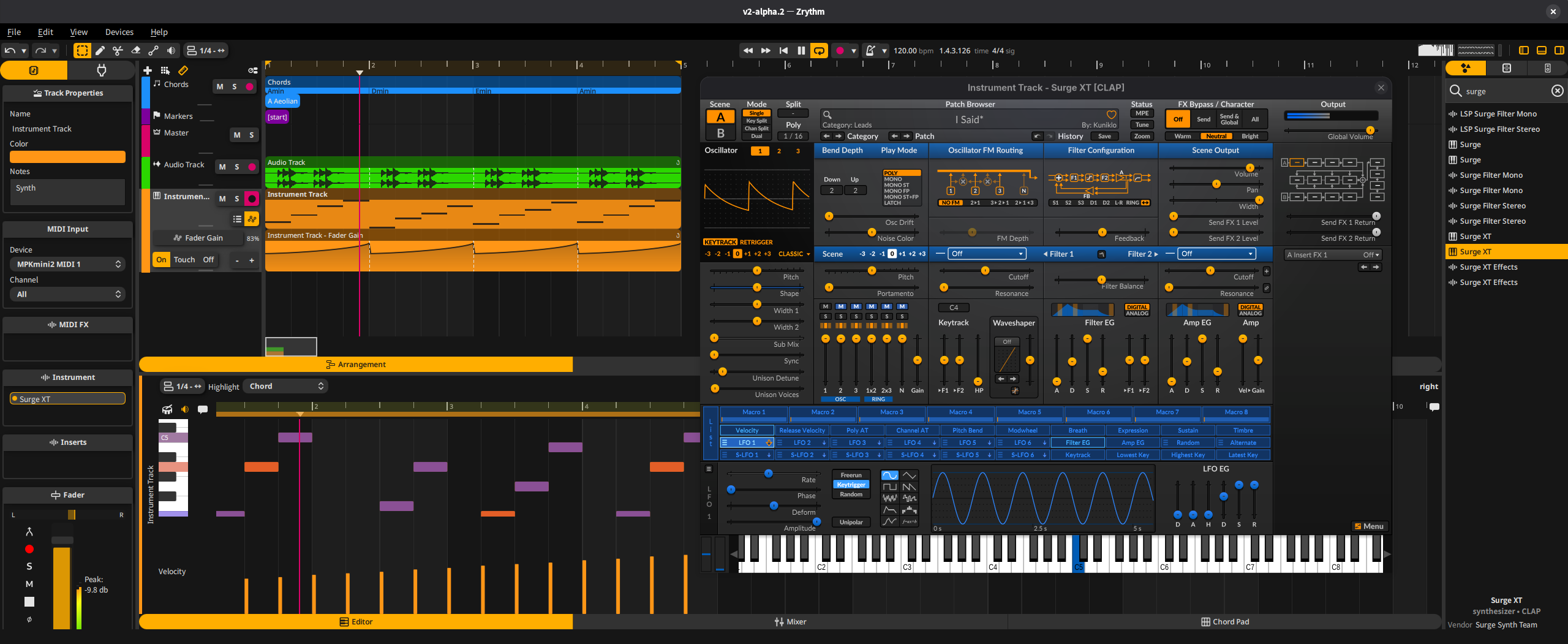
Zrythm is a digital audio workstation tailored for both professionals and beginners, offering an intuitive interface and robust functionality.
Key features include:
- Streamlined editing workflows
- Flexible tools for creative expression
- Limitless automation capabilities
- Powerful mixing features
- Chord assistance for musical composition
- Support for various plugin and file formats
Zrythm is free software written in C++23 using Qt/QML and JUCE.
Features
- Clip looping and cloning
- Adaptive snapping
- Editing tools: pencil, eraser, cut, ramp and audition
- Multiple lanes per track
- Piano roll (MIDI editor) with velocity editor
- Chord pad, chord editor and chord suggestions
- Audio editor with adjustable gain/fades
- Musical mode with offline time-stretching
- Audio/MIDI recording with takes
- Wide variety of track types for every purpose
- Support for VST3, CLAP, LV2, LADSPA and AudioUnit plugins
- Type 0 and 1 MIDI file support
- WAV audio file import
- Built-in plugin browser
- Undoable user actions with undo history
- Hardware-accelerated UI
- SIMD-optimized DSP
- Cross-platform, cross-audio/MIDI backend and cross-architecture
- Available in multiple languages including Chinese, Japanese, Russian, Portuguese, French and German
Not yet ported from v1 (click to expand)
- Clip linking
- Bounce anything to audio or MIDI
- Piano roll chord integration and drum mode
- Audio editor part editing (including in external app)
- Event viewers (list editors) with editable object parameters
- Per-context object functions
- Punch in/out recording and record on MIDI input
- Device-bindable parameters for external control
- Signal manipulation with signal groups, aux sends and direct anywhere-to-anywhere connections
- In-context listening by dimming other tracks
- Automate anything using automation events or CV signal from modulator plugins and macro knobs
- Detachable views for multi-monitor setups
- Searchable preferences
- VST2, DSSI, SFZ/SF2 SoundFont support and other audio file formats
- Built-in file browser
- Optional plugin sandboxing (bridging)
- Stem export
- Automatic project backups
- Serializable undo history
For a full list of features, see the Features page on our website.
Building and Installation
Prebuilt installers are available at https://www.zrythm.org/en/download.html. This is the recommended way to install Zrythm.
See the following instructions if you would like to build Zrythm from source instead.
Building From Source
[!NOTE] We make heavy use of CMake's FetchContent module to fetch dependencies so you don't need to install any dependencies manually other than CMake and Qt. This guide assumes you are fine with fetching dependencies automatically.
[!IMPORTANT] If you distribute your builds to others, you must comply with the license terms of Zrythm and all dependencies we use, in addition to our Trademark Policy.
You can change Release to Debug below if you want to build in debug mode.
GNU/Linux
- Install CMake, Ninja and Qt (see CMakeLists.txt for required version).
- Open a terminal and go to the root of Zrythm's source code.
- Run
cmake -B builddir -G Ninja -DCMAKE_BUILD_TYPE=Release -DCMAKE_PREFIX_PATH=<path to your Qt prefix>. - Run
cmake --build builddir --config Release. - Zrythm is now built at
builddir/src/gui/zrythm.
macOS
- Install Xcode, CMake and Qt.
- Open a terminal and go to the root of Zrythm's source code.
- Run
cmake -B builddir -G Xcode -DCMAKE_BUILD_TYPE=Release -DCMAKE_PREFIX_PATH=<path to your Qt prefix>. - Open the Xcode project inside
builddirand build it.
Windows
- Install Visual Studio 2022 (CMake ships with Visual Studio, but you have to install the "Desktop development with C++" package), and Qt.
- Open Developer Powershell for Visual Studio 2022 and go to the root of Zrythm's source code.
- Run
cmake -B builddir -G "Visual Studio 17 2022" -DCMAKE_BUILD_TYPE=Release -DCMAKE_PREFIX_PATH=<path to your Qt prefix>. - Open the Visual Studio solution inside
builddirand build it.
[!NOTE] On Windows, you must build Qt with the same compiler and same configuration (Debug/Release) you use to build Zrythm.
Using Conan (optional)
Conan can manage all dependencies (including Qt) for reproducible builds across platforms.
Install Conan, CMake, and Ninja in a virtual environment:
python -m venv venv && source venv/bin/activate
pip install -r requirements.txt
Install project profiles and settings:
conan config install conan[!WARNING] This overwrites all files in
~/.conan2/profiles/, as well as~/.conan2/settings_user.ymland~/.conan2/global.conf. To avoid conflicts, either back up existing configs or use a separate Conan home viaCONAN_HOME.Initialize submodules (includes the custom Qt recipe fork) and export:
git submodule update --init --recursive
conan remote add conan-local-index ext/conan-center-index
python3 tools/export_conan_recipes.py
Install dependencies and generate build files:
conan install . -pr:h <profile> -pr:b <profile> --build=missing
cmake --preset default
cmake --build conanbuild/<Debug|Release> --config <Debug|Release>
Select a profile for your platform (adjust compiler versions in
~/.conan2/profiles/_clang,_gcc,_msvc, or_apple_clangto match your toolchain):Platform Host/build profile Build profile (cross-compile) GNU/Linux (Clang) clang_debug/clang_release— GNU/Linux (GCC) gcc_debug/gcc_release— macOS appleclang_debug/appleclang_releaseappleclang_buildWindows (x64) msvc_debug/msvc_release— Windows (ARM64EC) msvc_arm64ec_debug/msvc_arm64ec_release— [!NOTE] macOS uses
appleclang_build(Release) as the build profile because the host profile builds sanitizer-instrumented Qt, which requires cross-building (sanitizer profiles setcross_build=Trueto skip running test executables that would otherwise fail under the sanitizer runtime).For sanitizer builds, use profiles like
clang_asan_ubsan,clang_tsan,gcc_asan_ubsan,appleclang_asan_ubsan, ormsvc_asan. These instrument the entire dependency chain.For instrumenting only Zrythm itself (without rebuilding dependencies), use the
sanitizeroption instead. Per the Conan sanitizer docs, most sanitizers (ASan, UBSan) do not require the whole chain to be built with them:conan install . -pr:h clang_debug -pr:b clang_debug -o sanitizer="address_undefined" --build=missing
Using Zrythm
See the user manual.
Contributing
See CONTRIBUTING.md.
Hacking
See the developer docs.
Forum
See our forum.
Chat
Issue tracker
See Issues on GitLab.
Releases
https://www.zrythm.org/releases
Copying Zrythm

See COPYING for general copying conditions and TRADEMARKS.md for our trademark policy.
Support
If you would like to support this project please donate below or purchase a binary installer from https://www.zrythm.org/en/download.html - creating a DAW takes many years of work and contributions enable us to spend more time working on the project.
- liberapay.com/Zrythm
- paypal.me/zrythmdaw
- opencollective.com/zrythm
- Bitcoin (BTC):
bc1qjfyu2ruyfwv3r6u4hf2nvdh900djep2dlk746j
This project is currently funded through NGI0 Commons Fund, a fund established by NLnet with financial support from the European Commission's Next Generation Internet program. Learn more at the NLnet project page.

