BleachBit system cleaner for Windows and Linux
pip install bleachbitBleachBit
BleachBit cleans files to free disk space and to maintain privacy.
Running from source
To run BleachBit without installation, first install the system dependencies, then build the translations and run it:
make install-deps       # runtime deps (auto-detects Debian/Fedora/openSUSE/Arch)
make -C po local        # build translations
python3 bleachbit.py
Many Linux systems have the basic dependencies: you may skip installation, but in case of any issues, please check for missing dependencies.
Then, review the preferences.
Then, select some options, and click Preview. Review the files, toggle options accordingly, and click Delete.
For information regarding the command line interface, run:
python3 bleachbit.py --help
Read more about running from source.
Links
Localization
Read translation documentation or translate now in Weblate, a web-based translation platform.
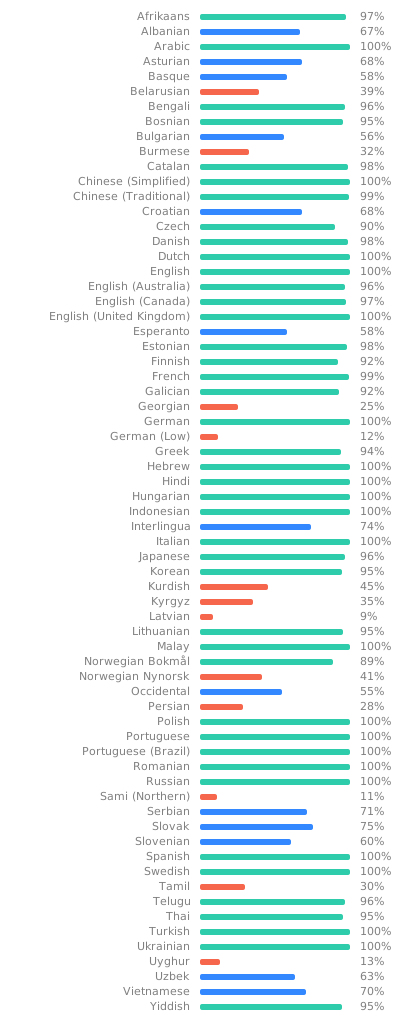
Licenses
BleachBit itself, including source code and cleaner definitions, is licensed under the GNU General Public License version 3, or at your option, any later version.
markovify is licensed under the MIT License.
Development
To develop, run the test suite, or build packages, install the extra build/test/lint/packaging tools too:
make install-deps-dev
Common commands include:
make tests   # run tests
make lint    # check .py and .sh files for issues
make pretty  # format .py and .xml files
More resources:


Docker-based Linux builds
The docker/build.sh script sets up a container, runs make tests,
and builds packages for a selected distribution. Usage:
./docker/build.sh <distro> # distro is one of {debian, fedora, opensuse}
Artifacts are copied to ./docker-artifacts/<distro> on the host.