SKiDL is a library that lets you design electronic circuits using Python.
pip install skidl







Never use a lousy schematic editor again!
SKiDL is a Python package that lets you describe electronic circuits using code instead of schematic editors. Write your circuit as a Python program, and SKiDL outputs a netlist for PCB layout tools. It's "infrastructure as code" for electronics.
- Free software: MIT license
- Documentation: http://devbisme.github.io/skidl
- User Forum: https://github.com/devbisme/skidl/discussions
Why SKiDL?
Textual Circuit Design: Use any text editor and enjoy version control with git, code reviews, and diff for circuit changes.
Compact & Powerful: Describe complex circuits in a fraction of the space. No more tracing signals across multi-page schematics.
Reusable Design: Share circuit modules on PyPI and GitHub. Create parametric "smart" circuits that adapt based on requirements.
Design Automation: Build circuits algorithmically. Generate repetitive structures, automatically size components, and create design variants programmatically.
Electrical Rules Checking: Catch common mistakes like unconnected pins, drive conflicts, and power connection errors.
Hierarchical Design: Mix linear, hierarchical, and modular design approaches as needed.
Tool Independence: Works with any PCB tool. Currently supports KiCad, but can be extended to other tools.
Python Ecosystem: Leverage Python's vast ecosystem for simulation, analysis, documentation, and automation.
Quick Example
Here's a simple voltage divider that demonstrates SKiDL's syntax:
from skidl import *

# Create input & output voltages and ground reference
vin, vout, gnd = Net('VI'), Net('VO'), Net('GND')

# Create two resistors with values and footprints
r1, r2 = 2 * Part("Device", 'R', dest=TEMPLATE, footprint='Resistor_SMD.pretty:R_0805_2012Metric')
r1.value, r2.value = '1K', '500'

# Connect the circuit elements.
vin & r1 & vout & r2 & gnd

# Or connect pin-by-pin if you prefer
# vin += r1[1]
# vout += r1[2], r2[1]
# gnd += r2[2]

# Check for errors and generate netlist
ERC()
generate_netlist(tool=KICAD9)
For a more complex example, here's a two-input AND gate built from discrete transistors:
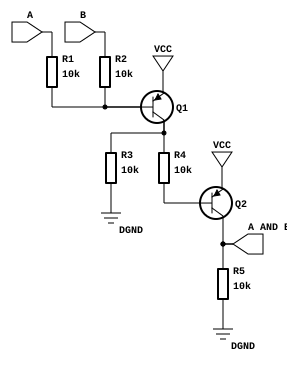
from skidl import *

# Create part templates
q = Part("Device", "Q_PNP_CBE", dest=TEMPLATE)
r = Part("Device", "R", dest=TEMPLATE)

# Create nets
gnd, vcc = Net("GND"), Net("VCC")
a, b, a_and_b = Net("A"), Net("B"), Net("A_AND_B")

# Instantiate parts
gndt = Part("power", "GND")             # Ground terminal
vcct = Part("power", "VCC")             # Power terminal
q1, q2 = q(2)                           # Two transistors
r1, r2, r3, r4, r5 = r(5, value="10K")  # Five 10K resistors

# Make connections - notice the readable topology
a & r1 & q1["B C"] & r4 & q2["B C"] & a_and_b & r5 & gnd
b & r2 & q1["B"]
q1["C"] & r3 & gnd
vcc += q1["E"], q2["E"], vcct
gnd += gndt

generate_netlist(tool=KICAD9)
Advanced Features
Hierarchical Design: Create reusable subcircuits and build complex systems from modular blocks.
Part & Net Classes: Apply design constraints, manufacturing requirements, and electrical specifications systematically.
Smart Part Libraries: Search parts by function, automatically assign footprints, and access any KiCad library.
Multiple Output Formats: Generate netlists for KiCad, XML for BOMs, or go directly to PCB layout.
Visual Output: Create SVG schematics, KiCad schematic files (currently V5 only), or DOT graphs for documentation.
SPICE Integration: Run simulations directly on your SKiDL circuits.
Installation
pip install skidl
Set up KiCad library access (optional but recommended):
# Linux/Mac
export KICAD_SYMBOL_DIR="/usr/share/kicad/symbols"

# Windows
set KICAD_SYMBOL_DIR=C:\Program Files\KiCad\share\kicad\symbols
Getting Started
- Learn the basics: Check out the documentation for comprehensive tutorials
- Try examples: Explore the
tests/examples/directory in the repository - Get help: Join discussions in our user forum
- Convert existing designs: Use the
netlist_to_skidltool to convert KiCad designs to SKiDL
Troubleshooting
"No libraries found" or symbol resolution errors
SKiDL needs to know where your KiCad symbol libraries are. If KICAD_SYMBOL_DIR is not
set or points to the wrong path, parts won't resolve.
Find your KiCad symbol library path:
# Linux (package manager install)
ls /usr/share/kicad/symbols/

# Linux (Flatpak)
ls /var/lib/flatpak/app/org.kicad.KiCad/current/active/files/share/kicad/symbols/

# macOS (Homebrew)
ls /Applications/KiCad/KiCad.app/Contents/SharedSupport/symbols/

# Windows (typical)
dir "C:\Program Files\KiCad\8.0\share\kicad\symbols"
Set the environment variable:
# Linux/macOS — add to ~/.bashrc, ~/.zshrc, or ~/.zprofile
export KICAD_SYMBOL_DIR="/usr/share/kicad/symbols"

# Windows PowerShell
[System.Environment]::SetEnvironmentVariable("KICAD_SYMBOL_DIR", "C:\Program Files\KiCad\8.0\share\kicad\symbols", "User")
Verify it works:
python -c "from skidl import Part; r = Part('Device', 'R'); print(f'Found: {r.name}')"
KiCad version compatibility
SKiDL supports KiCad 5 through 9. If you see parsing errors with newer KiCad library files, make sure you're running the latest version of SKiDL:
pip install --upgrade skidl