macOSWindowsLinux
alternativa a Cloudflare Tunnel、Tailscale、RethinkDB
GO Simple Tunnel - a simple tunnel written in golang
httphttpswebsockethttp2quichttp3shadowsockskcpgolangtuntaptunneldns
Métricas clave
Crecimiento de estrellas
Estrellas
7.7k
Forks
838
Crecimiento semanal
+37
Issues
105
2k4k6k
feb 2020mar 2021abr 2022jun 2023jul 2024sept 2025oct 2026
↓ Descargar
Todas las versiones →Windows
Linux
- gost_3.3.1_linux_mips64_hardfloat.tar.gz14 MB
- gost_3.3.1_linux_amd64.tar.gz17 MB
- gost_3.3.1_linux_armv7.tar.gz16 MB
- gost_3.3.1_linux_mips_hardfloat.tar.gz15 MB
- gost_3.3.1_linux_mipsle_softfloat.tar.gz15 MB
- gost_3.3.1_linux_mips_softfloat.tar.gz15 MB
- gost_3.3.1_linux_s390x.tar.gz16 MB
- gost_3.3.1_linux_riscv64.tar.gz16 MB
ArtefactosGo Modules
README
GO Simple Tunnel
GO语言实现的安全隧道


功能特性
- 多端口监听
- 多级转发链
- 多协议支持
- TCP/UDP端口转发
- 反向代理和隧道
- TCP/UDP透明代理
- DNS解析和代理
- TUN/TAP设备与TUN2SOCKS
- 负载均衡
- 路由控制
- 准入控制
- 限速限流
- 插件系统
- Prometheus监控指标
- 动态配置
- Web API
- GUI/WebUI
概览
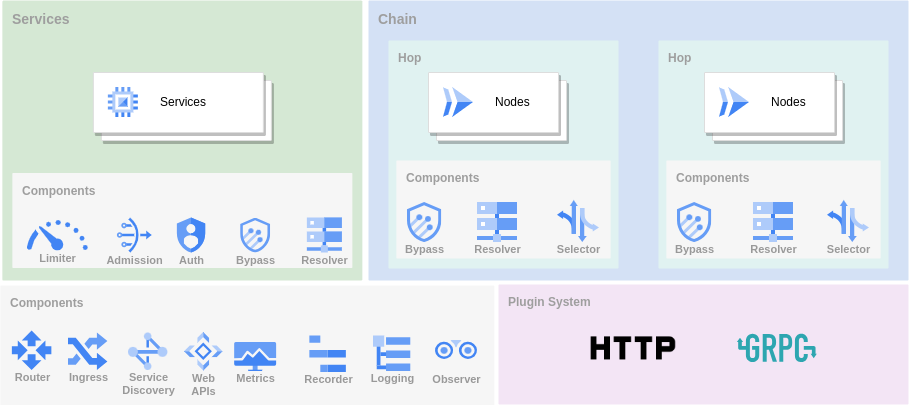
GOST作为隧道有三种主要使用方式。
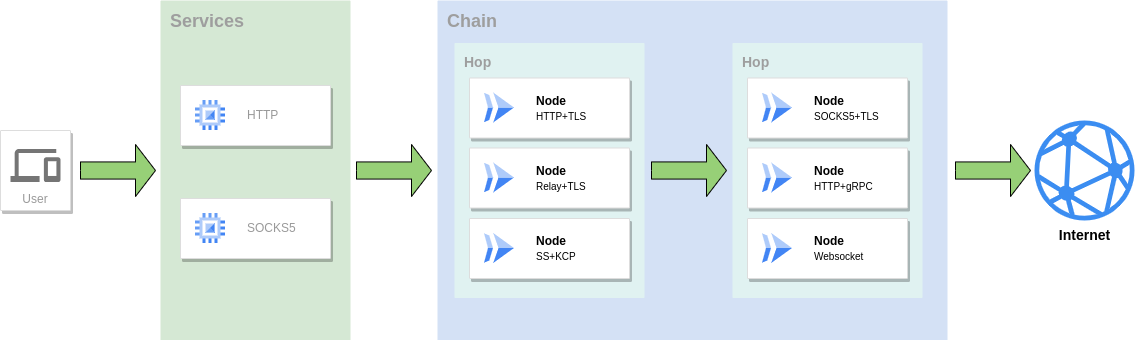
正向代理
作为代理服务访问网络,可以组合使用多种协议组成转发链进行转发。
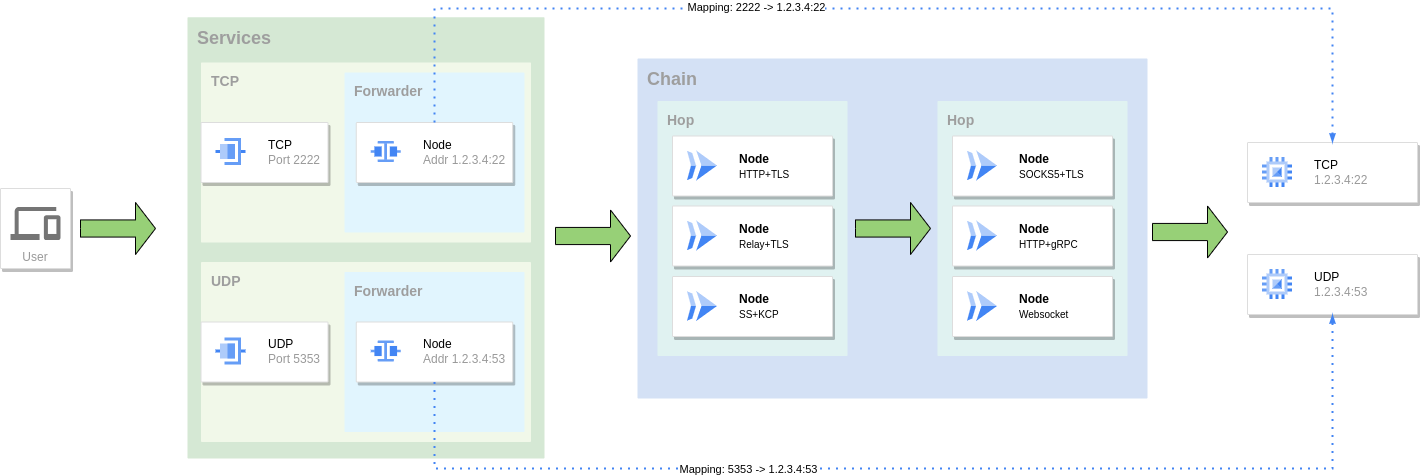
端口转发
将一个服务的端口映射到另外一个服务的端口,同样可以组合使用多种协议组成转发链进行转发。
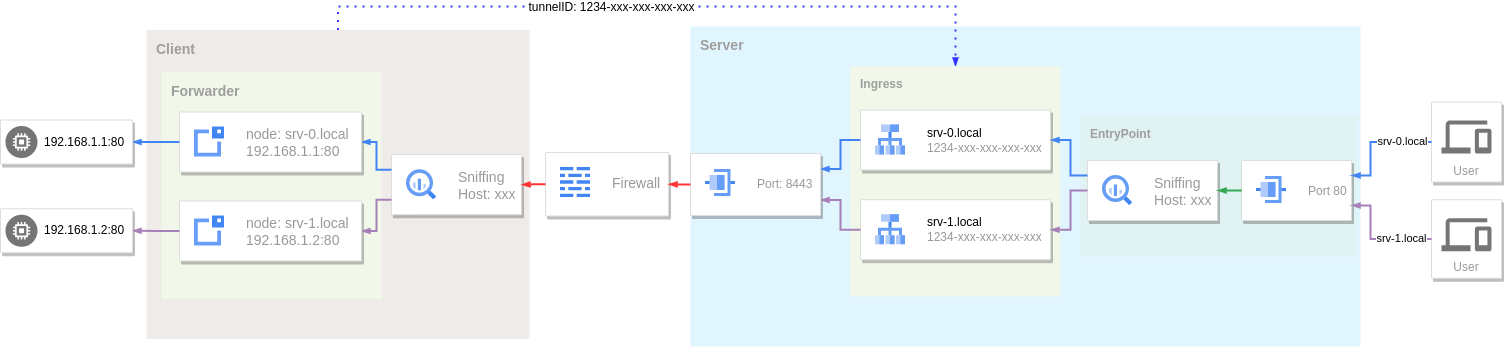
反向代理
利用隧道和内网穿透将内网服务暴露到公网访问。
下载安装
二进制文件
https://github.com/go-gost/gost/releases
系统包(DEB/RPM)
从 Releases 下载对应架构的安装包(amd64、amd64v3、arm64):
# Debian/Ubuntu
sudo apt install ./gost_<version>_linux_amd64.deb

# RHEL/Fedora
sudo dnf install ./gost_<version>_linux_amd64.rpm
amd64v3 包需要支持 AVX2 的 CPU(x86-64-v3),否则请使用 amd64。
安装包附带 systemd 服务,但不会自动启用:先创建 /etc/gost/gost.yml(示例见 /usr/share/doc/gost/examples/gost.yml),再执行 sudo systemctl enable --now gost。未提供配置文件时该服务会被跳过,而不是报错。
安装脚本
# 安装最新版本 [https://github.com/go-gost/gost/releases](https://github.com/go-gost/gost/releases)
bash <(curl -fsSL https://github.com/go-gost/gost/raw/master/install.sh) --install
# 选择要安装的版本
bash <(curl -fsSL https://github.com/go-gost/gost/raw/master/install.sh)
源码编译
git clone https://github.com/go-gost/gost.git
cd gost/cmd/gost
go build
Docker
docker run --rm gogost/gost -V
工具
GUI
WebUI
Shadowsocks Android插件
hamid-nazari/ShadowsocksGostPlugin
帮助与支持
Wiki站点:https://gost.run
YouTube: https://www.youtube.com/@gost-tunnel
Telegram:https://t.me/gogost
Google讨论组:https://groups.google.com/d/forum/go-gost
旧版入口:v2.gost.run