thewhiteh4t/seeker
CSSAccurately Locate Smartphones using Social Engineering
npm install seeker



Available in




Concept behind Seeker is simple, just like we host phishing pages to get credentials why not host a fake page that requests your location like many popular location based websites. Read more on thewhiteh4t's Blog .Seeker Hosts a fake website which asks for Location Permission and if the target allows it, we can get :
- Longitude
- Latitude
- Accuracy
- Altitude - Not always available
- Direction - Only available if user is moving
- Speed - Only available if user is moving
Along with Location Information we also get Device Information without any permissions :
- Unique ID using Canvas Fingerprinting
- Device Model - Not always available
- Operating System
- Platform
- Number of CPU Cores - Approximate Results
- Amount of RAM - Approximate Results
- Screen Resolution
- GPU information
- Browser Name and Version
- Public IP Address
- Local IP Address
- Local Port
Automatic IP Address Reconnaissance is performed after the above information is received.
This tool is a Proof of Concept and is for Educational Purposes Only, Seeker shows what data a malicious website can gather about you and your devices and why you should not click on random links and allow critical permissions such as Location etc.
How is this Different from IP GeoLocation
Other tools and services offer IP Geolocation which is NOT accurate at all and does not give location of the target instead it is the approximate location of the ISP.
Seeker uses HTML API and gets Location Permission and then grabs Longitude and Latitude using GPS Hardware which is present in the device, so Seeker works best with Smartphones, if the GPS Hardware is not present, such as on a Laptop, Seeker fallbacks to IP Geolocation or it will look for Cached Coordinates.
Generally if a user accepts location permission, Accuracy of the information received is accurate to approximately 30 meters
Accuracy depends on multiple factors which you may or may not control such as :
- Device - Won't work on laptops or phones which have broken GPS
- Browser - Some browsers block javascripts
- GPS Calibration - If GPS is not calibrated you may get inaccurate results and this is very common
Templates
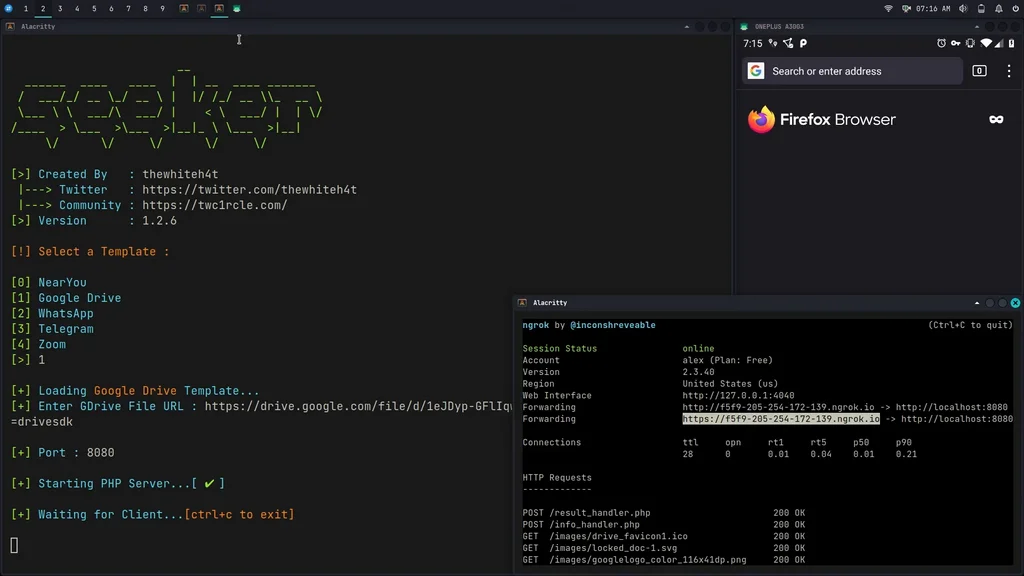
Available Templates :
- NearYou
- Google Drive (Suggested by @Akaal_no_one)
- WhatsApp (Suggested by @Dazmed707)
- Telegram
- Zoom (Made by @a7maadf)
- Google reCAPTCHA (Made by @MrEgyptian)
Create your own template ! Steps to let you create your template is described in this how-to
Once your template is ready, do not forget to propose it to the community via a PR (pull request)
Tested On :
- Kali Linux
- BlackArch Linux
- Ubuntu
- Fedora
- Kali Nethunter
- Termux
- Parrot OS
- OSX - Monterey v.12.0.1
Installation
Kali Linux / Arch Linux / Ubuntu / Fedora / Parrot OS / Termux
git clone https://github.com/thewhiteh4t/seeker.git
cd seeker/
chmod +x install.sh
./install.sh
BlackArch Linux
sudo pacman -S seeker
Docker
docker pull thewhiteh4t/seeker
OSX
git clone https://github.com/thewhiteh4t/seeker.git
cd seeker/
python3 seeker.py
In order to run in tunnel mode, install ngrok by running this command in the terminal:
brew install ngrok/ngrok/ngrok

ngrok http 8080
Usage
python3 seeker.py -h

usage: seeker.py [-h] [-k KML] [-p PORT] [-u] [-v] [-t TEMPLATE] [-d] [--telegram token:chatId] [--webhook WEBHOOK]

options:
  -h, --help                            show this help message and exit
  -k KML, --kml KML                     KML filename
  -p PORT, --port PORT                  Web server port [ Default : 8080 ]
  -u, --update                          Check for updates
  -v, --version                         Prints version
  -t TEMPLATE, --template TEMPLATE      Auto choose the template with the given index
  -d, --debugHTTP                       Disable auto http --> https redirection for testing purposes
                                        (only works for the templates having index_temp.html file)
  --telegram                            Send info to a telegram bot, provide telegram token and chat to use
                                        format = token:chatId separated by a colon
  --webhook                             Send events to a webhook endpoint to be processed
                                        Note : endpoint must be unauthenticated and accept POST request

#########################
# Environment Variables #
#########################

Some of the options above can also be enabled via environment variables, to ease deployment.
Other parameters can be provided via environment variables to avoid interactive mode.

Variables:
  DEBUG_HTTP            Same as -d, --debugHTTP
  PORT                  Same as -p, --port
  TEMPLATE              Same as -t, --template
  TITLE                 Provide the group title or the page title
  REDIRECT              Provide the URL to redirect the user to, after the job is done
  IMAGE                 Provide the image to use, can either be remote (http or https) or local
                        Note : Remote image will be downloaded locally during the startup
  DESC                  Provide the description of the item (group or webpage depending on the template)
  SITENAME              Provide the name of the website
  DISPLAY_URL           Provide the URL to display on the page
  MEM_NUM               Provide the number of group membres (Telegram so far)
  ONLINE_NUM            Provide the number of the group online members (Telegram so far)
  TELEGRAM              Provide telegram token and chat to use to send info to a telegram bot
                        format = token:chatId separated by a colon
  WEBHOOK               Provide the webhook url to forward the events to
                        Note : endpoint should be unauthenticated and accept POST method


##################
# Usage Examples #
##################

# Step 1 : In first terminal
$ python3 seeker.py

# Step 2 : In second terminal start a tunnel service such as ngrok
$ ./ngrok http 8080

###########
# Options #
###########

# Ouput KML File for Google Earth
$ python3 seeker.py -k <filename>

# Use Custom Port
$ python3 seeker.py -p 1337
$ ./ngrok http 1337

# Pre-select a specific template
$ python3 seeker.py -t 1

################
# Docker Usage #
################

# Step 1
$ docker network create ngroknet

# Step 2
$ docker run --rm -it --net ngroknet --name seeker thewhiteh4t/seeker

# Step 3
$ docker run --rm -it --net ngroknet --name ngrok wernight/ngrok ngrok http seeker:8080
Local Tunnels
Use
ssh -R 80:localhost:8080 nokey@localhost.run
as an alternative to ngrok
Demo
YouTube