ServiceStack/redis-windows
Shellalternative à 1Password
Vagrant redis configuration and the binary releases of MS Open Tech redis port of windows
Redis on Windows
This project contains the binary releases of MS Open Tech redis port of windows as well as a vagrant configuration for redis letting you run the native version of Redis in a Virtual Box VM.
Whilst it's recommended to use Redis on Linux in production, it is often useful for developers on Windows platforms to have their own local version of redis running to develop with.
The 3 most popular ways of running redis on windows is to use the binary releases of Microsoft's native port of redis, but as this is an unofficial port it always lags behind the latest official development of redis on Linux/OSX.
Thanks to Vagrant you can choose to run the latest linux version inside a Virtual Box Linux VM where you'll be able to run the official native version of redis.
Or if you have the latest version of Windows 10 you can install Bash on Ubuntu on Windows which will let you run the official version of Redis on Ubuntu on Windows :) This is our preferred approach as it lets you run native Ubuntu binaries on Windows more efficiently than running Linux in a VM:
Option 1) Install Redis on Ubuntu on Windows
Install Windows Subsystem for Linux (WSL)
- From Start, search for Turn Windows features on or off (type
turn) - Select Windows Subsystem for Linux (beta)
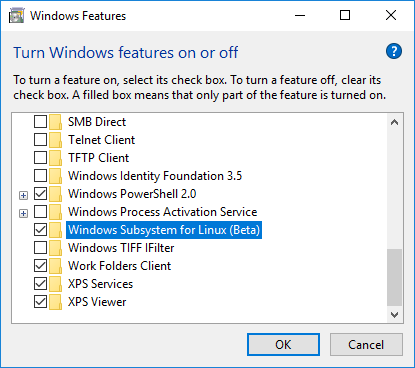
Once installed you can run bash on Ubuntu by typing bash from a Windows Command Prompt. To install the latest version of Redis we first need to install some prerequisites:
$ sudo apt-get update
$ sudo apt-get install make
$ sudo apt-get install gcc
Then follow the official installation guide
to download, build and install the latest stable version. NOTE: Installing
the binaries using make install will not work. You need to copy them manually
to /usr/bin (just like described in the guide, except that they use
/usr/local/bin - which is the problem).
You'll then be able to launch redis with:
$ redis-server --daemonize yes
Which will run redis in the background freeing your shell so you can play with it using the redis client:
$ redis-cli
$ 127.0.0.1:6379> SET foo bar
OK
$ 127.0.0.1:6379> GET foo
"bar"
Which you can connect to from within bash or from your Windows desktop using the redis-cli native Windows binary from MSOpenTech.
Option 2) Running the latest version of Redis with Vagrant
1. Install Vagrant on Windows
2. Download the vagrant-redis.zip vagrant configuration
wget https://raw.github.com/ServiceStack/redis-windows/master/downloads/vagrant-redis.zip
3. Extract vagrant-redis.zip in any folder, e.g. in c:\vagrant-redis
4. Launch the Virtual Box VM with vagrant up
cd c:\vagrant-redis
vagrant up
This will launch a new Ubuntu VM instance inside Virtual Box that will automatically install and start the latest stable version of redis.
The vagrant configuration was originally from JasonPunyon/redishobo and has been modified to use the latest stable release of Redis.
Option 3) Running Microsoft's native port of Redis
These 64-bit binary releases are created by building the Microsoft's native port of redis which have also been published on NuGet, but as it's more convenient we provide a zip of the 64-bit binaries here.
MS Open Announcements
- MSOpenTech Redis on Windows 3.0 Release Notes
- MSOpenTech Redis on Windows 2.8 Release Notes
- MSOpenTech's Redis on Windows
- Updates Released for Redis on Windows (2.8.4)
Current Version: 3.0.503 (June 28, 2016)
1. Download the redis-latest.zip native 64bit Windows port of redis
wget https://github.com/ServiceStack/redis-windows/raw/master/downloads/redis-latest.zip
2. Extract redis64-latest.zip in any folder, e.g. in c:\redis
3. Run the redis-server.exe using the local configuration
cd c:\redis
redis-server.exe redis.windows.conf
4. Run redis-cli.exe to connect to your redis instance
cd c:\redis
redis-cli.exe
5. Start playing with redis :)
redis 127.0.0.1:6379> SET foo bar
OK
redis 127.0.0.1:6379> KEYS *
1) "foo"
redis 127.0.0.1:6379> GET foo
"bar"
redis 127.0.0.1:6379>
The MSOpenTech of Redis adds some useful extensions for better integration with Windows:
Running Redis as a Service
If you installed Redis using the MSI package, then Redis was already installed as a Windows service. Nothing further to do. If you would like to change its settings, you can update the redis.windows-service.conf file and then restart the Redis service (Run -> services.msc -> Redis -> Restart).
During installation of the MSI you can either use the installer’s user interface to update the port that Redis listens to and the firewall exception or run it silently without a UI. The following examples show how to install from the command line:
default install (port 6379 and firewall exception ON):
msiexec /i Redis-Windows-x64.msi
set port and turn OFF firewall exception:
msiexec /i Redis-Windows-x64.msi PORT=1234 ADD_FIREWALL_RULE=""
set port and turn ON firewall exception:
msiexec /i Redis-Windows-x64.msi PORT=1234 ADD_FIREWALL_RULE =1
install with no user interface:
msiexec /quiet /i Redis-Windows-x64.msi
If you did not install Redis using the MSI package, then you still run Redis as a Windows service by following these instructions:
In order to better integrate with the Windows Services model, new command line arguments have been introduced to Redis. These service arguments require an elevated user context in order to connect to the service control manager. If these commands are invoked from a non-elevated context, Redis will attempt to create an elevated context in which to execute these commands. This will cause a User Account Control dialog to be displayed by Windows and may require Administrative user credentials in order to proceed.
Installing the Service
--service-install
This must be the first argument on the redis-server command line. Arguments after this are passed in the order they occur to Redis when the service is launched. The service will be configured as Autostart and will be launched as "NT AUTHORITY\NetworkService". Upon successful installation, a success message will be displayed and Redis will exit.
This command does not start the service.
For instance:
redis-server --service-install redis.windows.conf --loglevel verbose
Uninstalling the Service
--service-uninstall
This will remove the Redis service configuration information from the registry. Upon successful uninstallation, a success message will be displayed and Redis will exit. This does command not to stop the service.
For instance:
redis-server --service-uninstall
Starting the Service
--service-start
This will start the Redis service. Upon successful startup, a success message will be displayed and Redis service will be started.
For instance:
redis-server --service-start
Stopping the Service
--service-stop
This will stop the Redis service. Upon successful termination, a success message will be displayed and Redis will exit.
For instance:
redis-server --service-stop
Naming the Service
--service-name name
This optional argument may be used with any of the preceding commands to set the name of the installed service. This argument should follow the service-install, service-start, service-stop or service-uninstall commands, and precede any arguments to be passed to Redis via the service-install command. The following would install and start three separate instances of Redis as a service:
redis-server --service-install –service-name redisService1 –port 10001
redis-server --service-start –service-name redisService1
redis-server --service-install –service-name redisService2 –port 10002
redis-server --service-start –service-name redisService2
redis-server --service-install –service-name redisService3 –port 10003
redis-server --service-start –service-name redisService3
Redis Vue
Redis Vue is a simple, lightweight, versatile Redis Admin UI developed using Vue and ServiceStack .NET Core Web Apps. It supports Redis's core Strings, Lists, Sets, Sorted Sets and Hash data structures and custom Redis commands with its entire functionality contained in a single /app/index.html using the dynamic ServiceStack Templates language, making it easy to customize and further enhance.
Live Demo - http://redis.web-app.io

Download for Windows, OSX and Linux https://github.com/NetCoreWebApps/Redis
Redis React Browser
Redis React is a simple user-friendly UI for browsing data in Redis servers which takes advantages of the complex type conventions built in the ServiceStack.Redis Client to provide a rich, human-friendly UI for navigating related datasets, enabling a fast and fluid browsing experience for your Redis servers.
Live Demo
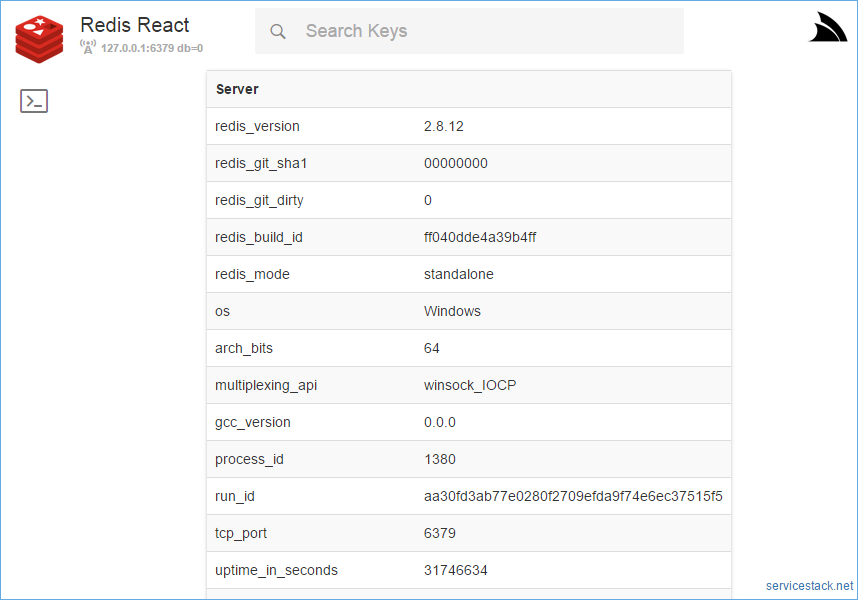
Windows, OSX and Linux downloads available from Redis React Home Page
Configure Redis Sentinel Servers
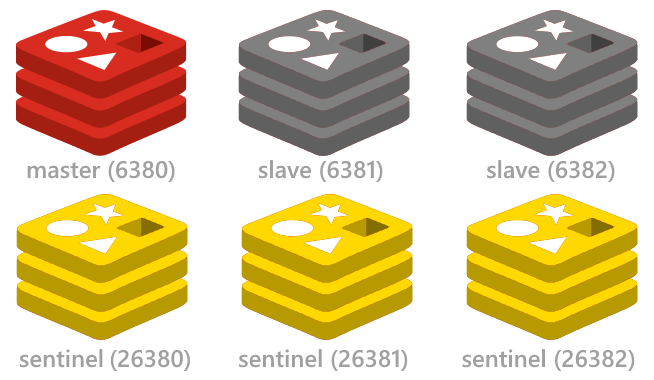
See the redis config project for a quick way to setup up the minimal highly available Redis Sentinel configuration including start/stop scripts for instantly running multiple redis instances on a single (or multiple) Windows, OSX or Linux servers.