WirelessAlien/ZipXtract
KotlinA fully open source app to extract rar, zip, tar, bz2, gz, 7z, xz, jar and z etc (encrypted .zip & .7z supported)
ZipXtract





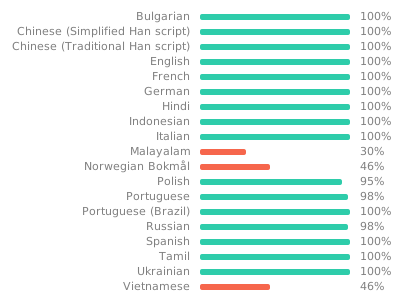
Read this in other languages: العربية, Български, Deutsch, Bahasa Indonesia, 한국어, Русский, தமிழ், Türkçe, Українська, 简体中文
ZipXtract is a fully open-source Android application designed for comprehensive archive management. It allows you to effortlessly extract and create a wide variety of archive files directly on your device.
Key Features
Comprehensive Extraction Capabilities
- Wide Format Support: RAR (including RAR5 and multi-volume), ZIP (password-protected and split), 7z (password-protected and multi-volume), TAR, GZ, BZ2, XZ, ZST, ISO, CAB, DEB, RPM, DMG, WIM, CHM, LZ4, Brotli (BR), Lzip, JAR, and many more.
- Encrypted Archives: Handles password-protected ZIP and 7z files.
- Multi-Volume Archives: Seamlessly extracts multi-volume RAR and 7z archives.
- Split Archives: Support for extracting split ZIP files.
Flexible Archive Creation
- Popular Formats: Create ZIP, 7z and TAR archives (with multiple type of compression support).
- Encryption Options: Secure your archives with password protection for ZIP and 7z formats.
- Split Archives: Create split ZIP archives for easier sharing of large files.
Installation
Get ZipXtract from your preferred source:
| Source | Notes (Features) |
|---|---|
| Full Version: Includes all features (RAR, 7z). | |
 |
Full Version: Includes all features (RAR, 7z). |
How to Use
Here are some general tips for managing archives with ZipXtract:
- Selecting Files/Folders: Long-press on files and folders, or tap their icons, to select them for archiving or other operations.
- Extraction Options: Click on an archive file to open the extraction menu, where you can choose your desired extraction path and settings.
- "Open With" and "Share" Behavior: Files opened with ZipXtract via the Android "Open With" and "Share" menu are, by default, extracted to
Internal Storage/ZipXtract/. You can customize this path in the app's settings. - Default Paths: When archiving or extracting from within the app, the default output location is the parent directory of the source file(s). This can also be changed in the app settings.
App Permissions & Privacy
ZipXtract requires the following permissions:
- Read and Write Storage Permission: For Android 10 and below.
- Manage External Storage Permission: For Android 11 and above.
The application does not require internet permission, ensuring your files are processed locally on your device.
For more details, please read our Privacy Policy.
Contributing
We welcome contributions to make ZipXtract even better! Here’s how you can help:
- Fork the Repository.
- Create a New Branch:
git checkout -b feature/YourAmazingFeature - Commit Your Changes:
git commit -m 'Add some AmazingFeature' - Push to the Branch:
git push origin feature/YourAmazingFeature - Open a Pull Request.
Report Bugs or Request Features
Found a bug or have an idea for a new feature? Please open an issue on our GitHub Issues page.
Translate ZipXtract
License
This project is licensed under the GNU General Public License v3.0. See the LICENSE file for details.
Acknowledgements
The app icon vector by Solar Icons in CC Attribution License via SVG Repo
Donate
If you find ZipXtract useful, please consider supporting its development:


Contact
For any inquiries or feedback, please open an issue on the GitHub repository.