jeffknupp/sandman2
PythonAutomatically generate a RESTful API service for your legacy database. No code required!
pip install sandman2sandman2


[ ~ Dependencies scanned by PyUp.io ~ ]
sandman2 automagically generates a RESTful API service from your existing database,
without requiring you to write a line of code. Simply point sandman2 to your
database, add salt for seasoning, and voila!, a fully RESTful API service with
hypermedia support starts running, ready to accept HTTP requests.
This is a big deal. It means every single database you interact with, from the
SQLite database that houses your web browser's data up to your production
PostgreSQL server can be endowed with a REST API and accessed programmatically,
using any number of HTTP client libraries available in every language.
sandman2 frees your data.
For developers:
Imagine you're working for AnonymousCorp and need to access Group Y's data, which is presented to you through some horrible API or GUI. Wouldn't it be nice if you could just interact with that database through a REST API?
More than that, imagine if you could interact with the database through a REST
API and no one had to write any code. Not you. Not Group Y. No one.
That means no boilerplate ORM code, no database
connection logic. Nothing. sandman2 can be run as a command-line tool
(sandman2ctl) that just takes your database information as parameters and
connects to it, introspects the schema, generates a RESTful API, and starts the server.
What Happened to Sandman (1)?
sandman, the precursor to sandman2, is no longer being maintained. sandman had almost identical
functionality but had an architecture that reflected the capabilities of the underlying ORM, SQLAlchemy. As of the 0.9 release, SQLAlchemy
introduced the automap construct. This fundamentally changed the way that sandman could interact with the underlying database in a
way that greatly simplified things. All that was needed was the actual effort to rewrite sandman from scratch...
sandman2 has since surpassed the functionality of the original sandman and the latter should be considered deprecated/obsolete.
Quickstart
Install sandman2 using pip: $ pip install sandman2. This provides the script
sandman2ctl, which just takes the database URI string, described here. For example, to connect to a SQLite database in the same directory you're running the script, you would run:
$ sandman2ctl sqlite+pysqlite:///database_file_name
To connect to a PostgreSQL database, make sure you install a driver like
psycopg2 using pip, then use the following connection string:
$ sandman2ctl postgresql+psycopg2://scott:tiger@localhost/mydatabase
Again, see the SQLAlchemy documentation for a more comprehensive discussion of connection strings.
Supported Databases
sandman2 supports all databases that the underlying ORM, SQLAlchemy, supports.
Presently, that includes:
- MySQL
- PostgreSQL
- Oracle
- Microsoft SQL Server
- SQLite
- Sybase
- Drizzle
- Firebird
Third-party packages extend support to:
- IBM DB2
- Amazon Redshift
- SQL Anywhere
- MonetDB
Admin Interface
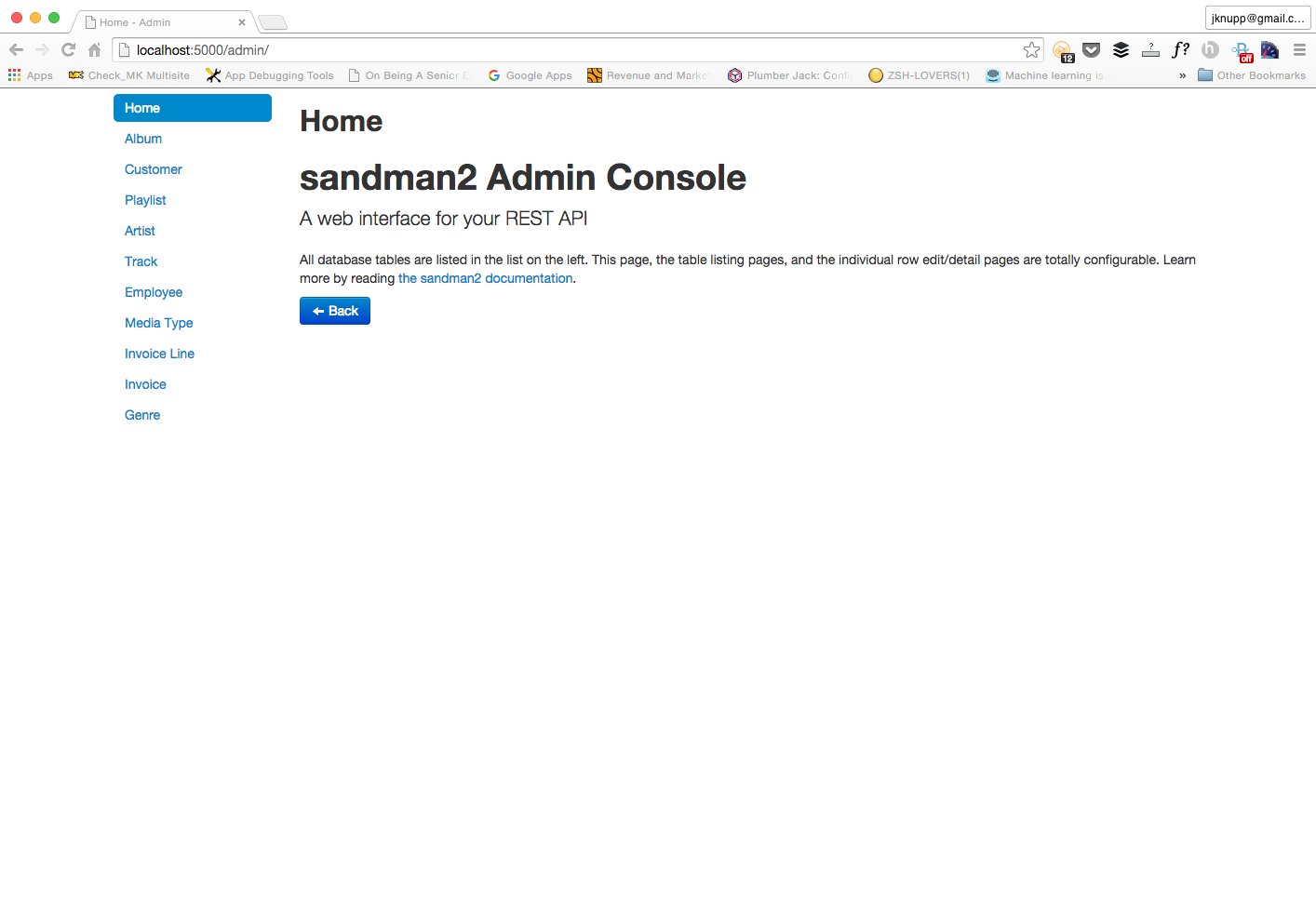
One of the best things about the original sandman was the Admin Interface. Not only does sandman2 include the Admin Interface, but it modernizes it as well. The layout has been greatly improved, especially when dealing with larger numbers of tables. All of the original functionality of the Admin Interface remains unchanged.
Here's a shot of the new look:
Customizing
If sandman2ctl doesn't give you fine-grained enough control over your REST
endpoints, or you'd like to restrict the set of tables made available via
sandman2ctl, you can easily integrate sandman2 into your application. See
the documentation for more info.
Running sandman2 under Docker
sandman2 has an official docker image at Docker Hub. Simply docker pull jeffknupp/sandman2 to get the latest version. It supports the most popular database engines, but not all that sandman2 currently natively supports. If you'd like to see support for your RDBMS, either add a pull request on this repo (if possible) or create a new issue with the details of your database's Python driver.
Example
Here's how one would run sandman2 to connect to a PostgreSQL database running on one's host machine (i.e. not a remote database, which is far simpler) under Docker (on a Mac, explained below):
$ docker pull jeffknupp/sandman2$ docker run -d -e DB_TYPE=postgres -e DB_DRIVER=psycopg2 -e USERNAME=jknupp -e DB_HOST=host.docker.internal -e DATABASE=jknupp -e DB_PORT=5432 -p 9000:5000 sandman2$ curl localhost:9000/metaor open a browser tohttp://localhost:9000/admin/
Note, DB_HOST=host.docker.internal is only necessary for databases that reside on the host system (and the value only works on macOS). To connect to a database on a remote machine, simply replace that value with the machine's IP or hostname.
Parameters
Here are the parameters available to specify your connection information and their meaning:
$DB_TYPE- The type of RDBMS to connect to (e.g.postgresormysql)$DB_DRIVER- The name of the Python library to use as a driver (e.g.psycopg2orpymysql)$USERNAME- Database username$PASSWORD- Database password$DB_HOST- Database IP or hostname$DB_PORT- Database port$DATABASE- Name of database to connect to
Pass each value separately to the docker run command with -e <VARIABLE>=<VALUE>. Not all are required, but which ones are required differs based on your target RDBMS.