The Powerful Friendly Uptodate AD Blocking Hosts 最新强大而友善的去广告
adawayadhostwhitelistadblockadblockingadblock-listadblocker-listspiholepihole-blocklistspihole-adblocker-listpihole-whitelist
Indicateurs clés
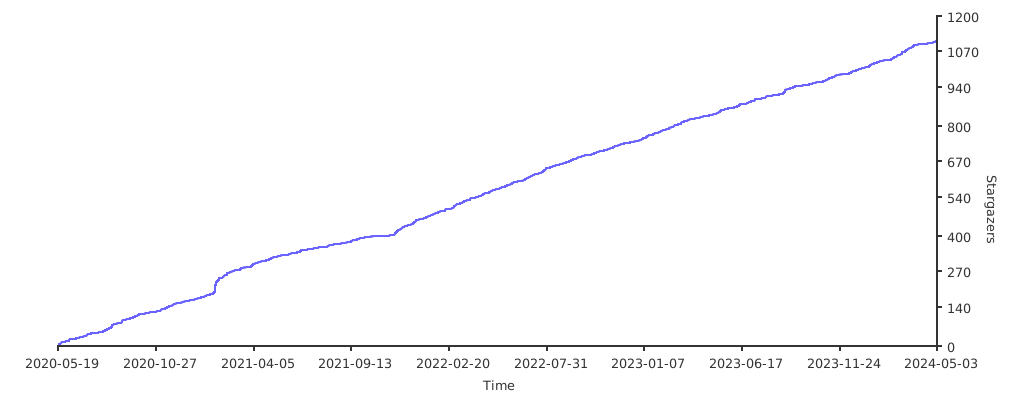
Croissance des étoiles
Étoiles
1.4k
Forks
83
Croissance hebdomadaire
+-1
Issues
1
5001k
mai 2020mai 2021juin 2022juil. 2023juil. 2024août 2025sept. 2026
README

The Powerful Friendly Uptodate AD Blocking Hosts 最新强大而友善的去广告



Total ad / tracking block list 屏蔽追踪广告总数: 109328

Total allowlist list 允许名单总数: 11194

Total upstream-non-accessable list 上游无法访问域名总数: 5353

Update 更新时间: 2026-09-08
UPTODATE 保持最新
Merge every day 每天更新
Supported Platform 支持平台
-Windows
-Android
-Linux
-Mac OS
-Openwrt
-etc
Supported adblocker 广告拦截器
-Pihole
-Adaway
-Adblocker/Adguard
-SmartDNS
-Clash
-etc
Download 下载
Number of Domain 域名数目: 109328
| Format 格式 | Compatible with 适用于 | Raw | 国内加速链接 |
|---|---|---|---|
| Host | Pihole,Adaway,hBlock ... | link | link |
| Adblocker | uBlock,Adguard ... | link | link |
| Dnsmasq | Dns ... | link | link |
| SmartDNS | SmartDNS | link | link |
| Domain | Domain | link | link |
| Clash | Clash | link | link |
How To Use 如何使用
1.Download files/copy link of files
2.Add host and whitelist file/link into adblocker
3.Update the data source in the app
1.下载文件/复制下载链接
2.添加文件或者下载链接到广告拦截器
3.更新数据规则
Pihole Installation 安装导入教程
Import and Installation 导入和安装
1.Login to pihole website
2.Go to Groupmanagement > Adlists
3.copy the NEODEV AD host link into "Address:"
4.open terminal
5. Run the following command :
sudo -i
sudo curl -s https://raw.githubusercontent.com/neodevpro/neodevhost/master/install.sh | bash
pihole -g
6.Wait for 20 mins around
7.Then it will import both NEODEV host and whitelist into your Pihole
Remove and Uninstall 移除和卸载
1.Login to pihole website
2.Go to Groupmanagement > Adlists
3.click the red trash can button
4.open terminal
5. Run the following command :
sudo -i
sudo curl -s https://raw.githubusercontent.com/neodevpro/neodevhost/master/uninstall.sh | bash
pihole -g
6.Wait for 20 mins around
7.Then it will Remove and Uninstall both NEODEV host and whitelist from your Pihole
Sources of AD-hosts data 去广告host源
| AD-hostss | Link |
|---|---|
| Anti-ad | link |
| 217heidai | link |
Sources of Allowlist 允许名单
| Allowlist | Link |
|---|---|
| AnudeepND | link |
| Ultimate-Hosts-Blacklist | link |
| Energized Protection | link |
| 217heidai | link |
| oisd | link |
| blahdns | link |
| DNS Blocklists | link |
| AWAvenue-Ads-Rule | link |
Dead Domain List 过期域名名单
| Allowlist | Link |
|---|---|
| Dead-block | link |
| Dead-allow | link |
Dépôts similaires