pi-hole/PADD
ShellPADD (formerly Chronometer2) is a more expansive version of the original chronometer.sh that is included with Pi-Hole. PADD provides in-depth information about your Pi-hole.
PADD
PADD (formerly Chronometer2) is a more expansive version of the original chronometer.sh that was included with Pi-Hole. PADD provides in-depth information about your Pi-hole.
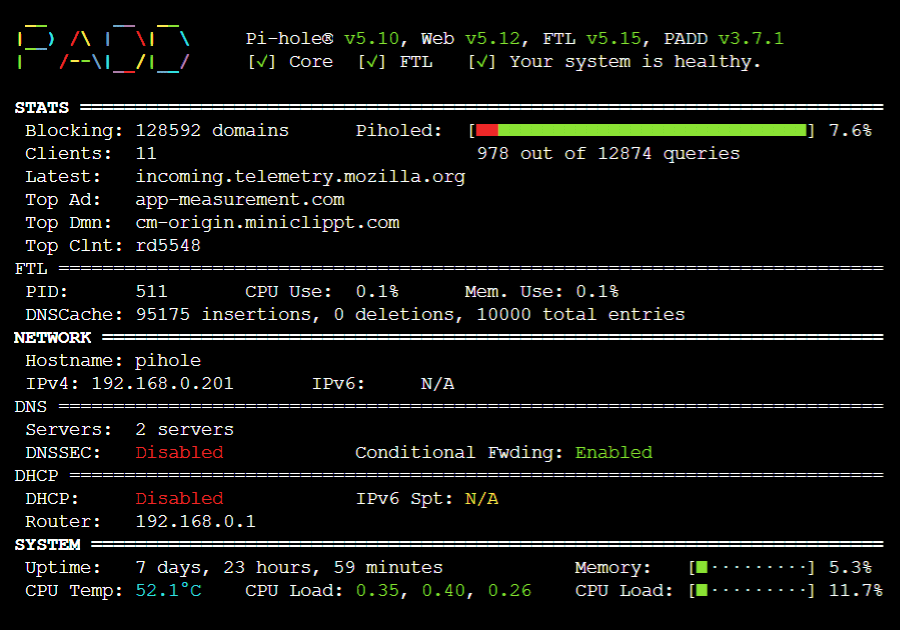
*Note: PADD has been adopted by the Pi-hole team, thanks to JPMCK for creating this helpful tool!
Setup PADD
Get a copy of PADD by running:
cd ~
wget -O padd.sh https://install.padd.sh
or
cd ~
curl -sSL https://install.padd.sh -o padd.sh
Make PADD executable by running
sudo chmod +x padd.sh
Dependencies
- curl
- jq
- dig
- tput
Using PADD
PADD on Pi-hole machine
Just run
./padd.sh
PADD from other machine
With PADD v4.0.0 and Pi-hole v6 it is also possible to run PADD from a machine that is not running Pi-hole
./padd.sh --server <DOMAIN|IP>
Authentication
Pi-hole v6 uses a completely new API with a new authentication mechanism
If you run PADD on the same machine as Pi-hole, it's possible to bypass authentication when your local user is member of the pihole group (specifically, if you can access /etc/pihole/cli_pw).
For details see https://github.com/pi-hole/FTL/pull/1999
If this is not the case, PADD will ask you for your password and (if configured) your two factor authentication token. You can also pass those as arguments
password only
./padd.sh --secret <password>with 2FA enabled
./padd.sh --secret <password> --2fa <2fa>
PADD with Pi-hole in a Docker Container
If you're running Pi-hole in the official Docker Container,
padd.shis pre-installed and namedpadd. It can be used with the following command:docker exec -it <container_name> padd [padd_options]
PADD on PiTFT screen
Instructions for how to setup PiTFT screen can be found here
Set PADD to auto run on the PiTFT screen by adding the following to the end of
~/.bashrc:# Run PADD # If we’re on the PiTFT screen (ssh is xterm) if [ "$TERM" == "linux" ] ; then while : do ./padd.sh sleep 1 done fiOne line version
cd ~ ; echo "if [ \"\$TERM\" == \"linux\" ] ; then\n while :\n do\n ./padd.sh\n sleep 1\n done\nfi" | tee ~/.bashrc -aReboot your Pi-Hole by running
sudo reboot. PADD should now run on PiTFT Screen when your Pi-Hole has completed booting.
(Optional) Put the PiTFT Display to Sleep at Night
If you don't want your PiTFT on all night when you are asleep, you can put it to sleep! (Note: these instructions only apply to a PiTFT.)
To do so, edit cron as root (
sudo crontab -e) and add the following:# PiTFT+ SLEEPY TIME # Turn off the PiTFT+ at midnight 00 00 * * * sh -c 'echo "0" > /sys/class/backlight/soc\:backlight/brightness' # Turn on the PiTFT+ at 8:00 am 00 08 * * * sh -c 'echo "1" > /sys/class/backlight/soc\:backlight/brightness'
Updating PADD
Simply run
./padd.sh -uor run the same commands you used to install
cd ~
wget -O padd.sh https://install.padd.sh
or
cd ~
curl -sSL https://install.padd.sh -o padd.sh
Sizes
PADD will display on screens that anywhere from 20x10 characters to over 80x26 characters.
As your screen gets smaller, you’ll be presented with less information… however, you’ll always get the most important details:
- The status of your Pi-hole (is it online, in need of an update?),
- How many ads have been blocked,
- Your hostname and IP, and
- Your CPU’s current load.
It will also run in the following modes (shown further below):
- Pico: 20x10 characters
- Nano: 24x12 characters
- Micro: 30x16 characters
- Mini: 40x18 characters
- Tiny: 53x20 characters
- Slim: 60x21 characters
- Regular: 60x22 characters (takes up the entire screen on a 3.5" Adafruit PiTFT using the Terminal font at 8x14.)
- Mega: 80x26 characters
Sizing Your PADD
How PADD will display on your screen depends on the size of the screen in characters, not pixels! PADD doesn’t care if it is running on a 5k Retina display on your $5,000 iMac Pro or on a $5 display you bought on eBay.
If you want to change how PADD displays on a small display attached to your Raspberry Pi, use
sudo dpkg-reconfigure console-setup
to configure your font settings to an ideal size for you.
If you want to change how PADD displays through a terminal emulator (PuTTY, Terminal.app, iTerm2, etc.), resize your window or play with font sizes in your app of choice.
The Sizes
