Turn any computer or edge device into a command center for your computer vision projects.
pip install inference




Make Any Camera an AI Camera
Inference turns any computer or edge device into a command center for your computer vision projects.
- 🛠️ Self-host your own fine-tuned models
- 🧠 Access the latest and greatest foundation models (like Florence-2, CLIP, and SAM2)
- 🤝 Use Workflows to track, count, time, measure, and visualize
- 👁️ Combine ML with traditional CV methods (like OCR, Barcode Reading, QR, and template matching)
- 📈 Monitor, record, and analyze predictions
- 🎥 Manage cameras and video streams
- 📬 Send notifications when events happen
- 🛜 Connect with external systems and APIs
- 🔗 Extend with your own code and models
- 🚀 Deploy production systems at scale
See Example Workflows for common use-cases like detecting small objects with SAHI, multi-model consensus, active learning, reading license plates, blurring faces, background removal, and more.
🔥 quickstart
Install Docker (and NVIDIA Container Toolkit for GPU acceleration if you have a CUDA-enabled GPU). Then run
pip install inference-cli && inference server start --dev
This will pull the proper image for your machine and start it in development mode.
In development mode, a Jupyter notebook server with a quickstart guide runs on http://localhost:9001/notebook/start. Dive in there for a whirlwind tour of your new Inference Server's functionality!
Now you're ready to connect your camera streams and start building & deploying Workflows in the UI or interacting with your new server via its API.
🛠️ build with Workflows
A key component of Inference is Workflows, composable blocks of common functionality that give models a common interface to make chaining and experimentation easy.
With Workflows, you can:
- Detect, classify, and segment objects in images using state-of-the-art models.
- Use Large Multimodal Models (LMMs) to make determinations at any stage in a workflow.
- Seamlessly swap out models for a given task.
- Chain models together.
- Track, count, time, measure, and visualize objects.
- Add business logic and extend functionality to work with your external systems.
Workflows allow you to extend simple model predictions to build computer vision micro-services that fit into a larger application or fully self-contained visual agents that run on a video stream.
Learn more, read the Workflows docs, or start building.
|
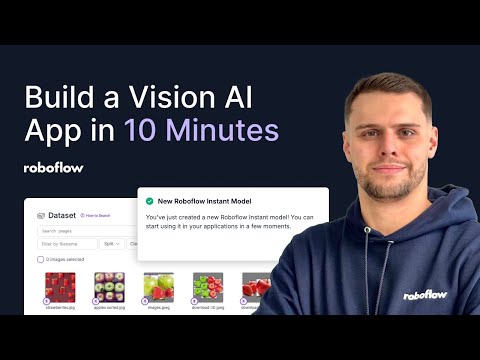
Tutorial: Build an AI-Powered Self-Serve Checkout
Created: 2 Feb 2025 Make a computer vision app that identifies different pieces of hardware, calculates the total cost, and records the results to a database. |
|
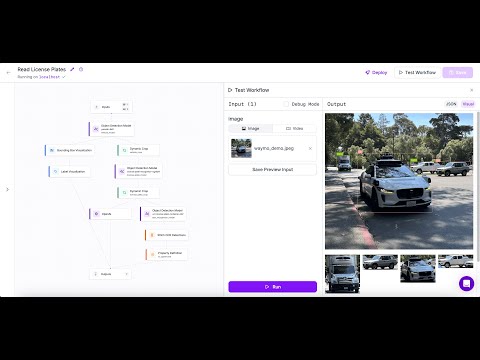
Tutorial: Intro to Workflows
Created: 6 Jan 2025 Learn how to build and deploy Workflows for common use-cases like detecting vehicles, filtering detections, visualizing results, and calculating dwell time on a live video stream. |
|
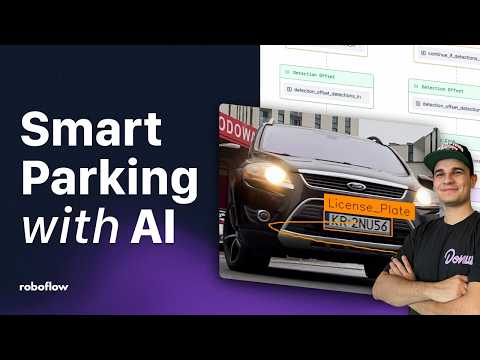
Tutorial: Build a Smart Parking System
Created: 27 Nov 2024 Build a smart parking lot management system using Roboflow Workflows! This tutorial covers license plate detection with YOLOv8, object tracking with ByteTrack, and real-time notifications with a Telegram bot. |
📟 connecting via api
Once you've installed Inference, your machine is a fully-featured CV center.
You can use its API to run models and workflows on images and video streams.
By default, the server is running locally on
localhost:9001.
To interface with your server via Python, use our SDK:
pip install inference-sdk
Then run an example model comparison Workflow like this:
from inference_sdk import InferenceHTTPClient

client = InferenceHTTPClient(
    api_url="http://localhost:9001", # use local inference server
    # api_key="<YOUR API KEY>" # optional to access your private data and models
)

result = client.run_workflow(
    workspace_name="roboflow-docs",
    workflow_id="model-comparison",
    images={
        "image": "https://media.roboflow.com/workflows/examples/bleachers.jpg"
    },
    parameters={
        "model1": "yolov8n-640",
        "model2": "yolov11n-640"
    }
)

print(result)
In other languages, use the server's REST API;
you can access the API docs for your server at
/docs (OpenAPI format) or
/redoc (Redoc Format).
Check out the inference_sdk docs to see what else you can do with your new server.
🎥 connect to video streams
The inference server is a video processing beast. You can set it up to run Workflows on RTSP streams, webcam devices, and more. It will handle hardware acceleration, multiprocessing, video decoding and GPU batching to get the most out of your hardware.
This example workflow will watch a stream for frames that CLIP thinks match an inputted text prompt.
from inference_sdk import InferenceHTTPClient
import atexit
import time

max_fps = 4

client = InferenceHTTPClient(
    api_url="http://localhost:9001", # use local inference server
    # api_key="<YOUR API KEY>" # optional to access your private data and models
)

# Start a stream on an rtsp stream
result = client.start_inference_pipeline_with_workflow(
    video_reference=["rtsp://user:password@192.168.0.100:554/"],
    workspace_name="roboflow-docs",
    workflow_id="clip-frames",
    max_fps=max_fps,
    workflows_parameters={
        "prompt": "blurry", # change to look for something else
        "threshold": 0.16
    }
)

pipeline_id = result["context"]["pipeline_id"]

# Terminate the pipeline when the script exits
atexit.register(lambda: client.terminate_inference_pipeline(pipeline_id))

while True:
  result = client.consume_inference_pipeline_result(pipeline_id=pipeline_id)

  if not result["outputs"] or not result["outputs"][0]:
    # still initializing
    continue

  output = result["outputs"][0]
  is_match = output.get("is_match")
  similarity = round(output.get("similarity")*100, 1)
  print(f"Matches prompt? {is_match} (similarity: {similarity}%)")

  time.sleep(1/max_fps)
Pipeline outputs can be consumed via API for downstream processing or the Workflow can be configured to call external services with Notification blocks (like Email or Twilio) or the Webhook block. For more info on video pipeline management, see the Video Processing overview.
If you have a Roboflow account & have linked an API key, you can also remotely monitor and manage your running streams via the Roboflow UI.
🔑 connect to the cloud
Without an API Key, you can access a wide range of pre-trained and foundational models and run public Workflows.
Pass an optional Roboflow API Key to the inference_sdk or API to access additional features enhanced by Roboflow's Cloud
platform. When running with an API Key, usage is metered according to
Roboflow's pricing tiers.
| Open Access | With API Key (Metered) | |
|---|---|---|
| Pre-Trained Models | ✅ | ✅ |
| Foundation Models | ✅ | ✅ |
| Video Stream Management | ✅ | ✅ |
| Dynamic Python Blocks | ✅ | ✅ |
| Public Workflows | ✅ | ✅ |
| Private Workflows | ✅ | |
| Fine-Tuned Models | ✅ | |
| Universe Models | ✅ | |
| Active Learning | ✅ | |
| Serverless Hosted API | ✅ | |
| Dedicated Deployments | ✅ | |
| Commercial Model Licensing | Paid | |
| Device Management | Enterprise | |
| Model Monitoring | Enterprise |
🌩️ hosted compute
If you don't want to manage your own infrastructure for self-hosting, Roboflow offers a hosted Inference Server via one-click Dedicated Deployments (CPU and GPU machines) billed hourly, or simple models and Workflows via our serverless Hosted API billed per API-call.
We offer a generous free-tier to get started.
🖥️ run on-prem or self-hosted
Inference is designed to run on a wide range of hardware from beefy cloud servers to tiny edge devices. This lets you easily develop against your local machine or our cloud infrastructure and then seamlessly switch to another device for production deployment.
inference server start attempts to automatically choose the optimal container to optimize performance on your machine (including with GPU acceleration via NVIDIA CUDA when available). Special installation notes and performance tips by device are listed below:
⭐️ New: Enterprise Hardware
For manufacturing and logistics use-cases Roboflow now offers the NVIDIA Jetson-based Flowbox, a ruggedized CV center pre-configured with Inference and optimized for running in secure networks. It has integrated support for machine vision cameras like Basler and Lucid over GigE, supports interfacing with PLCs and HMIs via OPC or MQTT, enables enterprise device management through a DMZ, and comes with the support of our team of computer vision experts to ensure your project is a success.
📚 documentation
Visit our documentation to explore comprehensive guides, detailed API references, and a wide array of tutorials designed to help you harness the full potential of the Inference package.
© license
The core of Inference is licensed under Apache 2.0.
Models are subject to licensing which respects the underlying architecture. These licenses are listed in inference/models. Paid Roboflow accounts include a commercial license for some models (see roboflow.com/licensing for details).
Cloud connected functionality (like our model and Workflows registries, dataset management, model monitoring, device management, and managed infrastructure) requires a Roboflow account and API key & is metered based on usage.
Enterprise functionality is source-available in inference/enterprise under an enterprise license and usage in production requires an active Enterprise contract in good standing.
See the "Self Hosting and Edge Deployment" section of the Roboflow Licensing documentation for more information on how Roboflow Inference is licensed.
🏆 contribution
We would love your input to improve Roboflow Inference! Please see our contributing guide to get started. Thank you to all of our contributors! 🙏