代替: QuickBooks
Free & Open-Source Invoice Generator - No Sign-Up, No Ads, Instant PDF Export, 100% In-Browser, and Fully Customizable Templates. ⭐ Star the repo if you like it
EasyInvoicePDF
Free and Open-Source Invoice Generator
Create professional invoices instantly. No account. No ads. No limits. Your data stays yours.
Live PDF preview · Stripe-style template · 10+ languages · 120+ currencies · Saved seller & buyer profiles
Start Invoicing · How it works · About
Made by Vlad Sazonau - a product engineer and design enthusiast
⭐ Like the project? Star it on GitHub
✨ Feature Highlights
- 🔒 Privacy-first - invoices are created and stored in your browser by default
- 📄 Live PDF preview - see every change as you type, download in one click
- 🎨 Two templates - classic and Stripe-style, with logo support
- 🧾 Flexible taxes - VAT, GST, sales tax or your own label, calculated automatically
- 👤 Saved seller & buyer profiles - reuse details across invoices
- 🔗 Shareable links - send an invoice as a link, no attachment needed
- 🏞️ Payment QR codes and automatic multi-page layout for long invoices
- 🌍 10+ languages, 120+ currencies
- 📱 Mobile-friendly - works on any device
- 🚀 Free, no sign-up, no ads
Learn more about features.
🎬 Invoice PDF Live Preview
See changes in real-time as you type
📥 Instant PDF Download
One-click PDF download ready for printing or sending
🌍 Language & Currency
Switch between 10+ languages and 120+ currencies instantly with live PDF preview updates
🔗 Shareable Links
Send invoices directly to clients without attachments
💰 Customizable Tax Settings
Customize tax labels (VAT, Sales Tax, IVA, etc.)
🏞️ QR Codes & Advanced Multi-Page PDF Support
Add payment QR codes with any invoice-related information (payment links, UPI, contact details, custom data) and seamless multi-page support with automatic pagination and page breaks for large invoices
| Default Invoice Template | Stripe Invoice Template |
|---|---|
📢 What's New
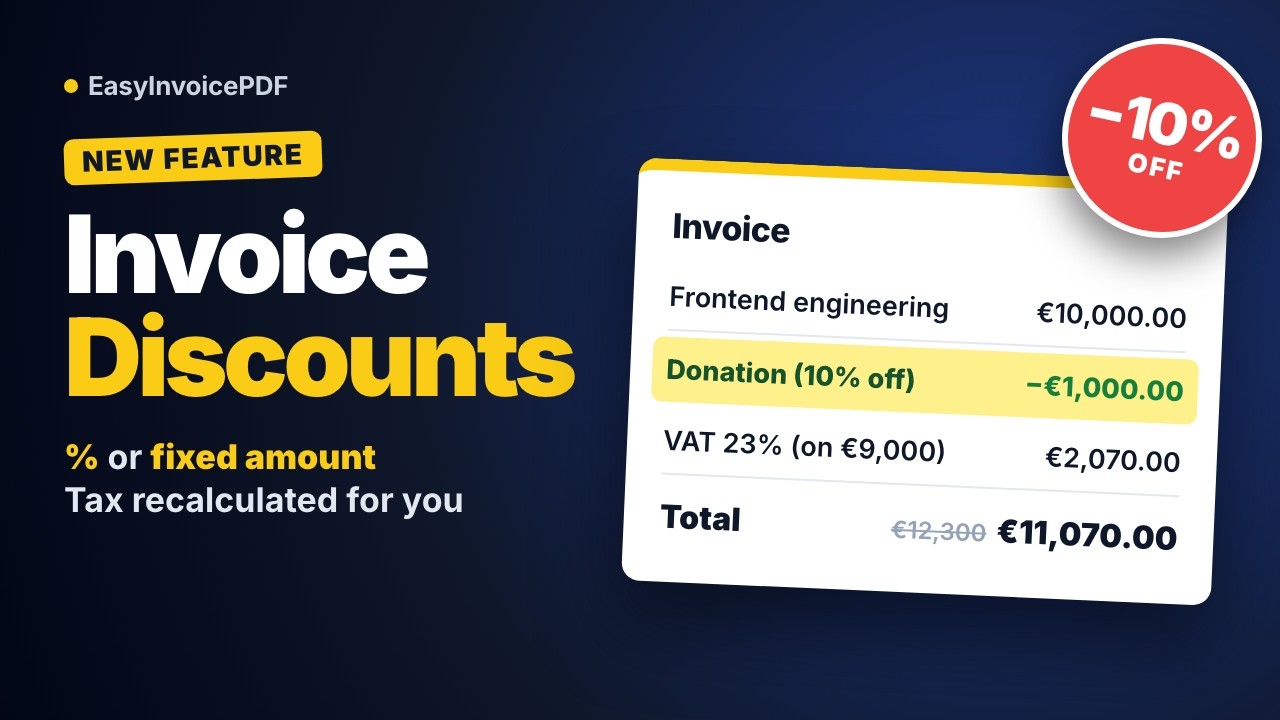
EasyInvoicePDF v1.0.6 - Item Discounts (October 20, 2026)
- Discounts on invoice items - take a percentage (
10%) or a fixed amount (50.00 EUR) off any line - Your own label - name the discount, e.g.
Charitable donation, and it shows on the invoice - Tax on the discounted amount - VAT, totals and amount in words all use the discounted figures
- Both templates - a Discount column in the default template, and a separate discount row in the Stripe template
EasyInvoicePDF v1.0.5 - Number Formats & Brazilian Portuguese (September 24, 2026)
- Number format setting - choose how amounts are punctuated, separately from the invoice language, including a new International format (
321 200.00) - Keep format when language changes - write an invoice in your client's language and keep your own number formatting
- Brazilian Portuguese invoices - a new
Portuguese (Brazil)PDF language withCNPJ/CPFand Brazilian amounts in words - Large amounts fit their columns - wide amounts wrap at a thousands boundary instead of overlapping the next column

EasyInvoicePDF v1.0.4 - Faster PDF Preview & Mobile Polish (September 4, 2026)
- Faster, flicker-free preview - the invoice PDF is generated once and shared by the desktop preview, the mobile viewer and the download button
- Redesigned mobile tabs - a pill-shaped track with a single indicator that slides between the invoice form and the preview
- Dates in the form now match the PDF - helper texts and the out-of-date banner use the invoice's own language and date format
- Fixed PDFs missing the first characters of labels -
Cobrar deno longer renders asobrar dein rare cases
https://github.com/user-attachments/assets/3c87d026-a1c3-4d69-b161-f7d72616c394
EasyInvoicePDF v1.0.3 — Seller & Buyer Improvements (March 29, 2026)
- Seller & Buyer Email visibility toggle — control whether email addresses appear in the generated PDF
- Confirm discard dialog — warns about unsaved changes when closing buyer/seller dialogs
- Improved seller & buyer forms — reworked layout, locked-state banners, and cleaner field grouping
- Out-of-Date dates helper shows outdated fields and provides a button to update all dates at once
- Auto-scroll (to the last position) the invoice form on mobile when switching between tabs (UX improvement)
https://github.com/user-attachments/assets/1b39eb6f-e2be-493f-9825-cbce3dc6fa16
EasyInvoicePDF v1.0.2 — QR Codes & Multi-Page PDFs (March 10, 2026)
- QR code support — add payment QR codes with custom descriptions to both templates
- Logo upload for default template — add a logo to the default invoice template
- Searchable currency combobox — search by currency code, symbol, or name, grouped into categories replacing the native dropdown
- Improved multi-page PDFs — automatic pagination and page breaks for large invoices
EasyInvoicePDF v1.0.1 — Customizable Tax/VAT Labels & Major Improvements (January 12, 2026)
- Customizable tax labels — set VAT, GST, Sales Tax, or any custom label per invoice language
- Improved i18n — dynamic tax label updates and better locale-based currency handling
- Enhanced VAT validation — accepts numeric values and specific strings
https://github.com/user-attachments/assets/4eef2b90-678b-4a55-9ee5-8fcf195c993a
EasyInvoicePDF v1.0.0 — Initial Release (November 19, 2025)
- Live preview — invoice updates in real-time as you type
- Instant PDF download — one-click, no sign-up required
- Default and Stripe-inspired invoice templates — choose the look you want
- Shareable links — send invoices directly to clients without attachments
- 10 languages & 120+ currencies — full multi-language and currency support out of the box
https://github.com/user-attachments/assets/23bb5448-c9fb-4ff2-98f3-0b80d75b7683
🌟 Star History
🎥 Demo Video
Watch a quick demo of EasyInvoicePDF in action to see how easy it is to create professional invoices in seconds. The video demonstrates key features like Live Preview, Instant PDF Download, and Customization Options.
More demo videos on YouTube.
https://github.com/user-attachments/assets/d46c6e4e-b78a-4aa1-ab44-d20d6485b682
👨💻 Made By
Built by Vlad Sazonau
- 🐦 Twitter: @vladsazonau
- 💼 LinkedIn: Vlad Sazonau
- ▶️ YouTube: @vladsazon (demo videos)
- 🌐 Website: vladsazon.com
❤️ Support the Project
If you find EasyInvoicePDF useful, please consider:
- ⭐ Star this repository on GitHub to show your support
- ☕ Buy me a coffee to support the creator of the project
Your support helps keep this project free and open-source 🙏
Join our community X.com
Tech Stack
Other Tools & Services
- Generate beautiful OG images: https://og.new
- Analytics: https://umami.is/
- typescript-plugin-directives
- Create Mockups with shots.so
- zizmor (static analysis tool for GitHub Actions): https://docs.zizmor.sh/
Quick Start
EasyInvoicePDF is AGPL v3; self-host your own instance locally or on your infrastructure with the steps below.
- Run
corepack enable - Run
corepack install - Run
pnpm install - Copy
.env.example to .env.local(cp .env.example .env.local) - (Optional) Encrypt it with dotenvx:
pnpm exec dotenvx encrypt -f .env.local - Run
pnpm run dev
Scripts load .env.local through dotenvx run (the with-env script), so it works plaintext or encrypted. Edit an encrypted file with pnpm exec dotenvx set KEY value -f .env.local, read a value back with pnpm exec dotenvx get KEY -f .env.local, and restart pnpm dev afterwards: Next.js reloads .env.local on its own, and from an encrypted file it gets the raw encrypted:... strings. If the private key is missing (new machine, locked keychain), scripts stop with DECRYPTION_FAILED instead of running.
For the full app experience, you’ll need to obtain and set values from the following services:
License
This project is licensed under the GNU AGPL v3.