The most popular spellchecking library.
About Hunspell
Hunspell is a free spell checker and morphological analyzer library and command-line tool, licensed under LGPL/GPL/MPL tri-license.
Hunspell is used by LibreOffice office suite, free browsers, like Mozilla Firefox and Google Chrome, and other tools and OSes, like Linux distributions and macOS. It is also a command-line tool for Linux, Unix-like and other OSes.
It is designed for quick and high quality spell checking and correcting for languages with word-level writing system, including languages with rich morphology, complex word compounding and character encoding.
Hunspell interfaces: Ispell-like terminal interface using Curses library, Ispell pipe interface, C++/C APIs and shared library, also with existing language bindings for other programming languages.
Hunspell's code base comes from OpenOffice.org's MySpell library, developed by Kevin Hendricks (originally a C++ reimplementation of spell checking and affixation of Geoff Kuenning's International Ispell from scratch, later extended with eg. n-gram suggestions), see http://lingucomponent.openoffice.org/MySpell-3.zip, and its README, CONTRIBUTORS and license.readme (here: license.myspell) files.
Main features of Hunspell library, developed by László Németh:
- Unicode support
- Highly customizable suggestions: word-part replacement tables and stem-level phonetic and other alternative transcriptions to recognize and fix all typical misspellings, don't suggest offensive words etc.
- Complex morphology: dictionary and affix homonyms; twofold affix stripping to handle inflectional and derivational morpheme groups for agglutinative languages, like Azeri, Basque, Estonian, Finnish, Hungarian, Turkish; 64 thousand affix classes with arbitrary number of affixes; conditional affixes, circumfixes, fogemorphemes, zero morphemes, virtual dictionary stems, forbidden words to avoid overgeneration etc.
- Handling complex compounds (for example, for Finno-Ugric, German and Indo-Aryan languages): recognizing compounds made of arbitrary number of words, handle affixation within compounds etc.
- Custom dictionaries with affixation
- Stemming
- Morphological analysis (in custom item and arrangement style)
- Morphological generation
- SPELLML XML API over plain spell() API function for easier integration of stemming, morpological generation and custom dictionaries with affixation
- Language specific algorithms, like special casing of Azeri or Turkish dotted i and German sharp s, and special compound rules of Hungarian.
Main features of Hunspell command line tool, developed by László Németh:
- Reimplementation of quick interactive interface of Geoff Kuenning's Ispell
- Parsing formats: text, OpenDocument, TeX/LaTeX, HTML/SGML/XML, nroff/troff
- Custom dictionaries with optional affixation, specified by a model word
- Multiple dictionary usage (for example hunspell -d en_US,de_DE,de_medical)
- Various filtering options (bad or good words/lines)
- Morphological analysis (option -m)
- Stemming (option -s)
See man hunspell, man 3 hunspell, man 5 hunspell for complete manual.
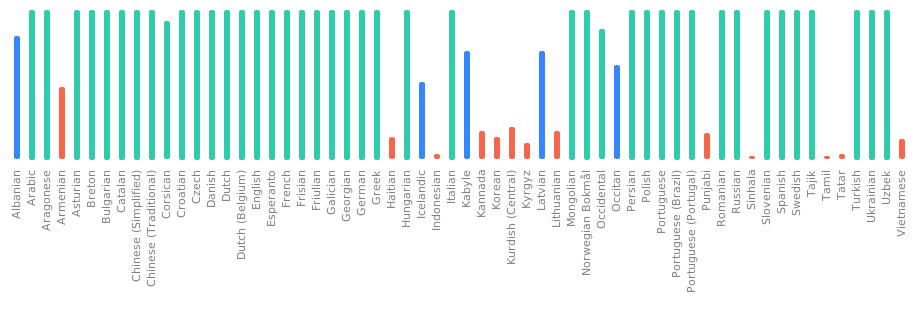
Translations: Hunspell has been translated into several languages already. If your language is missing or incomplete, please use Weblate to help translate Hunspell.
Dependencies
Build only dependencies:
g++ make autoconf automake autopoint libtool
Runtime dependencies:
| Mandatory | Optional | |
|---|---|---|
| libhunspell | ||
| hunspell tool | libiconv gettext | ncurses readline |
Compiling on GNU/Linux and Unixes
We first need to download the dependencies. On Linux, gettext and
libiconv are part of the standard library. On other Unixes we
need to manually install them.
For Ubuntu:
sudo apt install autoconf automake autopoint libtool
Then run the following commands:
autoreconf -vfi
./configure
make
sudo make install
sudo ldconfig
For a non-root install, use DESTDIR so libtool skips ldconfig:
make install DESTDIR="$HOME/hunspell-root"
For dictionary development, use the --with-warnings option of
configure.
For interactive user interface of Hunspell executable, use the
--with-ui option.
Optional developer packages:
- ncurses (need for --with-ui), eg. libncursesw5 for UTF-8
- readline (for fancy input line editing, configure parameter: --with-readline)
In Ubuntu, the packages are:
libncurses5-dev libreadline-dev
Compiling on OSX and macOS
On macOS for compiler always use clang and not g++ because Homebrew
dependencies are build with that.
brew install autoconf automake libtool gettext
brew link gettext --force
Then run:
autoreconf -vfi
./configure
make
sudo make install
Compiling on Windows
Compiling with Mingw64 and MSYS2
Download Msys2, update everything and install the following packages:
pacman -S base-devel mingw-w64-x86_64-toolchain mingw-w64-x86_64-libtool \
          mingw-w64-x86_64-libiconv mingw-w64-x86_64-gettext
Open Mingw-w64 Win64 prompt and compile the same way as on Linux, see
above. Without mingw-w64-x86_64-libiconv the build still succeeds but
the hunspell tool cannot convert between dictionary encodings, so any
test or dictionary that declares a non-UTF-8 SET (e.g. ISO8859-1/2/15)
will fail at runtime.
Compiling in Cygwin environment
Download and install Cygwin environment for Windows with the following extra packages:
- make
- automake
- autoconf
- libtool
- gcc-g++ development package
- ncurses, readline (for user interface)
- iconv (character conversion)
Then compile the same way as on Linux. Cygwin builds depend on Cygwin1.dll.
Debugging
It is recommended to install a debug build of the standard library:
libstdc++6-6-dbg
For debugging we need to create a debug build and then we need to start
gdb.
./configure CXXFLAGS='-g -O0 -Wall -Wextra'
make
./libtool --mode=execute gdb src/tools/hunspell
You can also pass the CXXFLAGS directly to make without calling
./configure, but we don't recommend this way during long development
sessions.
If you like to develop and debug with an IDE, see documentation at https://github.com/hunspell/hunspell/wiki/IDE-Setup
Testing
Testing Hunspell (see tests in tests/ subdirectory):
make check
or with Valgrind debugger:
make check
VALGRIND=[Valgrind_tool] make check
For example:
make check
VALGRIND=memcheck make check
Documentation
features and dictionary format:
man 5 hunspell
man hunspell
hunspell -h
Usage
After compiling and installing (see INSTALL) you can run the Hunspell spell checker (compiled with user interface) with a Hunspell or Myspell dictionary:
hunspell -d en_US text.txt
or without interface:
hunspell
hunspell -d en_GB -l <text.txt
Dictionaries consist of an affix (.aff) and dictionary (.dic) file, for example, download American English dictionary files of LibreOffice (older version, but with stemming and morphological generation) with
wget -O en_US.aff  https://cgit.freedesktop.org/libreoffice/dictionaries/plain/en/en_US.aff?id=a4473e06b56bfe35187e302754f6baaa8d75e54f
wget -O en_US.dic https://cgit.freedesktop.org/libreoffice/dictionaries/plain/en/en_US.dic?id=a4473e06b56bfe35187e302754f6baaa8d75e54f
and with command line input and output, it's possible to check its work quickly, for example with the input words "example", "examples", "teached" and "verybaaaaaaaaaaaaaaaaaaaaaad":
$ hunspell -d en_US
Hunspell 1.7.0
example
*

examples
+ example

teached
& teached 9 0: taught, teased, reached, teaches, teacher, leached, beached

verybaaaaaaaaaaaaaaaaaaaaaad
# verybaaaaaaaaaaaaaaaaaaaaaad 0
Where in the output, * and + mean correct (accepted) words (* = dictionary stem,
+ = affixed forms of the following dictionary stem), and
& and # mean bad (rejected) words (& = with suggestions, # = without suggestions)
(see man hunspell).
Example for stemming:
$ hunspell -d en_US -s
mice
mice mouse
Example for morphological analysis (very limited with this English dictionary):
$ hunspell -d en_US -m
mice
mice  st:mouse ts:Ns

cats
cats  st:cat ts:0 is:Ns
cats  st:cat ts:0 is:Vs
Other executables
The src/tools directory contains the following executables after compiling.
- The main executable:
- hunspell: main program for spell checking and others (see manual)
- Example tools:
- analyze: example of spell checking, stemming and morphological analysis
- chmorph: example of automatic morphological generation and conversion
- example: example of spell checking and suggestion
- Tools for dictionary development:
- affixcompress: dictionary generation from large (millions of words) vocabularies
- makealias: alias compression (Hunspell only, not back compatible with MySpell)
- wordforms: word generation (Hunspell version of unmunch)
- hunzip: decompressor of hzip format
- hzip: compressor of hzip format
- munch (DEPRECATED, use affixcompress): dictionary generation from vocabularies (it needs an affix file, too).
- unmunch (DEPRECATED, use wordforms): list all recognized words of a MySpell dictionary
Example for morphological generation:
$ ~/hunspell/src/tools/analyze en_US.aff en_US.dic /dev/stdin
cat mice
generate(cat, mice) = cats
mouse cats
generate(mouse, cats) = mice
generate(mouse, cats) = mouses
Note: morphological generation, stemming and analysis only work with
dictionaries whose entries carry morphological description fields
(po:, st:, is:, ts:, al:, ds:, dp: etc.; see man hunspell.5).
The example above relies on the older en_US dictionary linked earlier in
this README, which still ships these fields. Most current distributions
of en_US, fr, nl and hu_HU do not, and analyze, stem and generate
will return empty results for them. This is a dictionary property, not
a library bug. See tests/morph.aff and tests/morph.dic for a minimal
example.
Using Hunspell library with GCC
Including in your program:
#include <hunspell.hxx>
Linking with Hunspell static library:
g++ -lhunspell-1.7 example.cxx
# or better, use pkg-config
g++ $(pkg-config --cflags --libs hunspell) example.cxx
Installing Hunspell (vcpkg)
Alternatively, you can build and install hunspell using vcpkg dependency manager:
git clone https://github.com/Microsoft/vcpkg.git
cd vcpkg
./bootstrap-vcpkg.sh
./vcpkg integrate install
./vcpkg install hunspell
The hunspell port in vcpkg is kept up to date by Microsoft team members and community contributors. If the version is out of date, please create an issue or pull request on the vcpkg repository.
Dictionaries
Hunspell (MySpell) dictionaries:
- https://wiki.documentfoundation.org/Language_support_of_LibreOffice
- http://cgit.freedesktop.org/libreoffice/dictionaries
- http://extensions.libreoffice.org
- https://extensions.openoffice.org
- https://wiki.openoffice.org/wiki/Dictionaries
Aspell dictionaries (conversion: man 5 hunspell):
László Németh, nemeth at numbertext org