代替: The Unarchiver
Archive manager and 7zip replacement for macOS. Preview (nested) archives without extracting them. Extract single files.
↓ ダウンロード
すべてのリリース →

MacPacker
The archive manager for macOS that should have existed all along.
Browse archives like folders, preview files without extracting, and drag out only the ones you need — or create and edit ZIP and 7z archives.




Website · Install · Formats · Docs · Support · Contribute
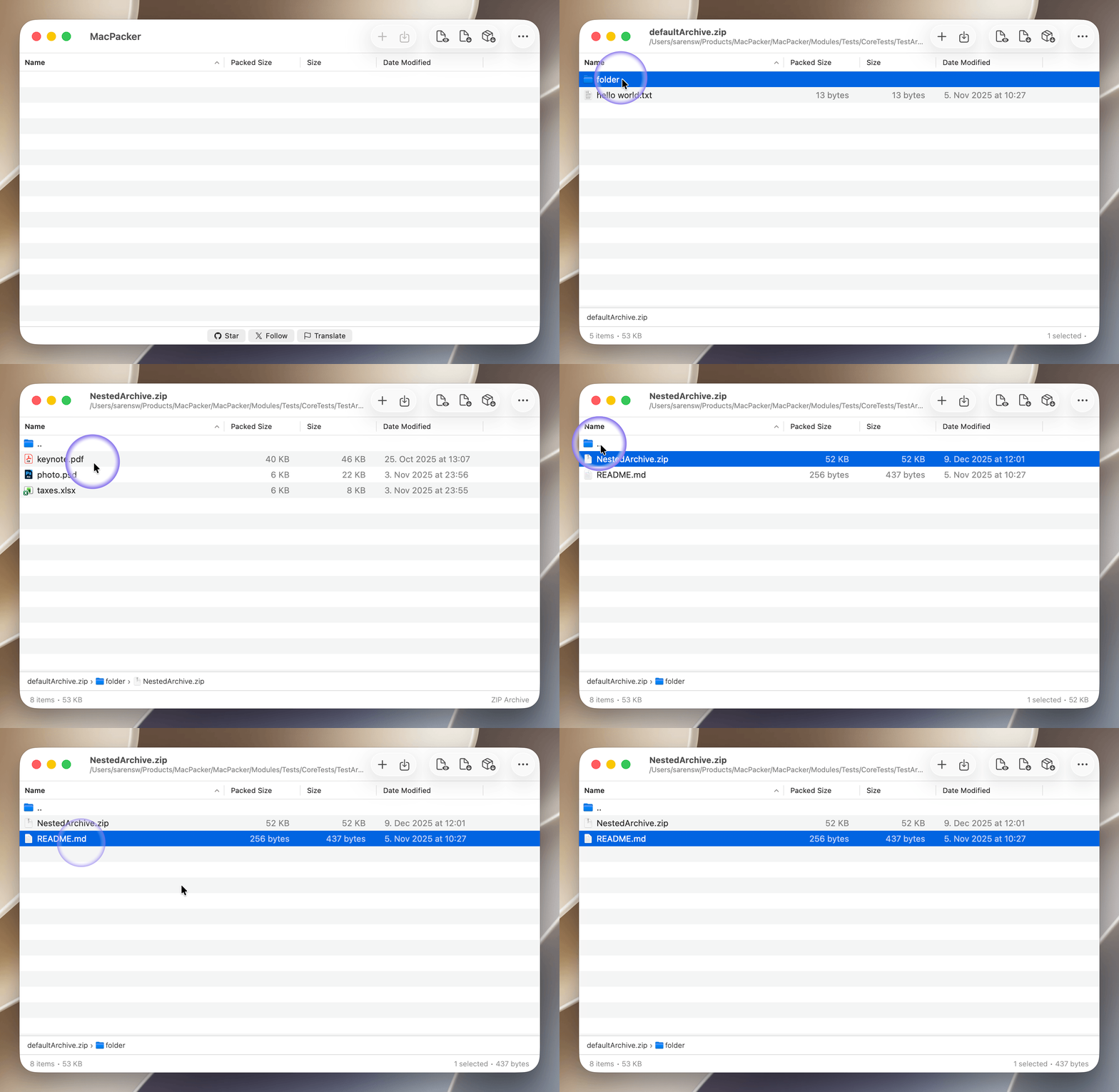
MacPacker is a free and open source archive manager for macOS. It opens 40+ archive, disk image, and compression formats, lets you peek inside without extracting, drills into nested archives, and hands you exactly the files you want via drag & drop. It also creates and edits ZIP and 7z archives, optionally with a password and split into volumes. Open source, because essential tools should be free. Inspired by 7-Zip, but built natively for the Mac.
Features
- Peek inside — Browse the full contents of any archive without extracting a single byte.
- Nested archives — Archives inside archives? Drill in seamlessly, in the app and in Quick Look, with no intermediate extractions.
- Selective extraction — Drag out exactly the files you need. No more 2 GB extractions for one config file.
- Smart extraction — Several top-level items land in a folder named after the archive; a single folder never ends up nested inside another.
- Create archives — Compress to ZIP or 7z from the Compress window or straight from Finder, with a password (AES-256) if you like.
- Edit & save — Add, replace, and delete files in ZIP and 7z archives, then save in place.
- Split archives — Open multi-volume ZIP and 7z archives, and split new ones into volumes.
- Quick Look — Preview archive contents straight from Finder with the spacebar, comic book archives (cbz, cbr) included.
- Finder integration — Right-click to extract or compress without leaving Finder. Choose which menu entries appear in Settings.
- Encrypted archives — Open password-protected and encrypted archives.
- Keeps Mac file information — Finder tags, custom icons, permissions, and symbolic links survive archiving and extraction, so extracted apps still launch.
- Built for the keyboard — Navigate archives with the same keys you use in Finder, with breadcrumbs, sortable columns, and search.
- Smart detection — Recognizes formats by their magic number, not just the file extension.
- Speaks your language — Available in 21 languages.
Supported Formats
MacPacker reads and extracts 40+ formats across archives, disk images, and compression containers. ZIP and 7z archives can also be created, edited, and split into volumes.
| Category | Formats |
|---|---|
| Archives | 7z · aar · apk · ar · arj · cab · cbr · cbz · chm · cpio · deb · exe · jar · lha · lzh · lzx · msi · pkg · rar · rpm · sea · sit · sitx · tar · xar · zip · zipx |
| Disk images | dmg · fat · iso · ntfs · qcow2 · squashfs · vdi · vhd · vhdx · vmdk · wim |
| Compression | bz2 · gz · lz4 · lzma · xz · z |
| Tarballs | tar.gz (tgz) · tar.bz2 (tbz2) · tar.lzma (tlzma) · tar.xz (txz) · tar.lz4 · tar.z (taz) |
| Split archives | zip.001 · z01 · 7z.001 |
See the full format reference and per-format guides on the website.
Languages
MacPacker is available in 21 languages. Missing yours, or spotted a mistake? Help translate.
| ar 🇸🇦 · ca 🇦🇩 · de 🇩🇪 · el 🇬🇷 · en 🇬🇧 · es 🇲🇽 · fa 🇮🇷 · fr 🇫🇷 · it 🇮🇹 · ja 🇯🇵 · ko 🇰🇷 · nb 🇳🇴 · nl 🇳🇱 · pl 🇵🇱 · pt 🇧🇷 · ru 🇷🇺 · tr 🇹🇷 · uk 🇺🇦 · vi 🇻🇳 · zh 🇨🇳 · zh 🇹🇼 |
Installation
Requirements: macOS 14.6 or later. (macOS 13 was supported through v0.14.1.)
Pick whichever you prefer — all builds are sandboxed, signed, and notarized by Apple.
| Method | How |
|---|---|
| Homebrew | brew install --cask macpacker |
| Direct download | Grab the .dmg or .zip from macpacker.app or GitHub Releases, then move the app to Applications. |
| Mac App Store | Download on the App Store |
[!NOTE] App Store releases land a few days after the GitHub and direct downloads, because every build goes through Apple's App Store review. For the newest version, use Homebrew or the direct download.
Support the Project
MacPacker is free and built in the open. If it saves you time, here are a few ways to give back:
Sponsor the work
Free ways to help
- ⭐ Star this repository.
- ✍️ Leave a review on the Mac App Store.
- 🌍 Help translate MacPacker into your language.
- 🐞 Report a bug or suggest a feature.
More apps by the maker
MacPacker is built by Stephan Arenswald. If you like it, take a look at the other apps:
- FrameBeast — Marketing assets for your app, from localized App Store screenshots to social headers.
- FileFillet — Organize files quickly on macOS.
- TailBeat — Native log viewer for Apple developers that your AI coding agent can read too.
- FlowMoose — Voice dictation in any Mac app, entirely on your Mac.
Contributing
Contributions are welcome. Please read CONTRIBUTING.md first.
[!IMPORTANT] Using AI to write code? Pull requests where AI is the primary author must follow the AI Contribution Guidelines: disclose AI involvement, open the PR from a human account, and include verification evidence (before/after screenshots for UI changes, terminal or test output otherwise). Minor AI-assisted edits where you're clearly the author don't need anything special.
Translation
Translations are managed on POEditor. To improve an existing language or add a new one, sign up and start editing:
Pull Requests
Pull requests may need rework or some wait time before they can be merged. Opening an issue first to discuss larger changes is appreciated.
Building from Source
Prerequisites
- Xcode 26 or later
Steps
Clone the repository (it uses submodules for vendored dependencies and test archives):
git clone --recurse-submodules https://github.com/sarensw/MacPacker.git
cd MacPacker
Already cloned without submodules? Run
git submodule update --init --recursive.Open the project in Xcode:
open MacPacker.xcodeprojBuild and run — click Run or press
Cmd + R.Use your own signing team (optional). If you have a different Apple Developer account, create a local override:
cp Config/SigningOverride.xcconfig.template Config/SigningOverride.xcconfigThen edit
Config/SigningOverride.xcconfigand set your Team ID (find it in Xcode under Settings → Accounts). This file is gitignored and never committed.
Roadmap
- Browse and navigate nested archives
- Breadcrumb and Finder-style keyboard navigation
- Extract selected files via drag & drop to any target
- Extract the full archive at once
- Preview files without extraction (via the system previewer)
- Quick Look and Finder extensions for quick access
- Open password-protected and encrypted archives
- Wide format coverage (40+ formats)
- Create ZIP and 7z archives, with a password and split into volumes
- Edit ZIP and 7z archives: add, replace, and delete files
- Integrity check and recovery (coming next)
- Tree view of an archive's contents
License
MacPacker is licensed under the GNU General Public License v3.0.