🔥 A simple yet powerful extension to add wrapper templates around your code blocks
npm install vscode-surroundSurround





A simple yet powerful extension to add wrapper snippets around your code blocks.
Features
- Now works on VSCode for Web 🚀New!
- Supports language identifiers
- Supports multi selections
- Fully customizable
- Custom wrapper snippets
- You can assign shortcuts for each wrapper snippets separately
- Nicely formatted (Preserves indentations)
- Sorts recently used snippets on top
Demo 1: Choosing a wrapper snippet from quick pick menu
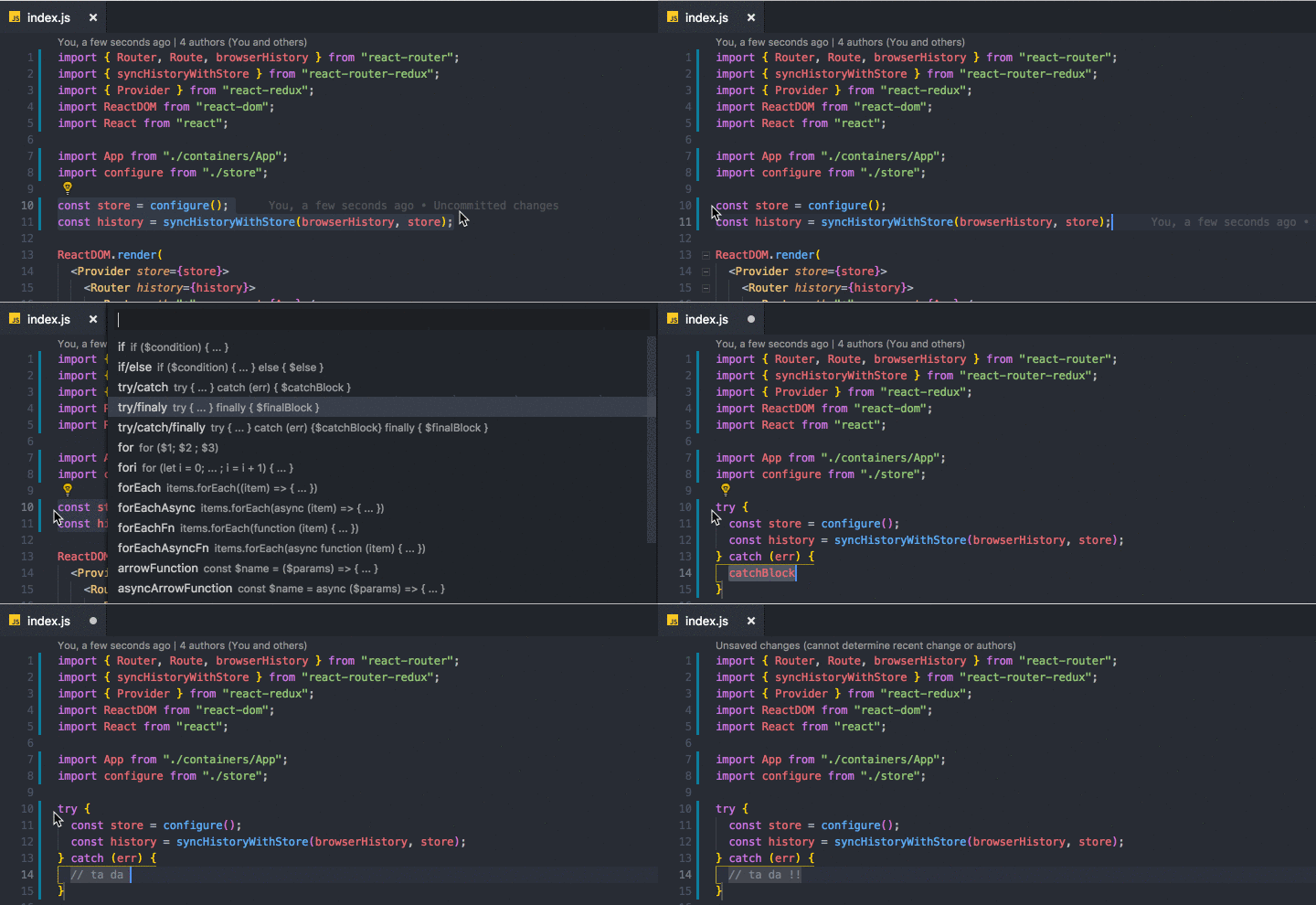
Demo 2: Wrapping multi selections

How To Use
After selecting the code block, you can
- right click on selected code
- OR press (ctrl+shift+T) or (cmd+shift+T)
to get list of commands and pick one of them.
Hint
Each wrapper has a separate command so you can define keybindings for your favorite wrappers by searching
surround.with.commandNamein the 'Keyboard Shortcuts' section.
List of commands
| Command | Snippet |
|---|---|
surround.with (ctrl+shift+T) |
List of all the enabled commands below |
surround.with.if |
if ($condition) { ... } |
surround.with.ifElse |
if ($condition) { ... } else { $else } |
surround.with.tryCatch |
try { ... } catch (err) { $catchBlock } |
surround.with.tryFinally |
try { ... } finally { $finalBlock } |
surround.with.tryCatchFinally |
try { ... } catch (err) {$catchBlock} finally { $finalBlock } |
surround.with.for |
for ($1) { ... } |
surround.with.fori |
for (let i = 0; ... ; i = i + 1) { ... } |
surround.with.forEach |
items.forEach((item) => { ... }) |
surround.with.forEachAsync |
items.forEach(async (item) => { ... }) |
surround.with.forEachFn |
items.forEach(function (item) { ... }) |
surround.with.forEachAsyncFn |
items.forEach(async function (item) { ... }) |
surround.with.arrowFunction |
const $name = ($params) => { ... } |
surround.with.asyncArrowFunction |
const $name = async ($params) => { ... } |
surround.with.functionDeclaration |
function $name ($params) { ... } |
surround.with.asyncFunctionDeclaration |
async function $name ($params) { ... } |
surround.with.functionExpression |
const $name = function ($params) { ... } |
surround.with.asyncFunctionExpression |
const $name = async function ($params) { ... } |
surround.with.element |
<element>...</element> |
surround.with.comment |
/** ... */ |
surround.with.region |
#region $regionName ... #endregion |
surround.with.templateLiteral 🚀New! |
... (Also replaces single and double quotes with backtick) |
surround.with.templateLiteralVariable 🚀New! |
${...} (Also replaces single and double quotes with backtick) |
surround.with.iife 🚀New! |
(function $name($params){ ... })($arguments); |
Options
showOnlyUserDefinedSnippets(boolean): Disables default snippets that comes with the extension and shows only used defined snippets.showRecentlyUsedFirst(boolean): Recently used snippets will be displayed on top.showUpdateNotifications(boolean): Shows notification when there is a new version of the extension.
Configuration
Each wrapper snippet config object is defined as ISurroundItem like below:
interface ISurroundItem {
  label: string; // must be unique
  description?: string;
  detail?: string;
  snippet: string; // must be valid SnippetString
  disabled?: boolean; // default: false
  languageIds?: string[];
}
Editing/Disabling existing wrapper functions
Go to "Settings" and search for "surround.with.commandName".
Example surround.with.if:
{
  "label": "if",
  "description": "if ($condition) { ... }",
  "disabled": false,
  "snippet": "if(${1:condition}) {\n\t$TM_SELECTED_TEXT\n}$0"
}
Adding new custom wrapper functions
Go to "Settings" and search for surround.custom and edit it like below.
{
  "surround.custom": {
    // command name must be unique
    "yourCommandName": {
      // label must be unique
      "label": "Your Snippet Label",
      "description": "Your Snippet Description",
      "snippet": "burrito { $TM_SELECTED_TEXT }$0", // <-- snippet goes here.
      "languageIds": ["html", "javascript", "typescript", "markdown"]
    },
    // You can add more ...
  }
}
Defining language-specific snippets
With version 1.1.0, you can define snippets based on the document type by using languageIds option.
Visit VSCode docs the full list of language identifiers.
1. Enabling a snippet for ALL languages
If you want to allow a snippet to work for all document types, simply REMOVE languageIds option.
OR set it to ["*"] as below:
{
  "label": "if",
  "description": "if ($condition) { ... }",
  "disabled": false,
  "snippet": "if(${1:condition}) {\n\t$TM_SELECTED_TEXT\n}$0",
  "languageIds": ["*"] // Wildcard allows snippet to work with all languages
}
2. Enabling a snippet for ONLY specified languages
If you want to allow a snippet to work with html, typescript and typescriptreact documents, you can use the example below.
{
  "label": "if",
  "description": "if ($condition) { ... }",
  "disabled": false,
  "snippet": "if(${1:condition}) {\n\t$TM_SELECTED_TEXT\n}$0",
  "languageIds": ["html", "typescript", "typescriptreact"]
}
3. Disabling a snippet for ONLY specified languages
If you want to allow a snippet to work with all document types EXCEPT html, typescript and typescriptreact documents,
you can add - (MINUS) sign as a prefix to the language identifiers (without a whitespace).
{
  "label": "if",
  "description": "if ($condition) { ... }",
  "disabled": false,
  "snippet": "if(${1:condition}) {\n\t$TM_SELECTED_TEXT\n}$0",
  "languageIds": ["*", "-html", "-typescript", "-typescriptreact"]
}
IMPORTANT NOTES:
- All command names and labels must be unique. If you do not provide a unique command name or label, your custom wrapper functions will override existing ones.
- You can redefine all snippets as long as you provide a valid
SnippetString. Read More
Contribution
As always, I'm open to any contribution and would like to hear your feedback.
PS: Guide for running @vscode/test-web on WSL 2
Just an important reminder:
If you are planning to contribute to any open source project, before starting development, please always open an issue and make a proposal first. This will save you from working on features that are eventually going to be rejected for some reason.
Logo
I designed the logo on canva.com and inspired by one of their free templates.
LICENCE
MIT (c) 2021 Mehmet Yatkı
Enjoy!