대체: Nextcloud
A highly extensible private cloud storage solution for individuals and teams, featuring AI-powered semantic search.
Foxel
A highly extensible private cloud storage solution for individuals and teams, featuring AI-powered semantic search.


The ocean of data is boundless, let the eye of insight guide the voyage, yet its intricate connections lie deep, not fully discernible from the surface.
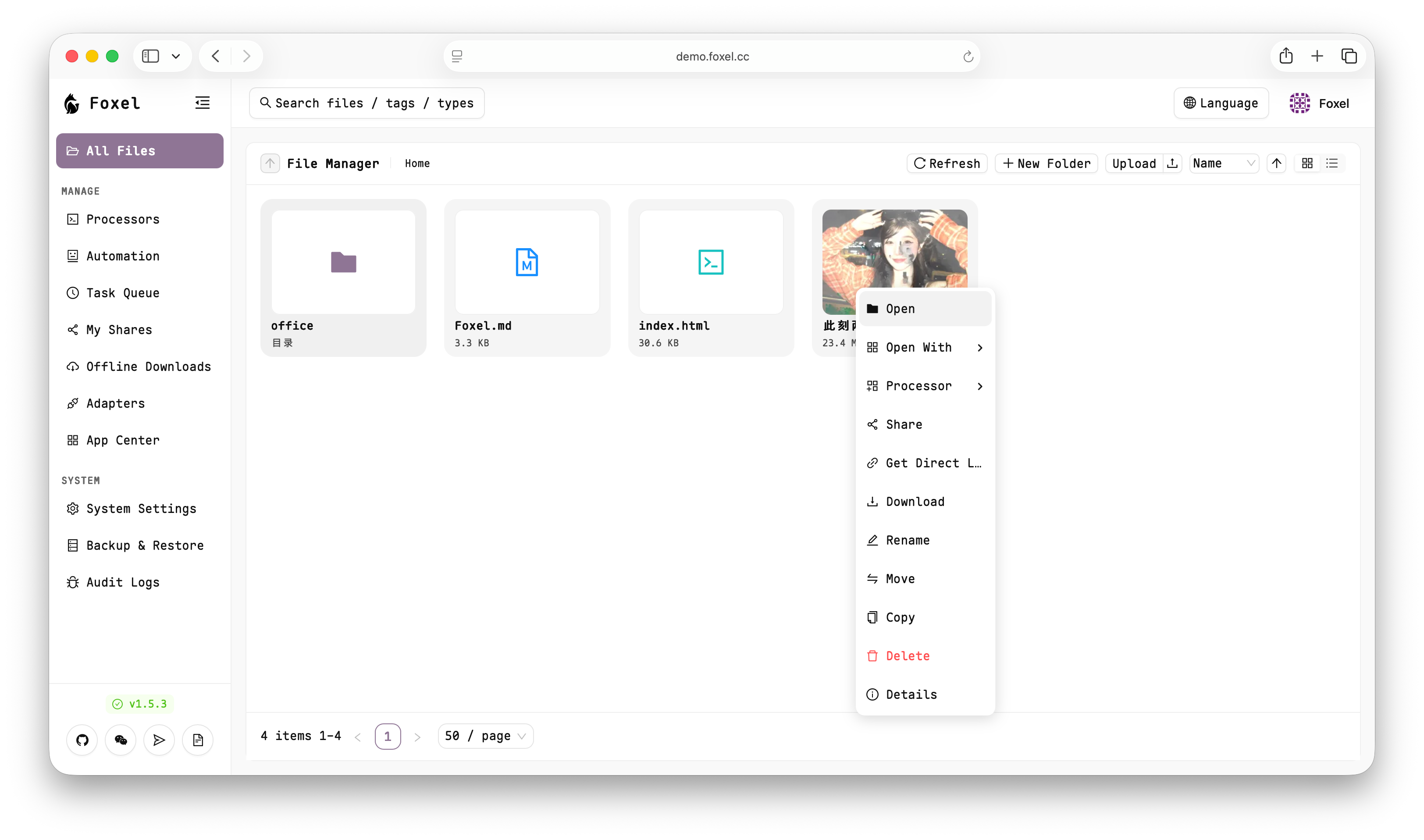
👀 Online Demo
Account/Password:
admin/admin
✨ Core Features
📁 Unified File Management
Centralize management of files distributed across different storage backends. Browse, upload, download, move, copy, and delete — all through a single, unified interface.
Choose Compress to ZIP in a file or folder's context menu, including multiple selected items. Local storage, Cloudreve V4, and Foxel upstreams exposing the compression API use native compression where possible. Other adapters supporting download and upload use the existing background task queue to download files to server temporary storage, create a ZIP, and upload it to the destination, including across storage mounts. The queue displays preparation, download, compression, and upload progress. Temporary files are removed after success or failure; source files are preserved. Existing destination archives cannot be overwritten.
Cloudreve runs an asynchronous server task and requires archive task permissions. Foxel connections discover and forward upstream capabilities. Refresh the folder after completion. PikPak supports GCID deduplication and OSS multipart uploads, including as a destination for cross-storage transfers and background compression tasks.
Choose Extract ZIP in a ZIP file's context menu and enter a new destination folder, including on another storage mount. Adapters supporting download, upload, and directories use the background queue to download, validate, extract, and upload files. The queue shows download, extraction, and upload progress; refresh the destination after completion. Existing folders are rejected, and each output path requires write permission. Unsafe paths, symbolic links, duplicate paths, and encrypted archives are rejected. Archives are limited to 100,000 entries and 10 GiB of extracted data; downloads are also limited to 10 GiB. Temporary files are cleaned up on success or failure. If an upload fails, files already uploaded remain in the destination folder.
🔌 Pluggable Storage Backends
Utilizes an extensible adapter pattern to easily integrate various storage types:
| Category | Adapters |
|---|---|
| Standard Protocols | Local, S3-compatible, WebDAV, SFTP, FTP, SMB |
| Cloud Drives | Google Drive, OneDrive, Dropbox, Baidu Netdisk, Quark, UC, 123Pan, 115, 189 |
| Special | Telegram, AList, Foxel-to-Foxel, Seafile, Cloudreve V4 |
The UC, 123Pan, 115, 189, SMB, Seafile, and Cloudreve V4 adapters use account or server credentials rather than developer SDK keys. See configuration notes.
Baidu Netdisk uses OAuth with client_id, client_secret, and a matching refresh_token. See setup and limits.
🔍 AI-Powered Semantic Search
Go beyond filename matching — search by natural language descriptions to find content within images, documents, and other unstructured data. Powered by configurable embedding providers and vector databases (Milvus, Qdrant).
👁️ Built-in File Preview
Preview images, videos, PDFs, Office documents, text, and code files directly in the browser — no downloads required.
🔐 Permissions & Access Control
A full-featured Role-Based Access Control (RBAC) system to secure your data:
- Built-in Roles: Three system roles — Admin (full access), User (configurable access), and Viewer (read-only).
- Custom Roles: Create tailored roles with fine-grained system and adapter permissions.
- Path-based Rules: Define read / write / delete / share permissions per path, with support for wildcards, regex patterns, and priority-based rule ordering.
- Audit Logging: Every user action is recorded with full traceability (user, IP, method, status, duration).
🔗 Sharing
Generate public or password-protected share links with configurable expiration dates. Recipients can browse shared files and folders without logging in.
🧩 Plugin System
Extend Foxel's capabilities through a manifest-based plugin architecture. Load React frontend components and custom backend routes at runtime, without modifying the core codebase.
⚙️ Task Processing Center
Run asynchronous background tasks — file indexing, data backups, scheduled jobs — without impacting the main application.
🤖 AI Agent
An integrated AI agent with built-in tools for VFS operations, web fetching, and file processing — bringing intelligent automation directly into your cloud storage.
MCP and Agent boundaries
- The MCP endpoint is
/api/mcp/. External clients authenticate with a Foxel Bearer Token and own their confirmation UI; the server always enforces the authenticated user's path permissions. - Set
APP_DOMAINto the public Foxel URL (for example,https://my.foxel.cc) to allow its Host and Origin headers through MCP transport validation. Loopback access remains available. - External MCP clients can access file-system and processor tools.
timeandweb_fetchare available only to the built-in AI agent and are not exposed through MCP. - Directory listing, metadata, text reads, search, and processor listing can run directly. In the built-in agent,
timeandweb_fetchalso run without approval.web_fetchsupports GET/POST/PUT/PATCH/DELETE/HEAD/OPTIONS, including external write requests, without an additional Foxel approval step. - Agent writes, creates, deletes, moves, copies, renames, and
processors_runcalls create database-backed approval batches. Approval requests must include the returnedapproval_batch_id; execution uses the server-stored arguments, rejects expired or cross-user requests, and does not re-execute repeated confirmations. - Recursive changes and directory processing validate all enumerated children before starting. Any denied or unverifiable path rejects the batch; queued work rechecks permissions and stops after a scope change.
- Tools return structured error codes such as
permission_denied,invalid_arguments,permission_scope_unverifiable,approval_expired,request_timeout, andexecution_failedwithout exposing internal exceptions or credentials. - Agent conversations currently support OpenAI, Anthropic, and Ollama interfaces, with at most eight tool-call rounds per request. Processor task IDs can be tracked in the task queue.
🌐 Protocol Mappings
Access your files through familiar protocols:
- S3 API — S3-compatible endpoint for programmatic access, with multiple buckets mapped to virtual directories
- WebDAV — Mount as a network drive in your OS file manager
- Direct Links — Temporary signed URLs for direct file access
🛠️ Tech Stack
| Layer | Technologies |
|---|---|
| Backend | Python 3.14+, FastAPI, Tortoise ORM, SQLite |
| Frontend | React 19, TypeScript, Vite, Ant Design |
| Auth | JWT (OAuth2), bcrypt |
| Vector DB | Milvus Lite / Server, Qdrant |
| Deployment | Docker, Gunicorn + Uvicorn |
| Package Managers | uv (Python), Bun (JS) |
🚀 Quick Start
Using Docker Compose is the most recommended way to start Foxel.
1. Create Data Directories
Create a data folder for persistent data:
mkdir -p data/db data/mount
chmod 777 data/db data/mount
2. Download Docker Compose File
curl -L -O https://github.com/DrizzleTime/Foxel/raw/main/compose.yaml
After downloading, it is strongly recommended to modify the environment variables in the compose.yaml file to ensure security:
- Modify
SECRET_KEYandTEMP_LINK_SECRET_KEY: Replace the default keys with randomly generated strong keys.
3. Start the Services
docker-compose up -d
4. Access the Application
Once the services are running, open the page in your browser.
On the first launch, please follow the setup guide to initialize the administrator account.
🤝 How to Contribute
We welcome contributions from the community! Whether it's submitting bugs, suggesting new features, or contributing code directly.
Before you start, please read our CONTRIBUTING.md file, which explains the development environment and submission process. A Simplified Chinese translation is available in CONTRIBUTING_zh.md.
❤️ Contributors
Thanks to all these wonderful people who have contributed to Foxel!
🌐 Community
Join our community on Telegram to discuss with developers and other users!
You can also join our WeChat group for more real-time communication and support. Please scan the QR code below to join:

If the QR code is invalid, please add WeChat ID drizzle2001, and we will invite you to the group.
📄 License
Foxel is open-sourced under the MIT License.