NMAC427/SwiftOCR
SwiftFast and simple OCR library written in Swift
⛔️ This Project is deprecated and no longer gets maintained!
Please use Apple's Vision framework instead of SwiftOCR. It is very fast, accurate and much less finicky.




SwiftOCR
SwiftOCR is a fast and simple OCR library written in Swift. It uses a neural network for image recognition. As of now, SwiftOCR is optimized for recognizing short, one line long alphanumeric codes (e.g. DI4C9CM). We currently support iOS and OS X.
Features
- Easy to use training class
- High accuracy
- Great default image preprocessing
- Fast and accurate character segmentation algorithm
- Add support for lowercase characters
- Add support for connected character segmentation
Why should I choose SwiftOCR instead of Tesseract?
This is a really good question.
If you want to recognize normal text like a poem or a news article, go with Tesseract, but if you want to recognize short, alphanumeric codes (e.g. gift cards), I would advise you to choose SwiftOCR because that's where it exceeds.
Tesseract is written in C++ and over 30 years old. To use it you first have to write a Objective-C++ wrapper for it. The main issue that's slowing down Tesseract is the way memory is managed. Too many memory allocations and releases slow it down.
I did some testing on over 50 difficult images containing alphanumeric codes. The results where astonishing. SwiftOCR beat Tesseract in every category.
| SwiftOCR | Tesseract | |
|---|---|---|
| Speed | 0.08 sec. | 0.63 sec. |
| Accuracy | 97.7% | 45.2% |
| CPU | ~30% | ~90% |
| Memory | 45 MB | 73 MB |
How does it work?
- Input image is thresholded (binarized).
- Characters are extracted from the image, using a technique called Connected-component labeling.
- Separated characters are converted into numbers, which are then fed into the neural network.
How to use it?
SwiftOCR is available through CocoaPods. To install it, simply add the following line to your Podfile:
pod 'SwiftOCR'
If you ever used Tesseract you know how exhausting it can be to implement OCR into your project. SwiftOCR is the exact opposite of Tesseract. It can be implemented using just 6 lines of code.
import SwiftOCR

let swiftOCRInstance = SwiftOCR()

swiftOCRInstance.recognize(myImage) { recognizedString in
    print(recognizedString)
}
To improve your experience with SwiftOCR you should set your Build Configuration to Release.
Training
Training SwiftOCR is pretty easy. There are only a few steps you have to do, before it can recognize a new font.
The easiest way to train SwiftOCR is using the training app that can be found under /example/OS X/SwiftOCR Training. First select the fonts you want to train from the list. After that, you can change the characters you want to train in the text field. Finally, you have to press the Start Testing button. The only thing that's left now, is waiting. Depending on your settings, this can take between a half and two minutes. After about two minutes you may manually stop the training.
Pressing the Save button will save trained network to your desktop.
The Test button is used for evaluating the accuracy of the trained neural network.
Examples
Here is an example image. SwiftOCR has no problem recognizing it. If you try to recognize the same image using Tesseract the output is 'LABMENSW' ?!?!?.
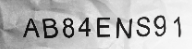
This image is difficult to recognize because of two reasons:
- The lighting is uneven. This problem is solved by the innovative preprocessing algorithm of SwiftOCR.
- The text in this image is distorted. Since SwiftOCR uses a neural network for the recognition, this isn't a real problem. A NN is flexible like a human brain and can recognize even the most distorted image (most of the time).
TODO
- Port to GPUImage 2
Dependencies
License
The code in this repository is licensed under the Apache License, Version 2.0 (the "License");
you may not use this file except in compliance with the License.
You may obtain a copy of the License at

   http://www.apache.org/licenses/LICENSE-2.0

Unless required by applicable law or agreed to in writing, software
distributed under the License is distributed on an "AS IS" BASIS,
WITHOUT WARRANTIES OR CONDITIONS OF ANY KIND, either express or implied.
See the License for the specific language governing permissions and
limitations under the License.
NOTE: This software depends on other packages that may be licensed under different open source licenses.