ReactiveX/RxSwift
SwiftReactive Programming in Swift





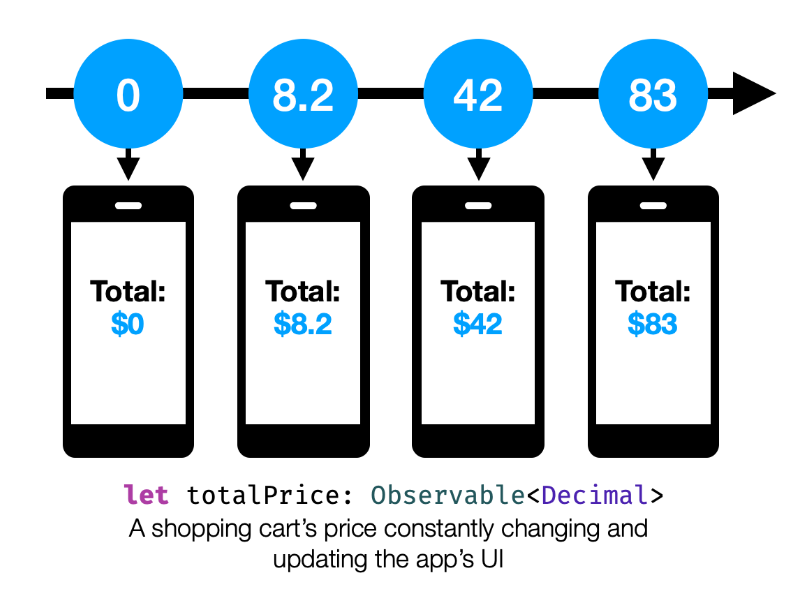
Rx is a generic abstraction of computation expressed through Observable<Element> interface, which lets you broadcast and subscribe to values and other events from an Observable stream.
RxSwift is the Swift-specific implementation of the Reactive Extensions standard.
While this version aims to stay true to the original spirit and naming conventions of Rx, this project also aims to provide a true Swift-first API for Rx APIs.
Cross platform documentation can be found on ReactiveX.io.
Like other Rx implementations, RxSwift's intention is to enable easy composition of asynchronous operations and streams of data in the form of Observable objects and a suite of methods to transform and compose these pieces of asynchronous work.
KVO observation, async operations, UI Events and other streams of data are all unified under abstraction of sequence. This is the reason why Rx is so simple, elegant and powerful.
I came here because I want to ...
... understand
- why use rx?
- the basics, getting started with RxSwift
- traits - what are
Single,Completable,Maybe,Driver, andControlProperty... and why do they exist? - testing
- tips and common errors
- debugging
- the math behind Rx
- what are hot and cold observable sequences?
... install
- Integrate RxSwift/RxCocoa with my app. Installation Guide
... hack around
- with the example app. Running Example App
- with operators in playgrounds. Playgrounds
... interact
- All of this is great, but it would be nice to talk with other people using RxSwift and exchange experiences.
Join Slack Channel - Report a problem using the library. Open an Issue With Bug Template
- Request a new feature. Open an Issue With Feature Request Template
- Help out Check out contribution guide
... compare
... understand the structure
RxSwift is as compositional as the asynchronous work it drives. The core unit is RxSwift itself, while other dependencies can be added for UI Work, testing, and more.
It comprises five separate components depending on each other in the following way:
┌──────────────┐    ┌──────────────┐
│   RxCocoa    ├────▶   RxRelay    │
└───────┬──────┘    └──────┬───────┘
        │                  │
┌───────▼──────────────────▼───────┐
│             RxSwift              │
└───────▲──────────────────▲───────┘
        │                  │
┌───────┴──────┐    ┌──────┴───────┐
│    RxTest    │    │  RxBlocking  │
└──────────────┘    └──────────────┘
- RxSwift: The core of RxSwift, providing the Rx standard as (mostly) defined by ReactiveX. It has no other dependencies.
- RxCocoa: Provides Cocoa-specific capabilities for general iOS/macOS/watchOS & tvOS app development, such as Shared Sequences, Traits, and much more. It depends on both
RxSwiftandRxRelay. - RxRelay: Provides
PublishRelay,BehaviorRelayandReplayRelay, three simple wrappers around Subjects. It depends onRxSwift. - RxTest and RxBlocking: Provides testing capabilities for Rx-based systems. It depends on
RxSwift.
Usage
| Here's an example | In Action |
|---|---|
| Define search for GitHub repositories ... | 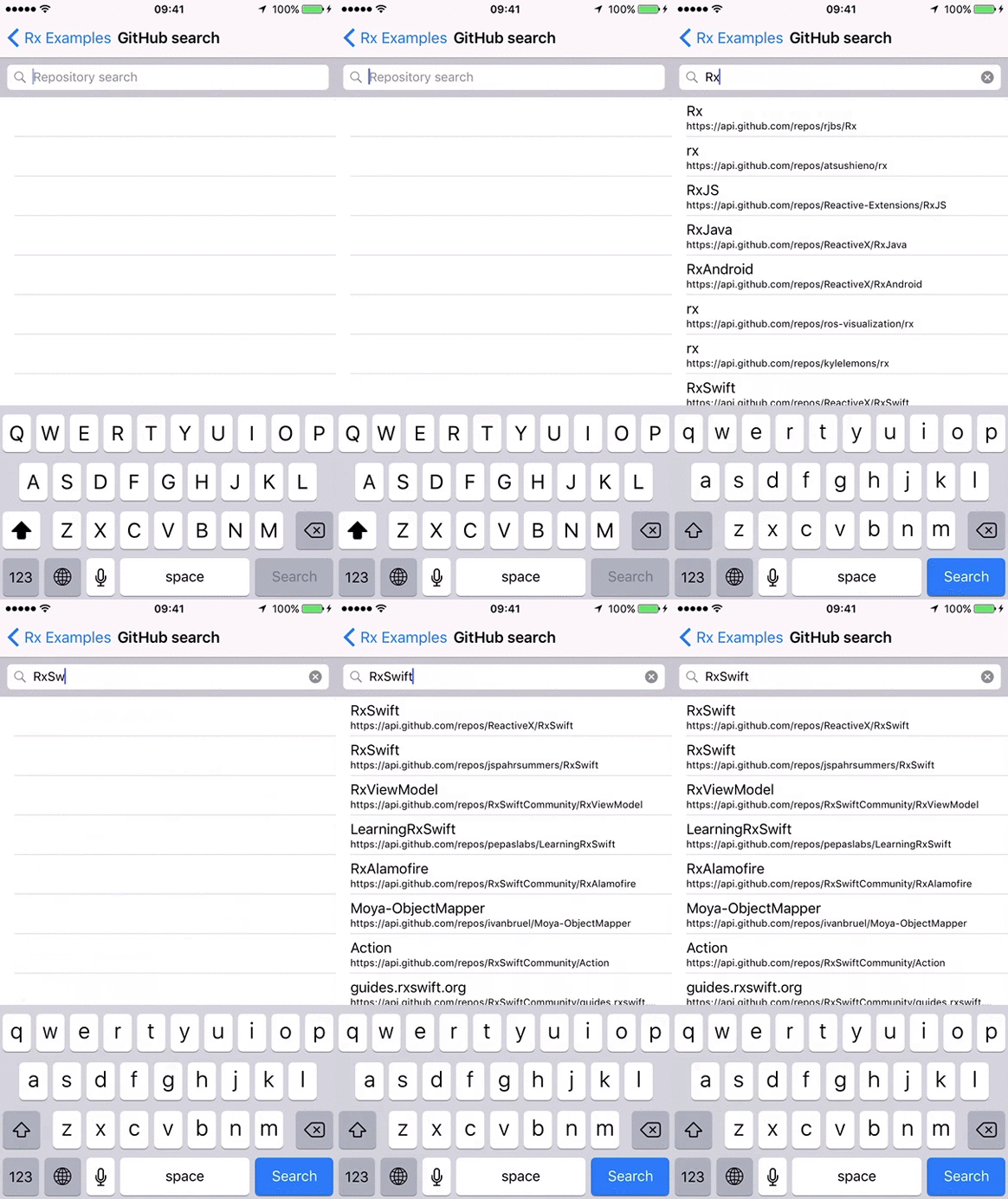 |
let searchResults = searchBar.rx.text.orEmpty
    .throttle(.milliseconds(300), scheduler: MainScheduler.instance)
    .distinctUntilChanged()
    .flatMapLatest { query -> Observable<[Repository]> in
        if query.isEmpty {
            return .just([])
        }
        return searchGitHub(query)
            .catchAndReturn([])
    }
.observe(on: MainScheduler.instance) |
|
| ... then bind the results to your tableview | |
searchResults
    .bind(to: tableView.rx.items(cellIdentifier: "Cell")) {
        (index, repository: Repository, cell) in
        cell.textLabel?.text = repository.name
        cell.detailTextLabel?.text = repository.url
    }
.disposed(by: disposeBag) |
Installation
RxSwift doesn't contain any external dependencies.
These are currently the supported installation options:
Manual
Open Rx.xcworkspace, choose RxExample and hit run. This method will build everything and run the sample app
XCFrameworks
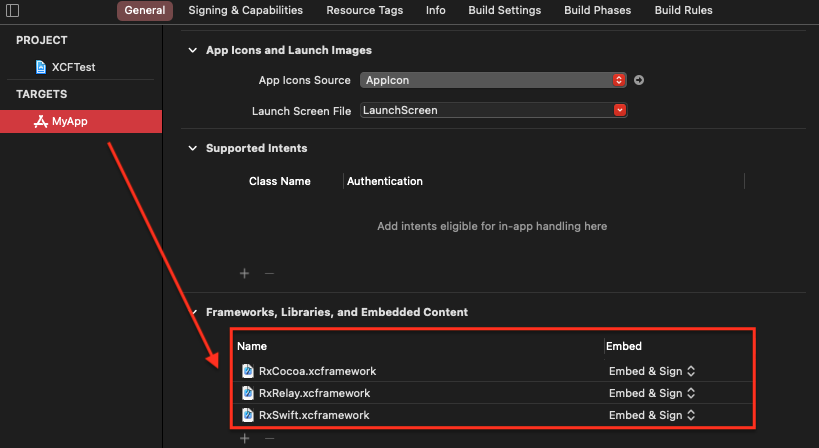
Each release starting with RxSwift 6 includes *.xcframework framework binaries.
Simply drag the needed framework binaries to your Frameworks, Libraries, and Embedded Content section under your target's General tab.
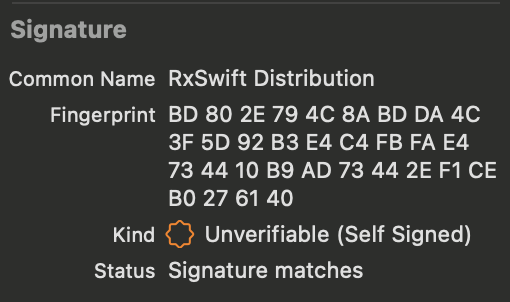
[!TIP] RxSwift's xcframework(s) are signed with an Apple Developer account, and you can always verify the Team Name: Shai Mishali
Carthage
Add this to Cartfile
github "ReactiveX/RxSwift" "6.10.0"
$ carthage update
Carthage as a Static Library
Carthage defaults to building RxSwift as a Dynamic Library.
If you wish to build RxSwift as a Static Library using Carthage you may use the script below to manually modify the framework type before building with Carthage:
carthage update RxSwift --platform iOS --no-build
sed -i -e 's/MACH_O_TYPE = mh_dylib/MACH_O_TYPE = staticlib/g' Carthage/Checkouts/RxSwift/Rx.xcodeproj/project.pbxproj
carthage build RxSwift --platform iOS
Swift Package Manager
Note: There is a critical cross-dependency bug affecting many projects including RxSwift in Swift Package Manager. We've filed a bug (SR-12303) in early 2020 but have no answer yet. Your mileage may vary. A partial workaround can be found here.
Create a Package.swift file.
// swift-tools-version:5.0

import PackageDescription

let package = Package(
  name: "RxProject",
  dependencies: [
    .package(url: "https://github.com/ReactiveX/RxSwift.git", .upToNextMajor(from: "6.0.0"))
  ],
  targets: [
    .target(name: "RxProject", dependencies: ["RxSwift", .product(name: "RxCocoa", package: "RxSwift")]),
  ]
)
$ swift build
To build or test a module with RxTest dependency, set TEST=1.
$ TEST=1 swift test
Manually using git submodules
- Add RxSwift as a submodule
$ git submodule add git@github.com:ReactiveX/RxSwift.git
- Drag
Rx.xcodeprojinto Project Navigator - Go to
Project > Targets > Build Phases > Link Binary With Libraries, click+and selectRxSwift,RxCocoaandRxRelaytargets
References
- http://reactivex.io/
- Reactive Extensions GitHub (GitHub)
- RxSwift RayWenderlich.com Book
- RxSwift: Debunking the myth of hard (YouTube)
- Boxue.io RxSwift Online Course (Chinese 🇨🇳)
- Expert to Expert: Brian Beckman and Erik Meijer - Inside the .NET Reactive Framework (Rx) (video)
- Reactive Programming Overview (Jafar Husain from Netflix)
- Subject/Observer is Dual to Iterator (paper)
- Rx standard sequence operators visualized (visualization tool)
- Haskell