A simple and lightweight translator that allows you to translate and speak text using Google, Yandex Bing, LibreTranslate and Lingva.
[!IMPORTANT]
The project has migrated under the KDE umbrella, and development will continue at https://invent.kde.org/office/crow-translate.
 Crow Translate


Crow Translate is a simple and lightweight translator written in C++ / Qt that allows you to translate and speak text using Google, Yandex, Bing, LibreTranslate and Lingva translate API. You may also be interested in my library QOnlineTranslator used in this project.
Content
- Screenshots
- Features
- Default keyboard shortcuts
- CLI commands
- D-Bus API
- Global shortcuts in Wayland
- Dependencies
- Icons
- Installation
- Building
- Localization
Screenshots
Plasma
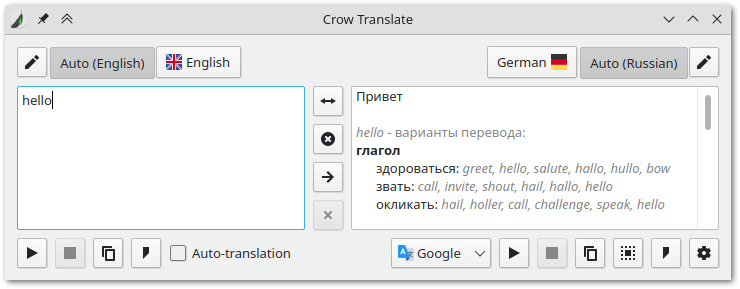
Plasma Mobile

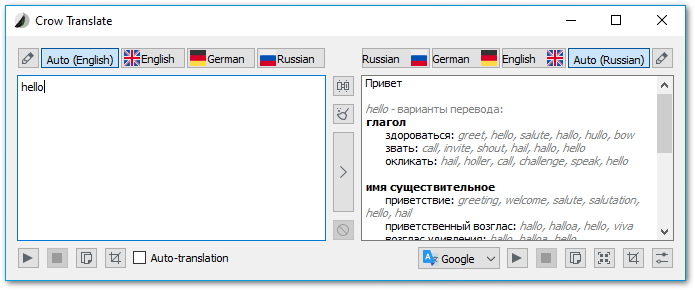
Windows 10
Features
- Translate and speak text from screen or selection
- Support 125 different languages
- Low memory consumption (~20MB)
- Highly customizable shortcuts
- Command-line interface with rich options
- D-Bus API
- Available for Linux and Windows
Default keyboard shortcuts
You can change them in the settings. Some key sequences may not be available due to OS limitations.
Wayland does not support global shortcuts registration, but you can use D-Bus to bind actions in the system settings. For desktop environments that support additional applications actions (KDE, for example) you will see them predefined in the system shortcut settings. You can also use them for X11 sessions, but you need to disable global shortcuts registration in the application settings to avoid conflicts.
Global
| Key | Description |
|---|---|
| Ctrl + Alt + E | Translate selected text |
| Ctrl + Alt + S | Speak selected text |
| Ctrl + Alt + F | Speak translation of selected text |
| Ctrl + Alt + G | Stop speaking |
| Ctrl + Alt + C | Show main window |
| Ctrl + Alt + I | Recognize text in screen area |
| Ctrl + Alt + O | Translate text in screen area |
In main window
| Key | Description |
|---|---|
| Ctrl + Return | Translate |
| Ctrl + R | Swap languages |
| Ctrl + Q | Close window |
| Ctrl + S | Speak source / pause text speaking |
| Ctrl + Shift + S | Speak translation / pause text speaking |
| Ctrl + Shift + C | Copy translation to clipboard |
CLI commands
The program also has a console interface.
Usage: crow [options] text
| Option | Description |
|---|---|
-h, --help |
Display help |
-v, --version |
Display version information |
-c, --codes |
Display language codes |
-s, --source <code> |
Specify the source language (by default, engine will try to determine the language on its own) |
-t, --translation <code> |
Specify the translation language(s), splitted by '+' (by default, the system language is used) |
-l, --locale <code> |
Specify the translator language (by default, the system language is used) |
-e, --engine <engine> |
Specify the translator engine ('google', 'yandex', 'bing', 'libretranslate' or 'lingva'), Google is used by default |
-p, --speak-translation |
Speak the translation |
-u, --speak-source |
Speak the source |
-f, --file |
Read source text from files. Arguments will be interpreted as file paths |
-i, --stdin |
Add stdin data to source text |
-a, --audio-only |
Print text only for speaking when using --speak-translation or --speak-source |
-b, --brief |
Print only translations |
-j, --json |
Print output formatted as JSON |
Note: If you do not pass startup arguments to the program, the GUI starts.
D-Bus API
io.crow_translate.CrowTranslate
├── /io/crow_translate/CrowTranslate/Ocr
|   └── method void io.crow_translate.CrowTranslate.Ocr.setParameters(QVariantMap parameters);
└── /io/crow_translate/CrowTranslate/MainWindow
    |   # Global shortcuts
    ├── method void io.crow_translate.CrowTranslate.MainWindow.translateSelection();
    ├── method void io.crow_translate.CrowTranslate.MainWindow.speakSelection();
    ├── method void io.crow_translate.CrowTranslate.MainWindow.speakTranslatedSelection();
    ├── method void io.crow_translate.CrowTranslate.MainWindow.playPauseSpeaking();
    ├── method void io.crow_translate.CrowTranslate.MainWindow.stopSpeaking();
    ├── method void io.crow_translate.CrowTranslate.MainWindow.open();
    ├── method void io.crow_translate.CrowTranslate.MainWindow.copyTranslatedSelection();
    ├── method void io.crow_translate.CrowTranslate.MainWindow.recognizeScreenArea();
    ├── method void io.crow_translate.CrowTranslate.MainWindow.translateScreenArea();
    ├── method void io.crow_translate.CrowTranslate.MainWindow.delayedRecognizeScreenArea();
    ├── method void io.crow_translate.CrowTranslate.MainWindow.delayedTranslateScreenArea();
    |   # Main window shortcuts
    ├── method void io.crow_translate.CrowTranslate.MainWindow.clearText();
    ├── method void io.crow_translate.CrowTranslate.MainWindow.cancelOperation();
    ├── method void io.crow_translate.CrowTranslate.MainWindow.swapLanguages();
    ├── method void io.crow_translate.CrowTranslate.MainWindow.openSettings();
    ├── method void io.crow_translate.CrowTranslate.MainWindow.setAutoTranslateEnabled(bool enabled);
    ├── method void io.crow_translate.CrowTranslate.MainWindow.copySourceText();
    ├── method void io.crow_translate.CrowTranslate.MainWindow.copyTranslation();
    ├── method void io.crow_translate.CrowTranslate.MainWindow.copyAllTranslationInfo();
    └── method void io.crow_translate.CrowTranslate.MainWindow.quit();
For example, you can show main window using dbus-send:
dbus-send --type=method_call --dest=io.crow_translate.CrowTranslate /io/crow_translate/CrowTranslate/MainWindow io.crow_translate.CrowTranslate.MainWindow.open
Or via qdbus:
qdbus io.crow_translate.CrowTranslate /io/crow_translate/CrowTranslate/MainWindow io.crow_translate.CrowTranslate.MainWindow.open
# or shorter
qdbus io.crow_translate.CrowTranslate /io/crow_translate/CrowTranslate/MainWindow open
Global shortcuts in wayland
Wayland doesn't provide API for global shortcuts and you need to register them by yourself.
KDE
KDE have a convenient feature to define shortcuts in .desktop file and import them in settings. These shortcuts are already enabled and should work by default.
GNOME
For GNOME you need to manually set D-Bus commands as global shortcuts. For example, to translate selected text use the following:
qdbus io.crow_translate.CrowTranslate /io/crow_translate/CrowTranslate/MainWindow translateSelection
You can set a hotkey for this command in GNOME system settings.
Dependencies
Required
- CMake 3.16+
- Extra CMake Modules
- Qt 5.9+ with Widgets, Network, Multimedia, Concurrent, X11Extras (Linux), DBus (Linux) and WinExtras (Windows) modules
- Tesseract 4.0+
- Png2Ico or IcoTool for generating executable icon (Windows)
Optional
External libraries
This project uses the following external libraries, which included as git submodules:
- QOnlineTranslator - provides free usage of Google, Yandex and Bing translate API.
- QGitTag - uses the GitHub API to provide information about releases.
- QHotkey - provides global shortcuts for desktop platforms.
- QTaskbarControl - to create a taskbar/launcher progress for all desktop platforms.
- SingleApplication - prevents launch of multiple application instances.
Icons
Fluent icon theme is bundled to provide icons on Windows and fallback icons on Linux.
circle-flags icons are used for flags.
Installation
Downloads are available on the Releases page. Also check out the website for other installation methods.
Note: On Linux to make the application look native on a non-KDE desktop environment, you need to configure Qt applications styling. This can be done by using qt5ct or adwaita-qt5 or qtstyleplugins. Please check the appropriate installation guide for your distribution.
Note: Windows requires Microsoft Visual C++ Redistributable 2019 to work.
Building
Building executable
You can build Crow Translate by using the following commands:
mkdir build
cd build
cmake .. # Or `cmake -D CMAKE_BUILD_TYPE=Release ..` for single-configuration generators such as Ninja or GNU Make
cmake --build . # Or `cmake --build . --config Release` for multi-config generators such as Visual Studio Generators or Xcode
You will then get a binary named crow.
Building a package using CPack
CMake can create specified package types automatically.
If you use Makefile, Ninja, or Xcode generator you can use package target:
mkdir build
cd build
cmake -D CMAKE_BUILD_TYPE=Release -D CPACK_GENERATOR=DEB .. # You can specify several types of packages separated by semicolons in double quotes, for example: `CPACK_GENERATOR="DEB;ZIP;NSIS"`
cmake --build . --target package
Or you can use CPack utility for any generators:
mkdir build
cd build
cmake .. # Or `cmake -D CMAKE_BUILD_TYPE=Release ..` for single-configuration generators such as Ninja or GNU Make
cpack -G DEB # Or `cpack -G DEB -C Release` for multi-config generators such as Visual Studio Generators or Xcode
On Windows you need VCPKG to bundle all necessary DLLs.
Build parameters
WITH_PORTABLE_MODE- Enable portable functionality. If you create file namedsettings.iniin the app folder and Crow will store the configuration in it. It also adds the “Portable Mode” option to the application settings, which does the same.WITH_KWAYLAND- Find and use KWayland library for better Wayland integration.
Build parameters are passed at configuration stage: cmake -D WITH_PORTABLE_MODE ...
Localization
To help with localization you can use Crowdin or translate files in data/translations with Qt Linguist directly. To add a new language, write me on the Crowdin page or copy data/translations/crow-translate.ts to data/translations/crow-translate_<ISO 639-1 language code>_<ISO 3166-1 country code>.ts, translate it and send a pull request.