Open-Source Web UI for managing Apache Kafka clusters

Kafbat UI
Versatile, fast and lightweight web UI for managing Apache Kafka® clusters.





Documentation •
Quick Start •
Community
AWS Marketplace •
ProductHunt
Kafbat UI is a free, open-source web UI to monitor and manage Apache Kafka clusters.
Kafbat UI is a simple tool that makes your data flows observable, helps find and troubleshoot issues faster and deliver optimal performance. Its lightweight dashboard makes it easy to track key metrics of your Kafka clusters - Brokers, Topics, Partitions, Production, and Consumption.
Kafbat UI, developed by Kafbat*, proudly carries forward the legacy of the UI Apache Kafka project. Our dedication is reflected in the continuous evolution of the project, ensuring adherence to its foundational vision while adapting to meet modern demands. We extend our gratitude to Provectus for their past support in groundbreaking work, which serves as a cornerstone for our ongoing innovation and dedication.* - The Kafbat team comprises key contributors from the project's inception, bringing a wealth of experience and insight to this renewed endeavor.
Interface
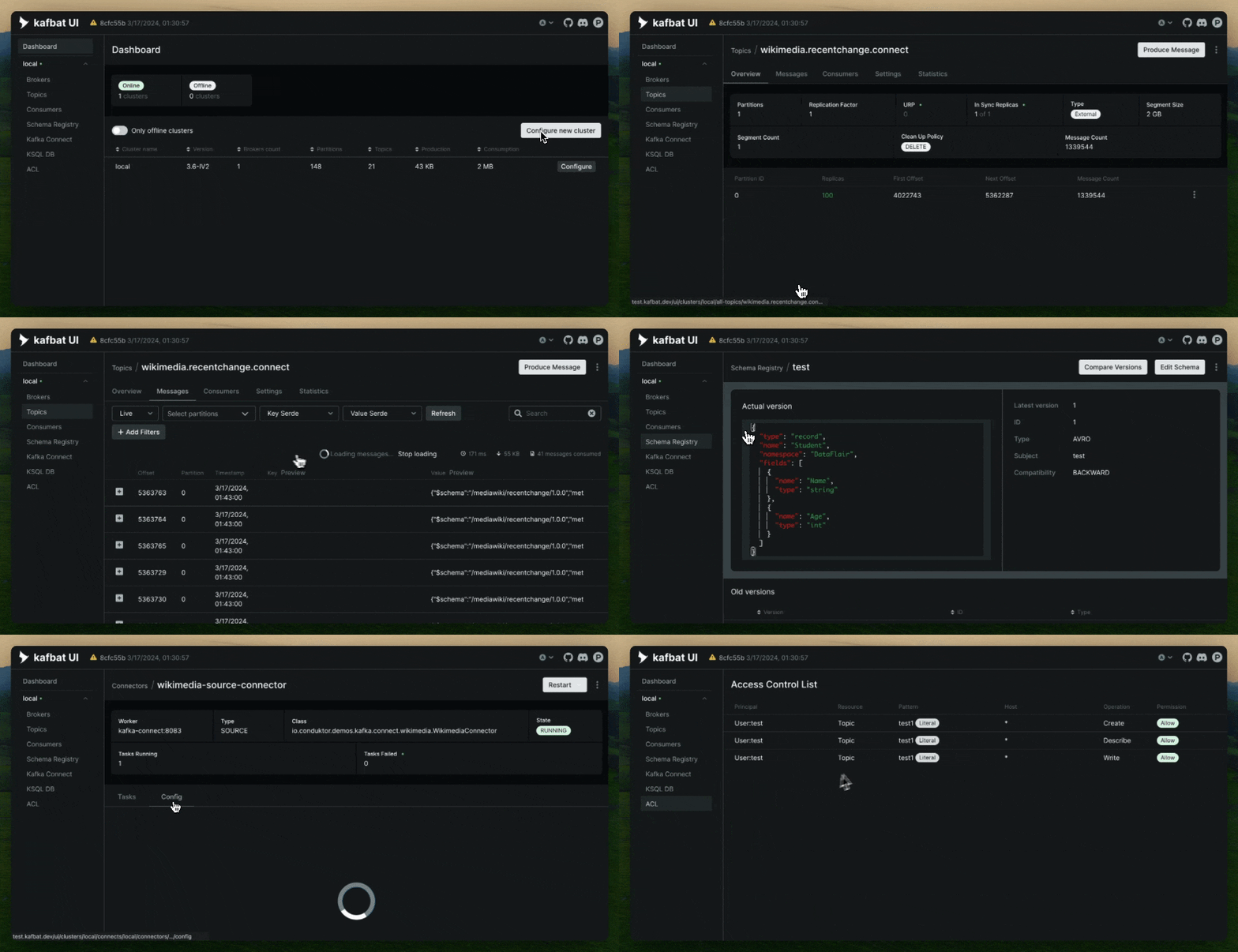
Features
- Topic Insights – View essential topic details including partition count, replication status, and custom configurations.
- Configuration Wizard – Set up and configure your Kafka clusters directly through the UI.
- Multi-Cluster Management – Monitor and manage all your Kafka clusters in one unified interface.
- Metrics Dashboard – Track key Kafka metrics in real time with a streamlined, lightweight dashboard.
- Kafka Brokers Overview – Inspect brokers, including partition assignments and controller status.
- Consumer Group Details – Analyze parked offsets per partition, and monitor both combined and partition-specific lag.
- Message Browser – Explore messages in JSON, plain text, or Avro encoding formats. Live view is supported, enriched with user-defined CEL message filters.
- Dynamic Topic Management – Create and configure new topics with flexible, real-time settings.
- Pluggable Authentication – Secure your UI using OAuth 2.0 (GitHub, GitLab, Google), LDAP, or basic authentication.
- Cloud IAM Support – Integrate with GCP IAM, Azure IAM, and AWS IAM for cloud-native identity and access management.
- Managed Kafka Service Support – Full support for Azure EventHub, Google Cloud Managed Service for Apache Kafka, and AWS Managed Streaming for Apache Kafka (MSK)—both server-based and serverless.
- Custom SerDe Plugin Support – Use built-in serializers/deserializers like AWS Glue and Smile, or create your own custom plugins.
- Role-Based Access Control – Manage granular UI permissions with RBAC.
- Data Masking – Obfuscate sensitive data in topic messages to enhance privacy and compliance.
- API Documentation (Swagger UI) - Access full API specifications via built-in Swagger UI (can be enabled via
SWAGGER_UI_ENABLEDvariable). - MCP Server - Model Context Protocol Server
Feature overview
Click here for the feature overview
Topics
Kafbat UI makes it easy for you to create topics in your browser with just a few clicks, by pasting your own parameters, and viewing topics in the list.

You can jump from the connectors view to corresponding topics and from a topic to consumers (back and forth) for more convenient navigation, including connectors and overview topic settings.

Messages
Suppose you want to produce messages for your topic. With Kafbat UI, you can easily send or write data/messages to Kafka topics by specifying parameters and viewing messages in the list.

Schema registry
There are three supported types of schemas: Avro®, JSON Schema, and Protobuf schemas.

Before producing Avro/Protobuf encoded messages, you need to add a schema for the topic in the Schema Registry. All these steps are now easy to do with just a few clicks in a user-friendly interface.

Getting Started
To run Kafbat UI, you can use either a pre-built Docker image or build it (or a jar file) yourself.
Quick start (Demo run)
docker run -it -p 8080:8080 -e DYNAMIC_CONFIG_ENABLED=true -e SWAGGER_UI_ENABLED=true ghcr.io/kafbat/kafka-ui
Then access the web UI at http://localhost:8080
This command is sufficient to try things out. When you're done, you can proceed with a persistent installation.
Persistent installation
services:
  kafbat-ui:
    container_name: kafbat-ui
    image: ghcr.io/kafbat/kafka-ui:latest
    ports:
      - 8080:8080
    environment:
      DYNAMIC_CONFIG_ENABLED: 'true'
      SWAGGER_UI_ENABLED: 'true'
    volumes:
      - ~/kui/config.yml:/etc/kafkaui/dynamic_config.yaml
Please refer to our configuration page to proceed with further app configuration.
Some useful configuration related links
Web UI Cluster Configuration Wizard
Configuration file explanation
Helm charts
Building from sources
Quick start for building from source
Liveliness and readiness probes
The liveness and readiness endpoint is at /actuator/health.
The info endpoint (build info) is located at /actuator/info.
Configuration options
All environment variables and configuration properties can be found here.
Contributing
Please refer to the contributing guide; we'll guide you from there.
Support
As we're fully independent, team members contribute in their free time. Your support is crucial for us, if you wish to sponsor us, take a look here
Powered by
