openai-translator/openai-translator
TypeScript基于 ChatGPT API 的划词翻译浏览器插件和跨平台桌面端应用 - Browser extension and cross-platform desktop application for translation based on ChatGPT API.
npm install openai-translator
English | 中文
The translator that does more than just translation - powered by OpenAI.







Why Yet another Translator
I have developed a Bob plugin that utilizes ChatGPT API to provide global word translation on macOS. However, since not all users have access to macOS to benefit from the plugin, I have created this project!
More than just a browser extension
What began as a Chrome extension has now evolved into a multi-platform desktop app that I am currently developing.

More than just translation
What began as a translation tool has now evolved to include surprisingly effective word polishing and summarization capabilities, accidentally.
How to use

Features
- It offers three modes: translation, polishing and summarization.
- Our tool allows for mutual translation, polishing and summarization across 55 different languages.
- Streaming mode is supported!
- It allows users to customize their translation text.
- One-click copying
- Text-to-Speech (TTS)
- Available on all platforms (Windows, macOS, and Linux) for both browsers and Desktop
- Support screenshot translation
- Support for vocabulary books, as well as support for generating memory aids based on the words in the vocabulary books
- Supports both OpenAI and Azure OpenAI Service at the same time
Preparation
- (required) Apply for an OpenAI API key here or Azure OpenAI Service API Key
- (optional) If you cannot access OpenAI, you can use the OpenAI API Proxy.
Installation
Windows
Install Manually
- Download the installation package ending in
.exefrom the Latest Release page. - Double click the downloaded file to install it.
- If prompted as unsafe, you can click on
More Info->Run Anywayto proceed with the installation. - Ready to use!
MacOS
Install Manually
- Go to the Latest Release page and download the corresponding chip's
.dmginstallation package. Note: Use aarch64 version for Apple Silicon machines and runxattrcommand below. - Double click the downloaded file to install it.
- Ready to use!
Troubleshooting
"OpenAI Translator" can’t be opened because the developer cannot be verified.

Click the
Cancelbutton, then go to theSettings->Privacy and Securitypage, click theStill Openbutton, and then click theOpenbutton in the pop-up window. After that, there will be no more pop-up warnings when openingOpenAI Translator. 🎉

If you cannot find the above options in
Privacy & Security, or get error prompts such as broken files with Apple Silicon machines. OpenTerminal.appand enter the following command (you may need to enter a password halfway through), then restartOpenAI Translator:sudo xattr -d com.apple.quarantine /Applications/OpenAI\ Translator.app
If you encounter a permission prompt every time you open it, or if you cannot perform a shortcut translation, please go to
Settings->Privacy & Security->Supporting Featuresto remove OpenAI Translator, and then re-add OpenAI Translator.
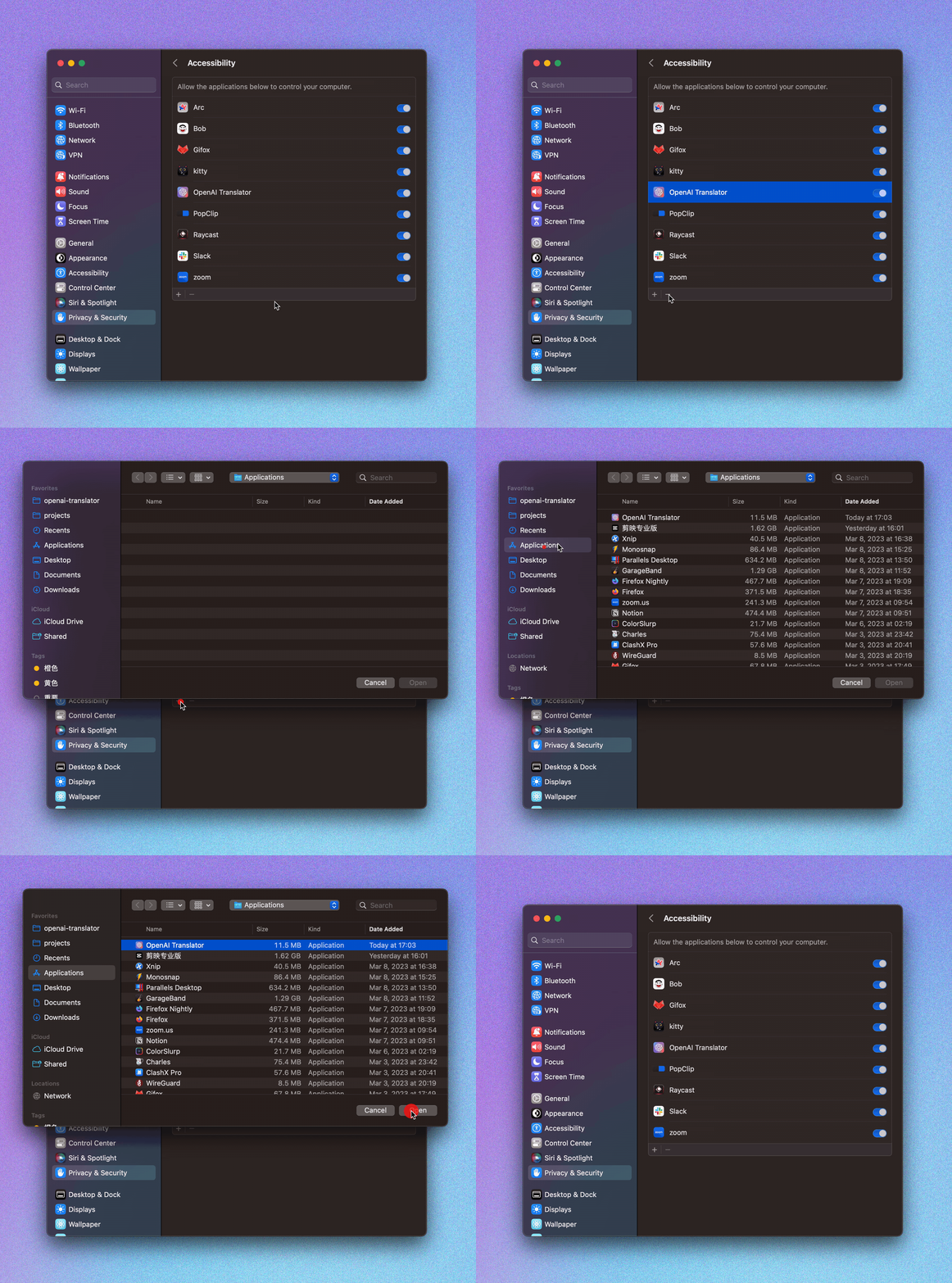
Installing Desktop Clip Extensions
For details, see Desktop Clip Extension

Browser Extension
Visit your Browser Extension Store to install this plugin:
Click on the OpenAI Translator icon in the browser plugin list, and enter the obtained API KEY into the configuration interface that pops up from this plugin.

Refresh the page in the browser to enjoy the smooth translation experience 🎉!


Configure Azure OpenAI Service
const API_URL = `https://${resourceName}.openai.azure.com`
const API_URL_PATH = `/openai/deployments/${deployName}/chat/completions?api-version=${apiVersion}`
- resourceName: Your Azure OpenAI Service resource name.
- deployName: Your Azure OpenAI Service model deploy name, you can change your model here.
- api-version: 2023-05-15, or newer. (supported api-version can be found at Azure's official doc)
License
Star History