翻墙 从容穿越党国敏感日 ShadowsocksR (SSRoT) native implementation for all platforms, GFW terminator
Please use overtls instead
請使用 overtls, 一個新代理,相當於 SSRoT 去掉 SSR 和 SS, 唯獨保留 OT 的 Rust 實現,速度飛快,穩如老狗。
Please use overtls, a Rust implementation of SSRoT without SSR and SS, only retaining OT, which is fast and stable.

ShadowsocksR-native

New feature: GFW terminator SSRoT English tutorial
Index
Intro
ShadowsocksR-native is a lightweight secured SOCKS5 proxy for embedded devices and low-end boxes. It's derived from Shadowsocks-libev.
It is a port of ShadowsocksR created by @breakwa11, which is maintained by @ssrlive.
Current version: 0.4 | Changelog
Features
ShadowsocksR-native is written in pure C and only depends on libuv , mbedTLS , libsodium and json-c.
In normal usage, the memory footprint is about 600KB and the CPU utilization is no more than 5% on a low-end router (Buffalo WHR-G300N V2 with a 400MHz MIPS CPU, 32MB memory and 4MB flash).
For a full list of feature comparison between different versions of shadowsocks, refer to the Wiki page.
Encrypto method
| none | table | ||||
| rc4 | rc4-md5-6 | rc4-md5 | |||
| aes-128-cfb | aes-192-cfb | aes-256-cfb | |||
| aes-128-ctr | aes-192-ctr | aes-256-ctr | |||
| camellia-128-cfb | camellia-192-cfb | camellia-256-cfb | |||
| bf-cfb | cast5-cfb | des-cfb | idea-cfb | rc2-cfb | seed-cfb |
| salsa20 | chacha20 | chacha20-ietf | |||
| aes-128-gcm | aes-192-gcm | aes-256-gcm | chacha20-ietf-poly1305 | xchacha20-ietf-poly1305 |
Protocols & obfuscators
| Protocols | obfuscators |
|---|---|
| origin | plain |
| auth_sha1_v4 | http_simple |
| auth_aes128_sha1 | http_post |
| auth_aes128_md5 | http_mix |
| auth_chain_a | tls1.2_ticket_auth |
| auth_chain_b | tls1.2_ticket_fastauth |
| auth_chain_c/d/e/f |
progress of data flow
+-----------------------------------------------------------------------------+
|                +--------------------------------------------------------+   |
|                |               +------------------------------------+   |   |
|                |               |            +-------------------+   |   |   |
|  obfuscator    |   encryptor   |  protocol  |     user data     |   |   |   |
|   |            |       |       |      |     +-------------------+   |   |   |
|   |            |       |       +------+-----------------------------+   |   |
|   |            +-------+--------------+---------------------------------+   |
+---+--------------------+--------------+-------------------------------------+
    |                    |              |
    +-- server_encode    +-- encrypt    +-- server_pre_encrypt       <<<=== user data
    |                    |              |
    +-- server_decode    +-- decrypt    +-- server_post_decrypt      ===>>> user data
Build
Distribution-specific guide
Debian & Ubuntu
For Unix-like systems, especially Debian-based systems, e.g. Ubuntu, Debian or Linux Mint, you can build the binary like this:
# Debian / Ubuntu
# sudo su                       # using root account
sudo apt-get update -y
sudo apt-get upgrade -y
sudo apt-get install --no-install-recommends build-essential autoconf libtool asciidoc xmlto -y
sudo apt-get install git gcc g++ gdb cmake automake -y
sudo apt-get -f install -y

# cd /                          # switch to root directory
git clone --recursive https://github.com/ShadowsocksR-Live/shadowsocksr-native.git ssr-n
cd ssr-n                      # enter ssr-n directory.

# build ShadowsocksR-native
mkdir build && cd build
cmake .. && make
# make install
# /bin/cp -rfa src/ssr-* /usr/bin

# build 32-bit binary
sudo apt-get install gcc-multilib -y
rm -rf *
cmake -D CMAKE_C_FLAGS=-m32 .. && make
The target binaries are ssr-n/build/src/ssr-server, ssr-n/build/src/ssr-client.
CentOS
CentOS 7 only. we don't support CentOS 6.x, it's too old.
Before build ssr-Native, we must install cmake 3.x first. following this
# CentOS / Fedora / RHEL
sudo su
yum install wget git gcc gcc-c++ gdb autoconf automake libtool make asciidoc xmlto -y
curl https://cmake.org/files/v3.25/cmake-3.25.1-linux-x86_64.sh -o a.sh
sh a.sh --prefix=/usr/ --exclude-subdir && rm -rf a.sh
cd /
git clone --recursive https://github.com/ShadowsocksR-Live/shadowsocksr-native.git ssr-n
cd ssr-n

# Since there no stdatomic.h exist in CentOS 7, we have to use older libuv version.
# Fedora / RHEL can skip the steps.
cd depends/libuv
git checkout 71932a9fc9e234b3ebac90de0dd061fb00ba191b
cd ../..

mkdir build && cd build
cmake .. && make
# make install
# /bin/cp -rfa src/ssr-* /usr/bin
The target binaries are ssr-n/build/src/ssr-server, ssr-n/build/src/ssr-client.
macOS
For macOS, we must download/install/run Xcode first.
Then use Homebrew to install or build.
Install Homebrew and tools:
ruby -e "$(curl -fsSL https://raw.githubusercontent.com/Homebrew/install/master/install)"
brew install git cmake automake libtool
brew upgrade git cmake automake libtool
Now get source code and build it.
git clone --recursive https://github.com/ShadowsocksR-Live/shadowsocksr-native.git ssr-n
cd ssr-n

mkdir build && cd build
cmake .. && make
The target binaries are ssr-n/build/src/ssr-server, ssr-n/build/src/ssr-client.
Windows
For Windows, chekout the project using the following commands then open win32/ssr-native.sln with Visual Studio 2010. Enjoy it!
git clone --recursive https://github.com/ShadowsocksR-Live/shadowsocksr-native.git ssr-n
Usage
For a detailed and complete list of all supported arguments, you may refer to the man pages of the applications, respectively.
    ssr-[client|local|server]

       [-c <config_file>]         The path to config file

       [-d]                       Run in background as a daemon.

       [-h]                       Show this help message.
Sample configure file
config.json
{
    "password": "password",
    "method": "aes-128-ctr",
    "protocol": "auth_aes128_md5",
    "protocol_param": "",
    "obfs": "tls1.2_ticket_auth",
    "obfs_param": "",

    "udp": true,
    "idle_timeout": 300,
    "connect_timeout": 6,
    "udp_timeout": 6,

    "server_settings": {
        "listen_address": "0.0.0.0",
        "listen_port": 12475
    },

    "client_settings": {
        "server": "12.34.56.78",
        "server_port": 12475,
        "listen_address": "0.0.0.0",
        "listen_port": 1080
    },

    "over_tls_settings": {
        "enable": false,
        "server_domain": "goodsitesample.com",
        "path": "/udg151df/",
        "root_cert_file": ""
    }
}
cmake
In the CentOS 7, the cmake version is too old to work with ShadowsocksR-Native. So we must install it by ourselves.
sudo su
cd /
wget --no-check-certificate https://cmake.org/files/v3.25/cmake-3.25.1-linux-x86_64.sh -O a.sh
bash a.sh  --prefix=/usr/ --exclude-subdir
rm -rf a.sh
cmake --version
And the cmake --version command will output message likes:
cmake version 3.25.0
CMake suite maintained and supported by Kitware (kitware.com/cmake).
Deploy server
Supporting CentOS 7 / Debian / Ubuntu with the following commands
sudo su
wget --no-check-certificate https://raw.githubusercontent.com/ShadowsocksR-Live/shadowsocksr-native/master/install/ssrn-install.sh
chmod +x ssrn-install.sh
./ssrn-install.sh 2>&1 | tee ssr-n.log
After installation, we can view the status with
systemctl status ssr-native.service
And we can view or edit the configuration with cat or vi in root privilege
cat /etc/ssr-native/config.json
After we changed the server configuration, we must restart the service to make the changes take effect.
systemctl restart ssr-native.service
To stop the server, please run
systemctl stop ssr-native.service
To uninstall the server, use the following command
./ssrn-install.sh uninstall
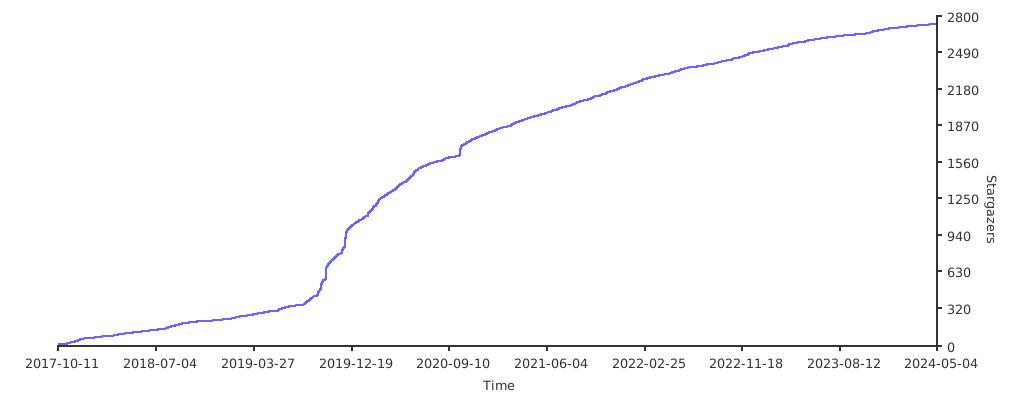
Stargazers over time