Voltar ao ranking
To easily transfer Telegram stickers to WhatsApp you can use Telegram Bot

Converts Lottie Animations (.json / .lottie) and Telegram stickers (*.tgs) to GIF / PNG / APNG / WEBP / WEBM
tgstelegramgifstickerlottiestickersanimated-stickersgifskiwebpapngpngtgs-to-apng
Métricas principais
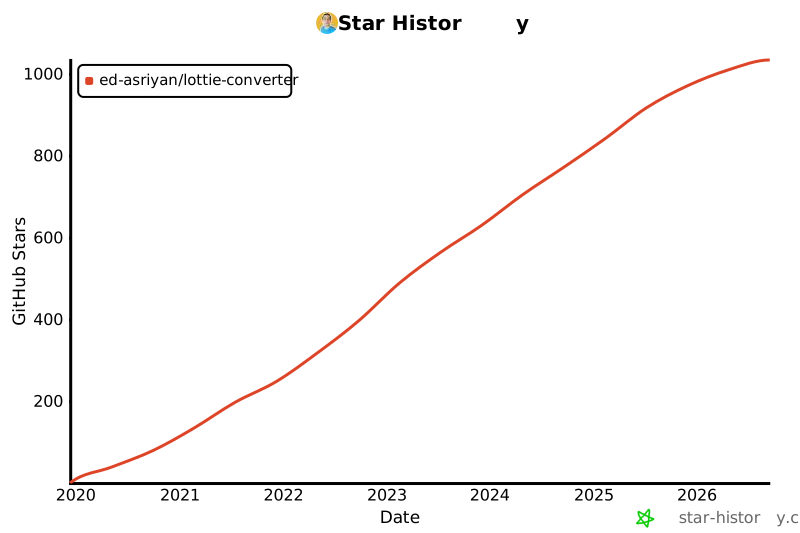
Crescimento de estrelas
Estrelas
1k
Forks
88
Crescimento semanal
—
Issues
5
5001k
dez. de 2019jan. de 2021fev. de 2022mar. de 2023mai. de 2024jun. de 2025jul. de 2026
README
Lottie Animations (.json) and Telegram Stickers (*.tgs) to GIF/PNG/APNG/WEBP/WEBM converter


To easily transfer Telegram stickers to WhatsApp you can use Telegram Bot
👉 https://t.me/tgtowabot 👈
How to use
There are 2 options:
- Run using Docker. One-line command, the option requires only Docker installed
- Download and run compiled executable files. The option requires run-time dependecies installed
Using Docker
Replace with directory with Lottie animations / Telegram stickers and run:
- Convert to GIF:
docker run --rm -v <path to directory>:/source edasriyan/lottie-to-gif - Convert to PNG:
docker run --rm -v <path to directory>:/source edasriyan/lottie-to-png - Convert to APNG:
docker run --rm -v <path to directory>:/source edasriyan/lottie-to-apng - Convert to WEBP:
docker run --rm -v <path to directory>:/source edasriyan/lottie-to-webp - Convert to WEBM:
docker run --rm -v <path to directory>:/source edasriyan/lottie-to-webm
You can provide parameters via env variables:
HEIGHT: Output image height. Default: 512WIDTH: Output image width. Default: 512FPS: Output frame rate. Default: apng,png,webp - 60; gif - 50QUALITY: Output quality. Default: 90THREADS: Number of threads to use. Default: number of CPUsBACKGROUND: Background color to replace transparent pixels. Formats:rgb(r,g,b),rgba(r,g,b,a),#RRGGBB,#RRGGBBAA
Example:
docker run --rm -e HEIGHT=256 -e WIDTH=256 -e FPS=30 -v /home/ed/Downloads/lottie-animations:/source edasriyan/lottie-to-apng
Results will be saved next to each source file in the same directory.
Using compiled executables
Install run-time dependencies. Make sure the path to them present in
PATHvariable:Download executable from releases section of this repo for your OS and arch
In downloaded archive find the following executable scripts:
lottie_to_apng.shlottie_to_gif.shlottie_to_png.shlottie_to_webp.shlottie_to_webm.sh
All of them have the same CLI:
$ ./bin/lottie_to_gif.sh -h
usage: ./bin/lottie_to_gif.sh [--help] [--output OUTPUT] [--height HEIGHT] [--width WIDTH] [--threads THREADS] [--fps FPS] [--quality QUALITY] [--background BACKGROUND] path

Lottie animations (.json) and Telegram stickers for Telegram (*.tgs) to animated .gif converter

Positional arguments:
path              Path to .json or .tgs file to convert

Optional arguments:
-h, --help        show this help message and exit
--output OUTPUT   Output file path
--height HEIGHT   Output image height. Default:
--width WIDTH     Output image width. Default: 512
--fps FPS         Output frame rate. Default: 50
--threads THREADS Number of threads to use. Default: number of CPUs
--quality QUALITY Output quality. Default: 90
--background BACKGROUND Background color to replace transparent pixels. Formats: rgb(r,g,b), rgba(r,g,b,a), #RRGGBB, #RRGGBBAA
Build
- Install dependencies
- Invoke conan preset
- Linux & MacOS
cmake --preset conan-release - Windows
cmake --preset conan-default
- Linux & MacOS
- Build
cmake -DCMAKE_BUILD_TYPE=Release -DLOTTIE_MODULE=OFF CMakeLists.txt && cmake --build . --config Release - Convert!
- To convert to GIF:
./bin/lottie_to_gif.sh /home/ed/Downloads/animation.json - To convert to PNG:
./bin/lottie_to_png.sh /home/ed/Downloads/animation.json - To convert to APNG:
./bin/lottie_to_apng.sh /home/ed/Downloads/animation.json - To convert to WEBP:
./bin/lottie_to_webp.sh /home/ed/Downloads/animation.json - To convert to WEBM:
./bin/lottie_to_webm.sh /home/ed/Downloads/animation.json
Results will be saved next to each source file in the same directory.
- To convert to GIF:
Notices
- What is lottie? - https://airbnb.design/lottie/
- You can download Telegram sticker files (.tgs) using @Stickerdownloadbot.