💾 The shell-like, command-line terminal file manager

The Command-Line File Manager
No GUI, no TUI, and no menus: just you and a powerful, file-management-oriented command line.
Install · Browse the documentation · Request feature · Report bug








👾 Brief description
Clifm is a shell-like, text-based terminal file manager that sits on the command line.
Some of its key features include: bookmarks, search, file selection, file tags, file filters, file previews (including image previews), bulk rename, archiving, trash, file opener, directory jumper, autocommands, workspaces, plugins, autosuggestions, specific command line expansions, and more. Consult the Features section below for a more comprehensive list.
While feature-rich, powerful, and extensible, its true strength lies in its design philosophy. Unlike traditional terminal file managers, based on the text user interface (TUI), clifm embraces the command-line interface (CLI). This means you can interact with your filesystem by typing commands directly, just as you would in a regular shell, but with greater ease, speed, and advanced capabilities.
For this reason, clifm does not need to be better: it's just different! :wink:
To get started, consult the Getting started section below.
✔️ Features
Click here to expand
In addition to common file operations, such as copy, move, remove, etc., clifm provides the following features:
- Specific
- Really CLI-based. No GUI nor TUI at all, but just a command-line
- It can run on the kernel built-in console and even on a SSH or any other remote session
- Highly compatible with old VT102-only terminal emulators like Rxvt and Rxvt-based ones: even on a terminal with only 8 colors and no Unicode support, clifm will just work. It can run even on an old DEC-VT100 terminal!
- High performance. Incredibly lightweight and fast even on really old hardware
- Short (and even one-character) commands
- Entry list numbers (ELNs) for filenames
- Extended color codes for file types and file extensions
- File counter for directories and symlinks to directories
- Support for files attributes, extended attributes, birth time, BSD flags, and Solaris doors.
- Privacy: Zero data collection and no connection to the outside world at all
- Security: Secure environment and secure commands. See also the stealth mode section
- Navigation and file operations
- Bookmarks
- File selection (supports both glob and regular expressions and works even across multiple instances of the program)
- File opener (supports regular expressions and is able to discern between GUI and non-GUI environments)
- File previews (including image previews)
- File tags
- File filters (including support for
.hiddenfiles) - File search (supports both glob and regular expressions)
- File templates
- Filenames sanitizer
- A Freedesktop-compliant trash system
- copy(-as), move(-as), interactive rename, and open-with functions
- Bulk operations: rename, create, remove, and create symbolik links in bulk
- File encryption/decryption (plugin)
- Archiving and compression support (including Zstandard and ISO 9660)
- Symlinks editor
- File permissions/ownership editor via the
pcandoccommands respectively - Advanced Copy support (just
cpandmvwith a nice progress bar) - Copy files to your smart phone (plugin)
- Autocommands
- Auto-cd, auto-open, and autols
- Directory jumper (similar to autojump, z.lua, and zoxide)
- Virtual directories
- Fastback (quickly change to any parent directory)
- Up to eight workspaces
- More than a dozen sort methods
- Remote filesystems management
- Mount/unmount storage devices
- Directory history map (keep in sight previous, current, and next entries in the directory history list)
- Shell
- Tab completion, with fzf integration (including file previews)
- Command line expansions (including bookmarks, selected files, tags, MIME types, and file types)
- Auto-suggestions
- Syntax highlighting
- Warning prompt (for invalid command names)
- Fused parameters for ELNs
- Fuzzy completion for filenames and paths
- Bash-like quoting system
- Shell commands execution
- Sequential and conditional commands execution
- Directory and commands history
- Glob and regular expressions (including inverse matching)
- Aliases
- Logs
- Prompt and profile commands (run commands with each new prompt or at program startup)
- Modes
- Stealth mode (also known as incognito or private mode)
- Light mode (just in case it is not fast enough for you)
- File opener (similar to
xdgand Ranger'srifle) - File previewer (similar to
pistoland Ranger'sscope.sh) - Disk usage analyzer
- File lister (ls-mode)
- Stat mode (similar to the shell command stat)
- File type identification (file-mode) (similar to
file --mime-type)
- Customization
- Misc
- Plugins
- Icons support (including emoji-icons :smirk:)
- Git integration
- Desktop notifications
- Unicode support.
- CD on quit and file picker functions
- A built-in pager for file listing
- Read and list files from STDIN (standard input)
Auto-suggestions in action
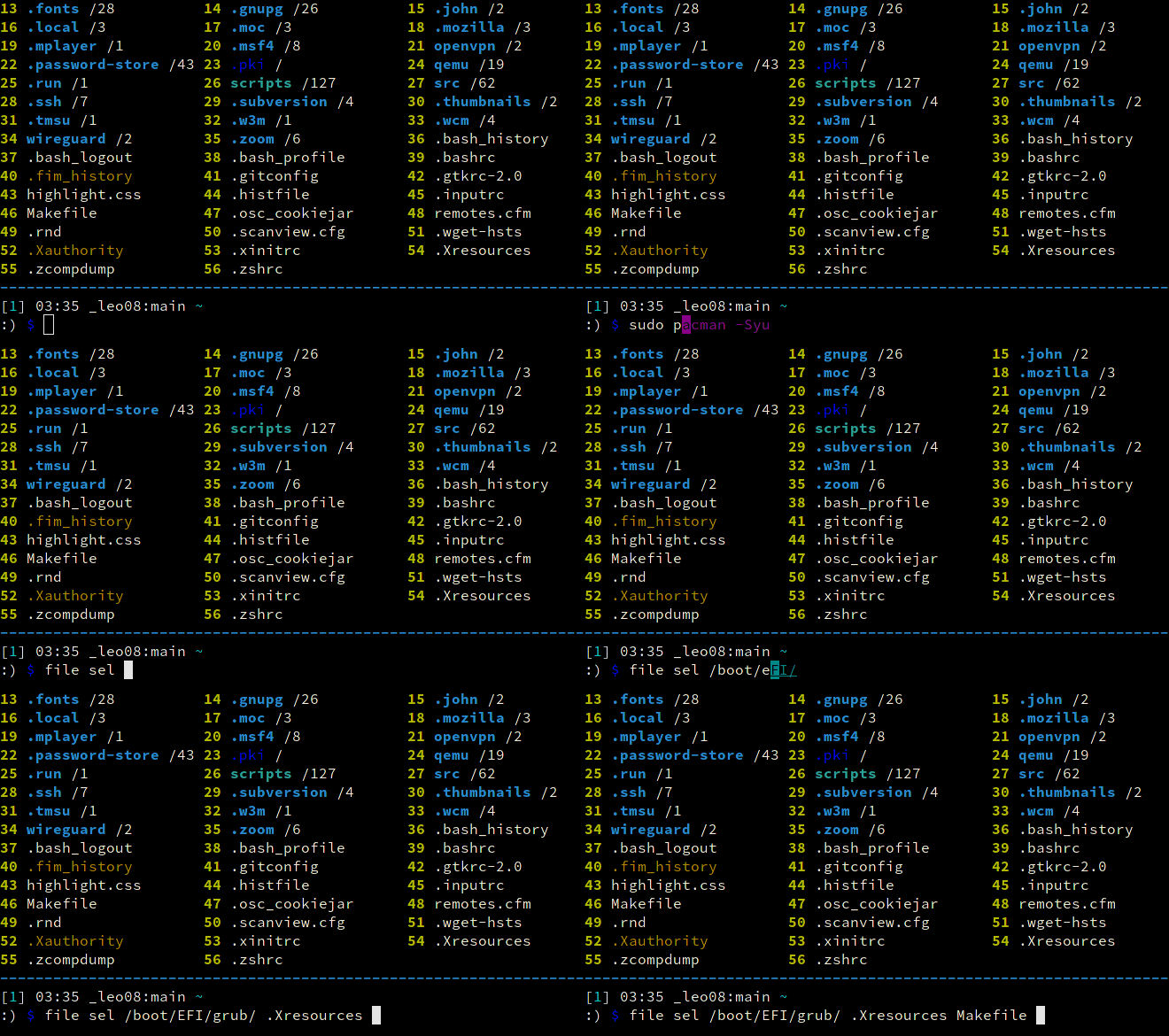
For a detailed explanation of each of these features, follow the corresponding links or consult the Wiki.
🎬 Introduction video

💾 Installation
From a package manager
Packaging status 

If running on Linux, binary packages are available for most major distributions via the OpenSUSE Build System.
From source (Linux/BSD)
Note: Dependencies are most likely already satisfied, but, in any case, consult the dependencies section.
git clone https://github.com/leo-arch/clifm.git
cd clifm
sudo make install
For more information/supported platforms, consult the installation page.
💡 Getting started
To start using clifm, you don't need to learn anything new: the usual shell commands will just work. However, there is much more than just shell commands...
✓ The help command gives you a quick introduction to clifm: once in the command prompt, enter help or ?.
✓ Type cmd<TAB> to get the list of available commands and a brief description.
✓ Type help <TAB> to get the list of available help topics. Select the one you want and press Enter.
✓ To jump into the COMMANDS section in the manpage, simply enter cmd or press F2.
✓ Press F1 to access the full manpage and F3 to access the keybindings help-page.
✓ To get help about some specific command, just enter CMD -h. For instance, s -h.
You can also take a look at our FAQ and these basic usage-examples.
For a complete description, please consult our Wiki.
[!TIP] Start clifm and just press a number (technically, an ELN or Entry List Number).
📰 What's new?
Consult the changelog file.
Support
Clifm runs on Linux, Termux (Android), FreeBSD, NetBSD, OpenBSD, DragonFly, MacOS, Solaris/Illumos, Haiku, and Cygwin/MinGW, on x86, ARM, PowerPC, and RISC-V architectures.
License
This project is licensed GPL version 2 (or later). See the LICENSE file for details.
Contributing
Contributions are kindly welcome! Please see our contribution guidelines for details.
Community
Visit the Discussions section of this repo and let us know what you think: ideas, comments, observations and questions are always useful.
Developer
Leo Abramovich <leo.clifm@outlook.com>.
Special thanks to all those who have contributed to this project.