Linux Patch Management & Automation Platform
npm install patchmonPatchMon
Enterprise-grade Linux patch & server management platform










What is PatchMon?
PatchMon is an enterprise-grade platform that gives operations teams a single pane of glass to monitor, patch and secure their Linux fleet, with FreeBSD and Windows agent support.
A lightweight agent communicates outbound-only to the PatchMon server on your schedule - no inbound ports required on monitored hosts - delivering real-time visibility into package health, compliance posture and system status across environments of any scale.

Why PatchMon?
- Outbound-only agents - no inbound firewall changes, no SSH or WinRM exposure, no VPN required.
- Single binary, bundled UI - one Go binary with the React frontend embedded. One container, no Node runtime at deploy time.
- Open source, with a managed cloud - AGPL v3 licensed, free to self-host. Production hosting available at patchmon.net/cloud.
- Multi-OS by design - Linux (apt, dnf, yum, apk, pacman), FreeBSD (pkg) and Windows, handled by the same agent and control plane.
Quick Start
Docker is the fastest way to try PatchMon:
mkdir patchmon && cd patchmon
bash -c "$(curl -fsSL https://raw.githubusercontent.com/PatchMon/PatchMon/refs/heads/main/docker/setup-env.sh)"
docker compose up -d
Open http://localhost:3000, create an admin user, add a host in the UI and copy the generated install command onto the target server.
Full deployment options (Docker manual, Proxmox LXC, PatchMon Cloud) are in the Deployment section.
Features at a Glance
Patch Management
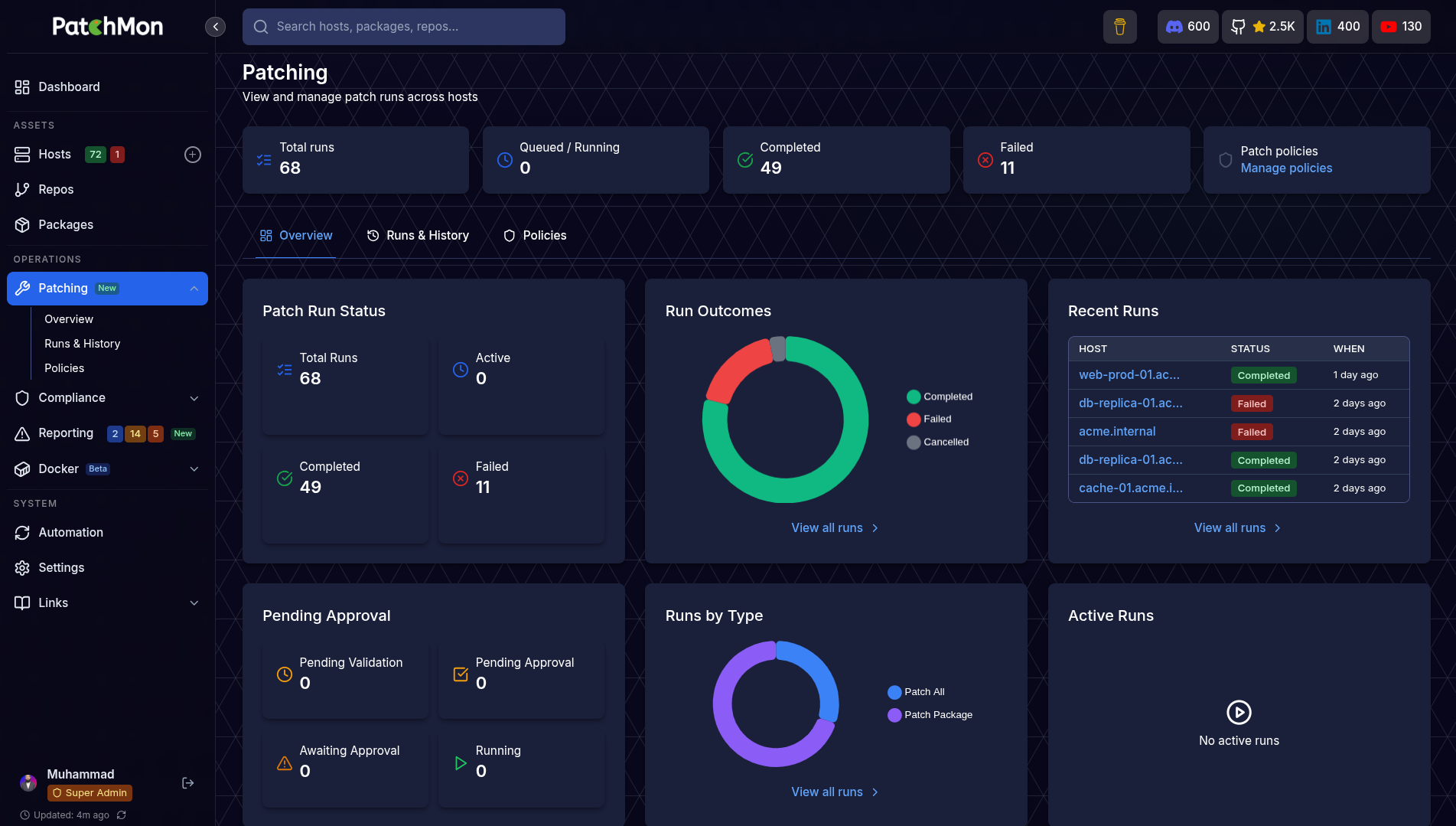
The core of PatchMon - orchestrate updates across your fleet with validation, approval and live visibility.
| Capability | What It Does |
|---|---|
| Dry-Run Validation | Preview the exact package transaction on a host before anything touches production. Every run captures the full plan so you know what would change. |
| Approve & Execute | One-click approval turns a validated dry-run into a real patch run, with a per-host audit trail of who approved what and when. |
| Scheduled Patching | Patch policies decide when updates apply - immediate, maintenance window or delayed rollout. Approve now, execute later. |
| Live Patch Streaming | Watch patch execution in real time from the browser. Agent stdout/stderr is streamed over WebSocket, with the ability to stop a run mid-flight. |
| Selective Patching | Target specific packages, security-only updates or a full upgrade. Works across apt, dnf, yum, apk, pacman and FreeBSD pkg. |
| Patch History & Audit | Full searchable history of every run - exit code, duration, packages touched, approver and host. |
Visibility & Inventory
| Capability | What It Does |
|---|---|
| Personalised Dashboard | Per-user, drag-and-reorder overview cards showing fleet health, outdated packages, host status and patching activity at a glance. |
| Host Inventory | Browse every enrolled server with OS, uptime, kernel, last check-in and group membership. |
| Package Inventory | View every installed package across your fleet, filter to outdated or vulnerable ones, and see exactly which hosts need attention. |
| Repository Tracking | Every APT / YUM / DNF / APK / pacman repository configured on each host, in one place. |
| Docker Monitoring | Automatic discovery of containers, images, volumes and networks with real-time status pushed over WebSocket. |
Security & Compliance
| Capability | What It Does |
|---|---|
| Compliance Scanning | Run OpenSCAP CIS Benchmarks and Docker Bench for Security. Track compliance scores over time with rule-level results and remediation guidance. |
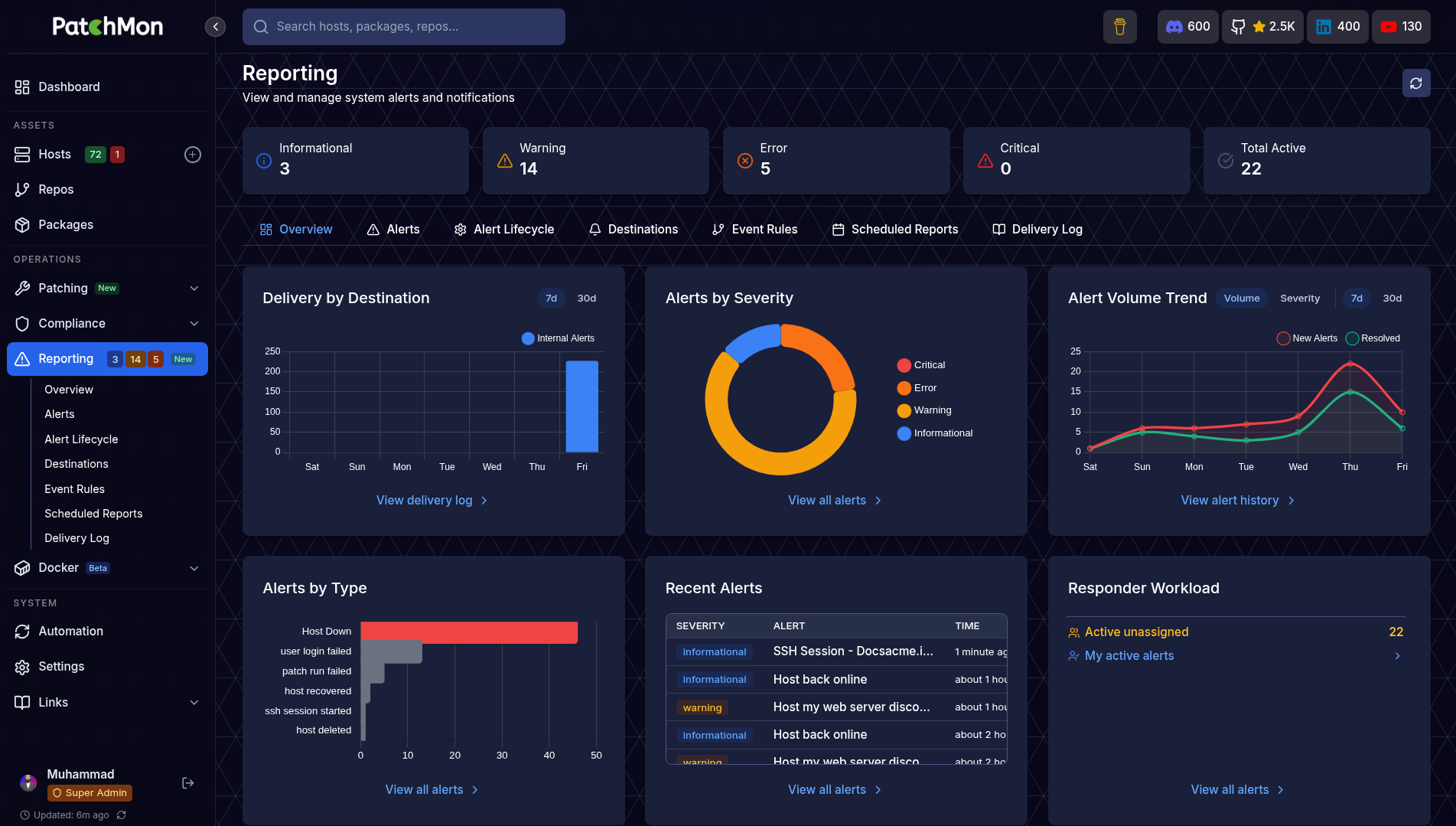
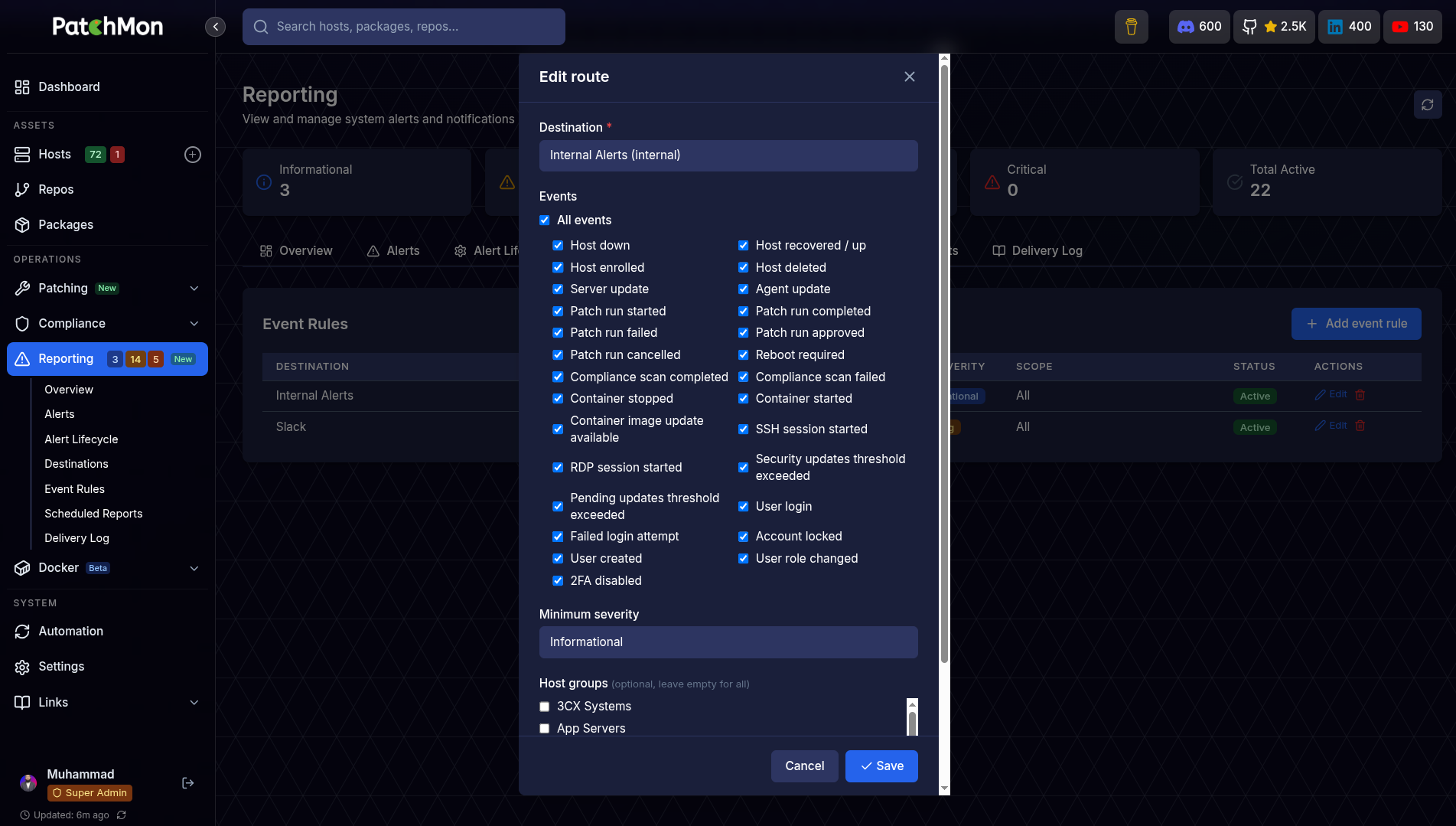
| Alerting | Host-down, pending server updates and agent-update alerts. Filter by severity, type and status; assign to team members. |
| Outbound-Only Agent | No inbound ports on monitored hosts. Agent initiates all traffic, with IP allow-lists for enrolment tokens and rate limiting on every endpoint. |
| RBAC | Multi-user accounts with fully customisable roles and granular permissions - every team member sees only what they need. |
| OIDC Single Sign-On | Authenticate with Authentik, Keycloak, Okta or any OIDC provider. Supports auto user provisioning, group-to-role mapping and SSO-only enforcement. |
Access & Operations
| Capability | What It Does |
|---|---|
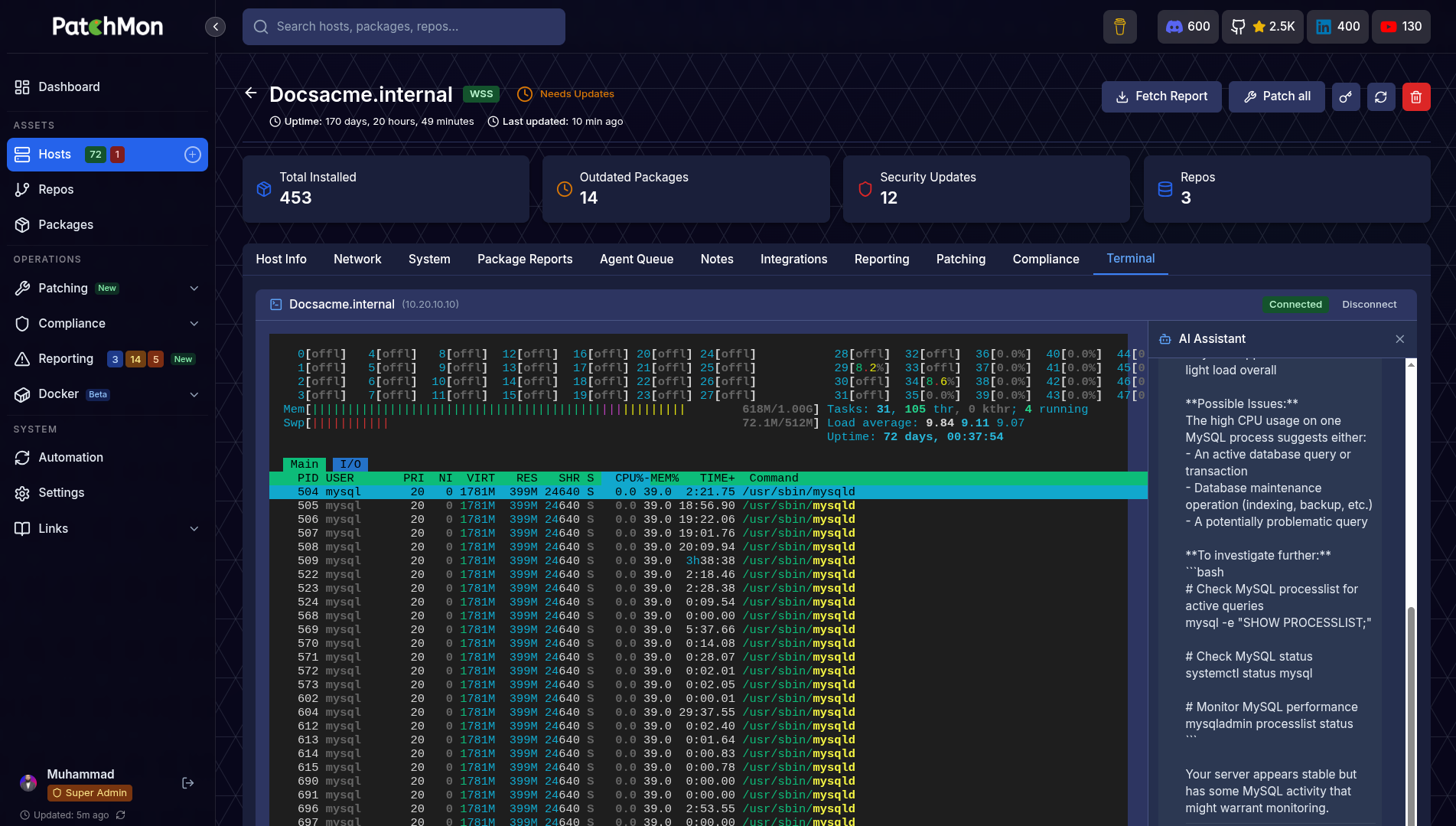
| Web SSH Terminal | Browser-based SSH to any host directly from the UI. Direct or proxy mode (route through the agent, no SSH port exposure). |
| AI Terminal Assistant | Built-in AI chat panel inside the SSH terminal for command suggestions, error diagnosis and context-aware help. Works with OpenRouter, Anthropic, OpenAI or Google Gemini. |
| Branding & Theming | Upload custom logos and favicon, choose colour themes and toggle light / dark mode per user. |
Platform
| Capability | What It Does |
|---|---|
| Integrations | 33+ integrations including Proxmox LXC auto-enrolment, getHomepage, Ansible and more. |
| REST API | Full /api/v1 with JWT authentication and interactive Swagger / OpenAPI docs at /api-docs. |
Deployment Options
PatchMon Cloud
14-day trial at patchmon.net/pricing
Fully managed PatchMon hosting with zero infrastructure overhead. We handle provisioning, updates, backups and scaling so you can focus on your fleet instead of the tooling behind it.
Self-Hosted - Docker (Officially supported)
Docker is the preferred and supported self-hosted deployment. We use hardened images for security.
Automated setup from an empty directory. The setup script downloads docker-compose.yml and env.example, generates all required secrets, and walks you through URL and CORS_ORIGIN configuration interactively:
mkdir patchmon && cd patchmon
bash -c "$(curl -fsSL https://raw.githubusercontent.com/PatchMon/PatchMon/refs/heads/main/docker/setup-env.sh)"
docker compose up -d
Access the application at the URL you configured (default: http://localhost:3000).
Manual Docker setup: see Installing PatchMon Server on Docker.
Self-Hosted - Proxmox LXC
One-command LXC deployment via the Proxmox VE Helper-Scripts community script:
bash -c "$(curl -fsSL https://raw.githubusercontent.com/community-scripts/ProxmoxVE/main/ct/patchmon.sh)"
Enrolling Hosts
Once the server is running:
- Log in to the UI and add a host under Hosts.
- PatchMon generates a one-line install command with a per-host API key.
- Paste the command on the target server (requires root/sudo) and the agent enrols itself.
Supported agent platforms: Linux (amd64, 386, arm64, arm), FreeBSD (amd64, 386, arm64, arm), Windows (amd64, 386, arm64).
Minimum Server Specs
| Resource | Requirement |
|---|---|
| CPU | 2 vCPU |
| RAM | 2 GB |
| Disk | 15 GB |
Architecture
| Component | Technology |
|---|---|
| Backend | Go, sqlc, chi router |
| Frontend | React + Vite, embedded in the patchmon-server binary |
| Database | PostgreSQL 17 |
| Queue | Redis 7 (Asynq) |
| Agent | Go binary - Linux, FreeBSD, Windows |
flowchart LR
    A[Browser / Admin UI] -- HTTPS --> B[Your Reverse Proxy]
    B -- HTTP --> C[Backend - Go Binary]
    C -- TCP --> D[(PostgreSQL)]
    C -- TCP --> R[(Asynq + Redis)]
    E[Agents on your servers] -- HTTPS + WSS --> C
Agents initiate all communication. HTTPS carries reports and config; WSS (WebSocket over TLS) carries real-time events such as live patch streaming and Docker status. Ensure that Websockets is supported by your proxy when passing the traffic to PatchMon container :3000 or whichever port you decide to use.
Documentation
Full documentation at patchmon.net/docs.
| Topic | Link |
|---|---|
| Installing on Docker | Docker install guide |
| Environment variables | Env vars reference |
| Integration API | Integration API docs |
| Proxmox LXC auto-enrolment | Proxmox guide |
| getHomepage dashboard card | getHomepage integration |
| Metrics collection | Metrics info |
Support
Community
- Discord: https://patchmon.net/discord
- Email: support@patchmon.net
Professional & Enterprise
- PatchMon PRO: https://patchmon.net/pro
Contributing
We welcome contributions from the community. See CONTRIBUTING.md for the full guide: code style, commit conventions, running tests, documentation workflow and the PR process.
Quick summary:
- Follow existing patterns and the Biome / golangci-lint configurations.
- Use conventional commit messages (
feat:,fix:,docs:, etc.). - Add tests for new features and ensure the full suite passes.
- Update documentation alongside code changes.
Good first issues are labelled in the issue tracker.
Roadmap
Track upcoming features and progress on the PatchMon Roadmap.
PatchMon PRO - Enterprise & Vendor Support
PatchMon is trusted by teams managing production infrastructure worldwide. We offer global vendor support and enterprise solutions tailored to your organisation's requirements.
| Offering | Details |
|---|---|
| PatchMon Cloud | Fully managed hosting - we handle infrastructure, updates, backups and scaling for you. |
| Global Vendor Support | Dedicated technical support available worldwide with SLA-backed response times. |
| Custom Integrations | Bespoke API endpoints, third-party connectors and tailored dashboards built to your specification. |
| On-Premises / Air-Gapped | Deploy in your own data centre or isolated environment with full support. |
| White-Label Solutions | Brand PatchMon as your own with custom logos, domains and theming, plus multi-context deployment options. |
| Training & Onboarding | Comprehensive team training and onboarding programmes for your organisation. |
| Consulting | Architecture review, deployment planning and migration assistance from the team that builds PatchMon. |
Contact us at support@patchmon.net for enterprise and vendor support enquiries.
License
AGPL v3 - see LICENSE for details.
Made with ❤️ by the PatchMon Team
This project represents hundreds of hours of development work. If PatchMon has saved you time or helped secure your infrastructure, a coffee would genuinely mean the world.

⭐ If you find PatchMon useful, please star this repo - it helps others discover the project!