Picocli is a modern framework for building powerful, user-friendly, GraalVM-enabled command line apps with ease. It supports colors, autocompletion, subcommands, and more. In 1 source file so apps can include as source & avoid adding a dependency. Written in Java, usable from Groovy, Kotlin, Scala, etc.
git clone https://github.com/remkop/picocli.git








picocli - a mighty tiny command line interface
Picocli aims to be the easiest-to-use way to create rich command line applications that can run on and off the JVM. Considering picocli? Check what happy users say about picocli.
Picocli is a modern library and framework, written in Java, that contains both an annotations API and a programmatic API. It features usage help with ANSI colors and styles, TAB autocompletion and nested subcommands. In a single file, so you can include it in source form. This lets users run picocli-based applications without requiring picocli as an external dependency.
Picocli-based applications can be ahead-of-time compiled to a  native image, with extremely fast startup time and lower memory requirements,
which can be distributed as a single executable file.
Picocli comes with an annotation processor that automatically Graal-enables your jar during compilation.
native image, with extremely fast startup time and lower memory requirements,
which can be distributed as a single executable file.
Picocli comes with an annotation processor that automatically Graal-enables your jar during compilation.
Picocli applications can be very compact with no boilerplate code: your command (or subcommand) can be executed with a single line of code.
Simply implement Runnable or Callable, or put the business logic of your command in a @Command-annotated method.

Picocli makes it easy to follow Command Line Interface Guidelines.
How it works: annotate your class and picocli initializes it from the command line arguments, converting the input to strongly typed data. Supports git-like subcommands (and nested sub-subcommands), any option prefix style, POSIX-style grouped short options, custom type converters, password options and more.
Picocli distinguishes between named options and
positional parameters and allows both to be
strongly typed.
Multi-valued fields can specify
an exact number of parameters or a range (e.g., 0..*, 1..2).
Supports Map options like -Dkey1=val1 -Dkey2=val2, where both key and value can be strongly typed.
Parser tracing facilitates troubleshooting.
Command-line argument files (@-files) allow applications to handle very long command lines.
Generates polished and easily tailored usage help and version help, using ANSI colors where possible. Requires at minimum Java 5, but is designed to facilitate the use of Java 8 lambdas. Tested on all Java versions between 5 and 18-ea (inclusive).
Picocli-based command line applications can have TAB autocompletion,
interactively showing users what options and subcommands are available.
When an option has completionCandidates or has an enum type, autocompletion can also suggest option values.
Picocli can generate completion scripts for bash and zsh, and offers picocli-shell-jline2 and picocli-shell-jline3 modules with JLine Completer implementations for building interactive shell applications.
Unique features in picocli include support for negatable options,
advanced quoted values,
and argument groups.
Argument groups can be used to create mutually exclusive options,
mutually dependent options,
option sections in the usage help message
and repeating composite arguments like
([-a=<a> -b=<b> -c=<c>] (-x | -y | -z))....
For advanced use cases, applications can access the picocli command object model with the
@Spec annotation, and
implement custom parameter processing for option parameters if the built-in logic is insufficient.
Picocli-based applications can easily integrate with Dependency Injection containers.
The Micronaut microservices framework has built-in support for picocli.
Quarkus has a Command Mode with Picocli extension for facilitating the creation of picocli-based CLI applications with Quarkus.
Picocli ships with a picocli-spring-boot-starter module
that includes a PicocliSpringFactory and Spring Boot auto-configuration to use Spring dependency injection in your picocli command line application.
The user manual has examples of integrating with Guice, Spring Boot, Micronaut, Quarkus and with containers that comply to CDI 2.0 specification (JSR 365).
Releases
- All Releases
- Latest: 4.7.7 Release Notes
- Older: Picocli 4.0 Release Notes
- Older: Picocli 3.0 Release Notes
- Older: Picocli 2.0 Release Notes
Documentation
- 4.x User manual: https://picocli.info
- 4.x Quick Guide
- 4.x API Javadoc
- PREVIEW: Modular Javadoc for all artifacts (4.7.7-SNAPSHOT)
- Command line autocompletion
- Programmatic API
- FAQ
- GraalVM AOT Compilation to Native Image
Older
Articles & Presentations
English
- 6 things you can do with JBang but you can’t with Shell (2022-02-28) by F.Marchioni.
- [VIDEO]Kotlin, CLIs and StarWars! - An introduction to creating CLI applications with Kotlin using Picocli (2022-02-05) by Julien Lengrand-Lambert.
- [VIDEO]Autocomplete Java CLI using Picocli (2022-01-24) by raksrahul.
- Picocli – Easiness for CLI arguments in Java (2021-10-27) by agamboa.
- Building Command Line Interfaces with Kotlin using picoCLI (2021-09-23) by Julien Lengrand-Lambert.
- [VIDEO]Create Java CLI applications with picocli (2021-09-14) by coder4life.
- PICOCLI (2021-06-30) by Sybren Boland.
- Picocli | Create your first Kotlin /JVM CLI application with GraalVM (2021-02-13) by manserpatrice.
- [VIDEO] Building kubectl plugins with Quarkus, picocli, fabric8io and jbang (2021-01-22) by Sébastien Blanc.
- [VIDEO] J-Fall Virtual 2020: Julien Lengrand - An introduction to creating CLI applications using picoCLI (2020-12-07) by Julien Lengrand-Lambert. This was the top rated talk for @nljug #jfall virtual 2020! Congrats, Julien!
- Paginate results in a command line application using picoCLI (2020-11-17) by Julien Lengrand-Lambert.
- CLI applications with GraalVM Native Image (2020-11-13) by Oleg Šelajev.
- Picocli subcommands - One program, many purposes (2020-09-22) by Jonas Andersen.
- Native CLI with Picocli and GraalVM (2020-08-20) by jbebar.
- How to build a CLI app in Java using jbang and picocli (2020-08-13) by Matthew Gilliard.
- Building a GitHub Dependents Scraper with Quarkus and Picocli (2020-07-31) by Marc Nuri.
- Building a decent Java CLI (2020-07-27) by Andreas Textor.
- [VIDEO] (Another very well-produced video by Szymon Stepniak) Implementing OAuth 2.0 in a Java command-line app using Micronaut, Picocli, and GraalVM (2020-07-23) by Szymon Stepniak (YouTube channel).
- Micronaut, Picocli, and GraalVM (2020-07-08) by Szymon Stepniak.
- [VIDEO] (Extremely well-produced and informative, recommended!) Building command-line app with Java 11, Micronaut, Picocli, and GraalVM (2020-07-01) by Szymon Stepniak (YouTube channel).
- [AUDIO] Scala Valentines #2 (2020-06-21) Podcast talks about picocli (from 18:11).
- How to create a command line tool using Java? (2020-06-18) by Vijay SRJ.
- Command-line tools with Quarkus and Picocli (2020-06-08) by Dmytro Chaban.
- Quarkus guide for Quarkus command mode with picocli, thanks to a picocli extension by Michał Górniewski included in Quarkus 1.5 (2020-06-03).
- Native images with Micronaut and GraalVM (2020-06-01) by Λ: Olivier Revial.
- CLI applications with Micronaut and Picocli (2020-06-01) by Λ: Olivier Revial.
- Picocli introduction - Modern Java command-line parsing (2020-05-19) by Jonas Andersen.
- Building Native Covid19 Tracker CLI using Java, PicoCLI & GraalVM (2020-05-11) by Mohammed Aboullaite.
- Quarkus Command mode with Picocli (2020-04-27) by Dmytro Chaban.
- Creating CLI tools with Scala, Picocli and GraalVM (2020-03-09) by Naoki Takezoe
- Building native Java CLIs with GraalVM, Picocli, and Gradle (2020-03-08) by Mitch Seymour
- Build Great Native CLI Apps in Java with Graalvm and Picocli (2020-03-07)
- Picocli Structured Objects (2019-09-10) by Philipp Hanslovsky explains how to use picocli's support for repeating argument groups to add or configure structured objects from the command line.
- Create a Java Command Line Program with Picocli|Baeldung (2019-05-07) by François Dupire.
- A whirlwind tour of picocli JAX Magazine "Putting the spotlight on Java tools" (2019-04-08).
- An Introduction to PicoCLI (2019-02-10) by devop.
- Corda CLI UX (User Experience) Guide (2018 by R3 Limited) gives useful advice.
- Develop a CLI tool using groovy scripts (2018-10-26) by Chinthaka Dinadasa.
- Migrating from Commons CLI to picocli. You won't regret it! :-) (also on: DZone and Java Code Geeks).
- Groovy 2.5 CliBuilder Renewal (also on blogs.apache.org). In two parts: Part 1 (also on: DZone, Java Code Geeks), Part 2 (also on: DZone, Java Code Geeks).
- Micronaut user manual for running microservices standalone with picocli.
- Java Command-Line Interfaces (Part 30): Observations by Dustin Marx about picocli 2.0.1 (also on: DZone, Java Code Geeks)
- Java Command-Line Interfaces (Part 10): Picocli by Dustin Marx about picocli 0.9.7 (also on: DZone, Java Code Geeks)
- Picocli 2.0: Groovy Scripts on Steroids (also on: DZone, Java Code Geeks)
- Picocli 2.0: Do More With Less (also on: DZone, Java Code Geeks)
- Announcing picocli 1.0 (also on: DZone)
русский
- Выбор необходимых опций Picocli на основе основного варианта (2020-05-07)
- Интерфейсы командной строки Java: picocli (2018-08-06): Russian translation by MaxRokatansky of Dustin Marx' blog post.
Español
- picocli, un poderoso framework para la creación de aplicaciones de línea de comandos (2023-09-09) by Darkcrizt
- picocli, un poderoso framework para la creación de aplicaciones de línea de comandos (2023-09-09) by Darkcrizt
- Quarkus + Picocli: Web scaper para extraer proyectos dependientes en GitHub (2020-08-15) by Marc Nuri.
- Quarkus - Introducción: picocli (2020-06-15) by Gerardo Arroyo.
- [VIDEO] Picocli - Spring Boot example (2020-05-24) 7-minute quick introduction by Gonzalo H. Mendoza.
Français
- Application mobile: Créez de superbes applications CLI natives en Java avec Graalvm et Picocli (2020-05-07) Translation of Build Great Native CLI Apps in Java with Graalvm and Picocli by bouf1450.
- [VIDEO] Des applications en ligne de commande avec Picocli et GraalVM (N. Peters) (2019-05-07): 15-minute presentation by Nicolas Peters during Devoxx FR. Presentation slides are available on GitHub.
Português
- Desenvolva aplicações CLI nativas em Java com Graalvm e Picocli (2020-08-28): Portuguese translation of Build Great Native CLI Apps in Java with Graalvm and Picocli, thanks to Rodrigo Ap G Batista.
- [VIDEO] Quarkus #40: Command Mode com Picocli (2020-06-23): 13-minute presentation by Vinícius Ferraz (@viniciusfcf).
日本語
- CLI applications with GraalVM Native Image (2020-11-21) translation by Logico_jp of Oleg Šelajev's post.
- Picocli + Kotlin + graalvm-native-image plugin でネイティブツールを作る (2020-04-24) blog post by mike-neck (引きこもり持田 on Twitter).
- pythonのArgumentParserような使い心地!picocliのご紹介 (2020-04-15) by @astamuseLab
- Javaのコマンドラインアプリケーション向けのフレームワーク、picocliで遊ぶ (2020-03-07) blog post by かずひら.
- KuromojiのCLIコマンドとpicocliとGraalVM (2020-02-28) blog post by @johtani.
- GraalVM, PicocliとJavaでときめくネイティブコマンドラインアプリを作ろう (2019-11-23) Slides for my presentation at Japan Java User Group's JJUG CCC 2019 Fall conference.
- Picocliを使用してJavaコマンドラインプログラムを作成する - 開発者ドキュメント (2019-10-18)
- GraalVM と Picocliで Javaのネイティブコマンドラインアプリを作ろう (2019-09-06) Slides for my lightning talk presentation at 【東京】JJUG ナイトセミナー: ビール片手にLT大会 9/6(金)
- Picocli+Spring Boot でコマンドラインアプリケーションを作成してみる (2019-07-20) by かんがるーさんの日記.
- GraalVM の native image を使って Java で爆速 Lambda の夢を見る (2019-05-02) by @kencharos
中文
- Java命令行界面(第10部分):picocli (2020-06-07) translation by dnc8371.
- 如何借助 Graalvm 和 Picocli 构建 Java 编写的原生 CLI 应用 (2020-03-26): Chinese translation of Build Great Native CLI Apps in Java with Graalvm and Picocli, thanks to 张卫滨.
- 从Commons CLI迁移到Picocli (2019-03-13): Chinese translation of Migrating from Commons CLI to picocli, thanks to genghaihua.
- Picocli 2.0: Steroids上的Groovy脚本
- Picocli 2.0: 以少求多
Mailing List
Join the picocli Google group if you are interested in discussing anything picocli-related and receiving announcements on new releases.
Credit

Reallinfo designed the picocli logo! Many thanks!
Commitments
| This project follows semantic versioning and adheres to the Zero Bugs Commitment. |
|---|
Adoption



































- Picocli is now part of Groovy. From Groovy 2.5, all Groovy command line tools are picocli-based, and picocli is the underlying parser for Groovy's CliBuilder DSL.
- Picocli is now part of Micronaut. The Micronaut CLI has been rewritten with picocli, and Micronaut has dedicated support for running microservices standalone with picocli. See also Micronaut Picocli Guide.
- Quarkus now offers Command mode with picocli.
- Picocli is now part of JUnit 5. JUnit 5.3 migrated its
ConsoleLauncherfrom jopt-simple to picocli to support @-files (argument files); this helps users who need to specify many tests on the command line and run into system limitations. - Debian now offers a libpicocli-java package. Thanks to Miroslav Kravec.
- Picocli is used in the Intuit Karate standalone JAR / executable.
- Picocli is part of Ballerina. Ballerina uses picocli for all its command line utilities.
- Picocli is used in the CheckStyle standalone JAR / executable from Checkstyle 8.15.
- Picocli is included in the OpenJDK Quality Outreach list of Free Open Source Software (FOSS) projects that actively test against OpenJDK builds.
- Picocli is used in the Apache Hadoop Ozone/HDDS command line tools, the Apache Hive benchmark CLI, Apache Ignite TensorFlow, and Apache Sling Feature Model Converter.
- Picocli is listed on StackShare. Please add it to your stack and add/upvote reasons why you like picocli!
- Picocli is used in Pinterest ktlint.
- Picocli is used in Spring IO nohttp-cli.
- The MinecraftPicocli library facilitates the use of picocli in Minecraft Forge.
- Simple Java Mail now offers a picocli-based CLI.
- jbang not only uses picocli internally, but also has a CLI template to generate an initial script: use
jbang --init=cli helloworld.javato generate a sample picocli-enabled jbang script. See asciinema. - Picocli is the main library used in the CookieTemple cli-java template for building GraalVM native CLI executables in Java. See this preview.
- Picocli is mentioned in Command Line Interface Guidelines.


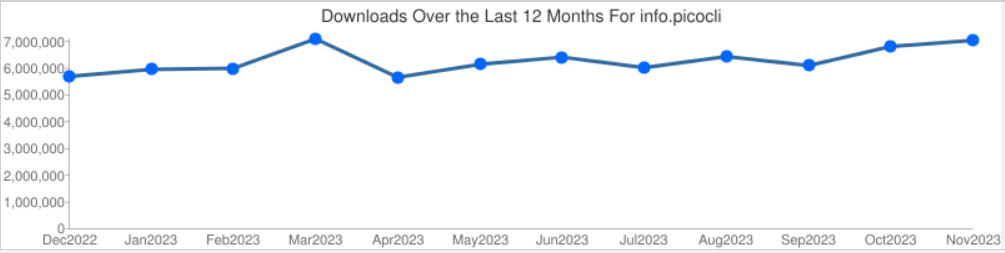
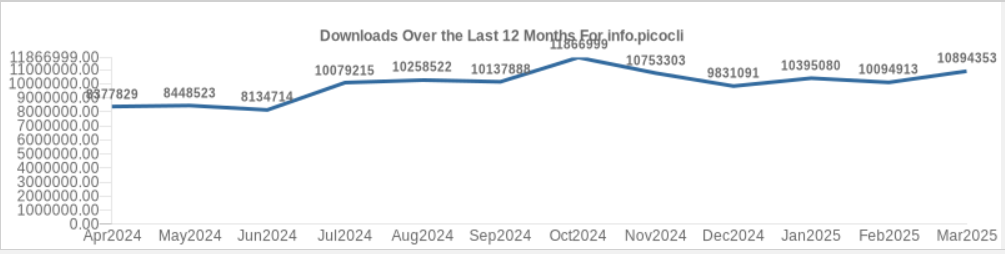
Glad to see more people are using picocli. We must be doing something right. :-)
Contribute by helping to promote picocli
If you like picocli, help others discover picocli:
Easy and impactful :sweat_smile:
- Give picocli a star on GitHub!
- Upvote my StackOverflow answer to "How do I parse command line arguments in Java?"
- Upvote my Quora answer to "What is the best way to parse command-line arguments with Java?"
Spread the joy! :tada:
- Tweet about picocli! What do you like about it? How has it helped you? How is it different from the alternatives?
- Mention that your project uses picocli in the documentation of your project.
- Show that your GitHub project uses picocli, with this badge in your README.md:

[](https://github.com/remkop/picocli)
Preach it! :muscle:
- Perhaps the most impactful way to show people how picocli can make their life easier is to write a blog post or article, or even do a video!
Example
Annotate fields with the command line parameter names and description. Optionally implement Runnable or Callable to delegate error handling and requests for usage help or version help to picocli. For example:
import picocli.CommandLine;
import picocli.CommandLine.Command;
import picocli.CommandLine.Option;
import picocli.CommandLine.Parameters;
import java.io.File;

@Command(name = "example", mixinStandardHelpOptions = true, version = "Picocli example 4.0")
public class Example implements Runnable {

    @Option(names = { "-v", "--verbose" },
      description = "Verbose mode. Helpful for troubleshooting. Multiple -v options increase the verbosity.")
    private boolean[] verbose = new boolean[0];

    @Parameters(arity = "1..*", paramLabel = "FILE", description = "File(s) to process.")
    private File[] inputFiles;

    public void run() {
        if (verbose.length > 0) {
            System.out.println(inputFiles.length + " files to process...");
        }
        if (verbose.length > 1) {
            for (File f : inputFiles) {
                System.out.println(f.getAbsolutePath());
            }
        }
    }

    public static void main(String[] args) {
        // By implementing Runnable or Callable, parsing, error handling and handling user
        // requests for usage help or version help can be done with one line of code.

        int exitCode = new CommandLine(new Example()).execute(args);
        System.exit(exitCode);
    }
}
Implement Runnable or Callable, and your command can be executed in one line of code. The example above uses the CommandLine.execute method to parse the command line, handle errors, handle requests for usage and version help, and invoke the business logic. Applications can call System.exit with the returned exit code to signal success or failure to their caller.
$ java Example -v inputFile1 inputFile2

2 files to process...
The CommandLine.execute method automatically prints the usage help message if the user requested help or when the input was invalid.

This can be customized in many ways. See the user manual section on Executing Commands for details.
Usage Help with ANSI Colors and Styles
Colors, styles, headers, footers and section headings are easily customized with annotations. For example:

See the source code.
Usage Help API
Picocli annotations offer many ways to customize the usage help message.
If annotations are not sufficient, you can use picocli's Help API to customize even further. For example, your application can generate help like this with a custom layout:

See the source code.
Download
You can add picocli as an external dependency to your project, or you can include it as source.
See the source code. Copy and paste it into a file called CommandLine.java, add it to your project, and enjoy!
Gradle
implementation 'info.picocli:picocli:4.7.7'
Maven
<dependency>
  <groupId>info.picocli</groupId>
  <artifactId>picocli</artifactId>
  <version>4.7.7</version>
</dependency>
Scala SBT
libraryDependencies += "info.picocli" % "picocli" % "4.7.7"
Ivy
<dependency org="info.picocli" name="picocli" rev="4.7.7" />
Grape
@Grapes(
    @Grab(group='info.picocli', module='picocli', version='4.7.7')
)
Leiningen
[info.picocli/picocli "4.7.7"]
Buildr
'info.picocli:picocli:jar:4.7.7'
JBang
//DEPS info.picocli:picocli:4.7.7