Centaur Emacs - A Fancy and Fast Emacs Configuration
🧙♂️ Centaur Emacs





Table of Contents
- ✨ Features
- 🧰 Prerequisites
- 🚀 Quick Start
- ⚙️ Customization
- 🎯 Hydra Keybindings
- 📸 Screenshots
- ❓ Frequently Asked Questions (FAQ)
- 💖 Support the Project
This is an Emacs distribution that aims to enhance the default Emacs experience. It alters a lot of the default settings, bundles a plethora of additional packages and adds its own core library to the mix. The final product offers an easy to use Emacs configuration for Emacs newcomers and lots of additional power for Emacs power users.
It is able to run on Windows, GNU Linux and macOS. It is compatible ONLY with GNU Emacs 28.1 and above. In general you're advised to always run with the latest stable release - currently 30.2.
✨ Features
- Out of the box: Ready to use immediately after installation
- Clean and Fast: Optimized for performance and clean interface
- Quick fuzzy search: Efficient file and text searching capabilities
- Better Org/Markdown support: Enhanced markup language editing
- Multi-language Programming Support:
- System Languages: C/C++/Object-C/C#/Java
- Scripting Languages: Python/Ruby/Perl/PHP/Shell/Powershell/Bat
- Web Technologies: JavaScript/Typescript/JSON/YAML
- Markup Languages: HTML/CSS/XML
- Modern Languages: Golang/Swift/Rust/Dart/Elixir
- And many more...
- Auto completion: Intelligent code completion
- Fly syntax check: Real-time syntax error detection
- Fly spell check: Live spelling correction
- Git integration: Seamless version control workflow
- Project/Workspace integration: Advanced project management
- Pomodoro integration: Built-in productivity timer
- MPD integration: Music player daemon support
- Docker support: Containerization tools integration
- Enhanced Chinese support:
- Chinese calendar integration
- Youdao dictionary lookup
- Google translation service
- Pinyin search functionality
🧰 Prerequisites
Operating Systems
- GNU Linux: Fully supported
- macOS: Fully supported
- Windows: Supported via Cygwin/MSYS
GNU Emacs
Compatible with GNU Emacs 28.1 and above. We recommend using the latest stable release (currently Emacs 30.1).
For installation instructions, please refer to Installing Emacs.
Dotfiles (Optional)
We recommend using Centaur Dotfiles for a complete system configuration.
🚀 Quick Start
Installation
Standard Installation
To install Centaur Emacs, backup your existing configuration and clone the repository:
# Backup your existing configuration
mv ~/.emacs.d ~/.emacs.d.bak

# Clone the repository
git clone --depth 1 https://github.com/seagle0128/.emacs.d.git ~/.emacs.d
Alternatively, you can download the ZIP package directly and extract it to ~/.emacs.d.
:information_source: Notes: XDG Configuration Directory (Linux)
If you're using Linux and prefer an XDG-compatible location, use:
# Ensure ~/.emacs.d, ~/.emacs and ~/.emacs.el don't exist
git clone --depth 1 https://github.com/seagle0128/.emacs.d.git $XDG_CONFIG_HOME/emacs
Or extract the ZIP package to the $XDG_CONFIG_HOME/emacs directory.
First Startup
After installation, start Emacs and wait for packages to install during the first startup. This may take some time depending on your network speed.
:warning: Notes:
- First startup may take a while as packages are downloaded and installed
- If installation stalls, check your network connection or consider using a proxy
- For troubleshooting, start with minimal configuration:
emacs -Q -l ~/.emacs.d/init-mini.el
:rocket: Enjoy! :smile:
Updating
Keep your Centaur Emacs installation up-to-date with these commands:
Update Commands
;; Update everything: configurations and packages
M-x centaur-update

;; Update only Emacs configurations
M-x centaur-update-config

;; Update ~/.dotfiles (if you have them installed)
M-x centaur-update-dotfiles

;; Update only packages
M-x centaur-update-packages

;; Update everything: configurations, packages, and dotfiles
M-x centaur-update-all
Docker Support
Run Centaur Emacs in a containerized environment:
# Navigate to the Dockerfile directory
cd ~/.emacs.d

# Build the Docker image
docker build -t centaur/emacs -f Dockerfile.xx .

# Run the container interactively
docker run -it centaur/emacs bash
⚙️ Customization
Using Customize Interface
The easiest way to customize Centaur Emacs is through the built-in customization interface:
- Execute
M-x customize-group - Select the
centaurgroup - Modify the settings as needed
- Click Save to store the configurations
- Restart Emacs to apply changes
Manual Configuration
For advanced users, you can directly edit configuration settings in your custom.el file:
Common Configuration Options
;; Disable startup logo
(setq centaur-logo nil)

;; Set user information
(setq centaur-full-name "Your Name")           ; Your full name
(setq centaur-mail-address "your@email.com")   ; Your email address

;; Proxy settings
(setq centaur-proxy "127.0.0.1:1087")          ; HTTP/HTTPS proxy
(setq centaur-socks-proxy "127.0.0.1:1086")    ; SOCKS proxy

;; System settings

(setq centaur-use-exec-path-from-shell t)      ; Use shell environment (set to nil for emacs-plus)

;; Visual settings
(setq centaur-icon t)                          ; Display icons (t to enable, nil to disable)
(setq centaur-package-archives 'melpa)         ; Package repository (melpa, bfsu, iscas, netease, sjtu, tencent, tuna, ustc)
(setq centaur-theme 'auto)                     ; Theme: auto, random, system, default, pro, dark, light, warm, cold, day, night

;; UI settings
(setq centaur-completion-style 'minibuffer)    ; Completion style: minibuffer or childframe
(setq centaur-frame-maximized-on-startup t)    ; Maximize frame on startup
(setq centaur-dashboard nil)                   ; Show dashboard on startup (t to show, nil to hide)

;; Development settings
(setq centaur-lsp nil)                         ; Enable LSP or not

;; Feature toggles
(setq centaur-tree-sitter nil)                 ; Enable tree-sitter (requires Emacs 29+)
(setq centaur-chinese-calendar nil)            ; Enable Chinese calendar support
(setq centaur-player t)                        ; Enable media player controls
(setq centaur-prettify-symbols-alist nil)      ; Symbol prettification (nil to use font ligatures)
:information_source: Notes:
- The default package archive is
melpa. You can change this incustom.elor viaM-x set-package-archives - Personal configurations can be placed in
~/.emacs.d/custom-post.orgor~/.emacs.d/custom-post.el
🎯 Hydra Keybindings
Centaur Emacs comes with several Hydra interfaces for efficient workflows. Here are the available hydras and their keybindings:
| Hydra Name | Scope | Keybinding(s) | Description |
|---|---|---|---|
dape-hydra |
Global | M-<f5> |
Debug adapter protocol actions |
doom-modeline-hydra |
Modeline Mode | C-<f6> |
Modeline customization options |
elfeed-hydra |
Elfeed Search Mode | ? |
RSS feed reader commands |
git-messenger-hydra |
Global | C-x v p |
Git commit message inspection |
hideshow-hydra |
Programming Modes | C-~ |
Code folding/unfolding actions |
hydra-dired-quick-sort |
Dired Mode | S |
File sorting options |
org-hydra |
Org Mode | < |
Org template insertion |
rect-hydra |
Org Mode | S-<return> |
Rectangle selection operations |
rect-hydra |
Text/Programming | C-<return> |
Rectangle selection operations |
smerge-mode-hydra |
Smerge Mode | C-c m |
Merge conflict resolution |
toggles-hydra |
Global | <f6> |
Global option toggles |
window-hydra |
Global | C-c w / C-x o w |
Window management |
xwidget-hydra |
XWidget Webkit Mode | ? |
Embedded browser controls |
ztreediff-hydra |
Ztree Diff Mode | C-<f5> |
Directory comparison operations |
📸 Screenshots


❓ Frequently Asked Questions (FAQ)
How do I display icons correctly in Centaur Emacs?
To properly display icons in Centaur Emacs:
- Run
M-x centaur-install-fontsto install all necessary fonts automatically - Alternatively, install fonts manually:
- Install nerd-icons package
- Run
M-x nerd-icons-install-fontsto install the required icon fonts - On Windows, fonts need to be installed manually
- Note:
nerd-iconssupports both GUI and TUI modes
:information_source: Tip: To disable color icons, add (setq nerd-icons-color-icons nil) to your configuration.
For more details, visit nerd-icons.el.
What should I do if packages cannot be installed?
Most package installation issues stem from network connectivity problems. Try these solutions:
- Refresh the package contents:
M-x package-refresh-contents, then retry installation - Adjust TLS settings:
(setq gnutls-algorithm-priority "NORMAL:-VERS-TLS1.3") - Switch to a different ELPA mirror
- Change your network connection or use a proxy
For more information, see issue #98.
How do I search Chinese text using pinyin?
To search Chinese text via pinyin in Emacs, use: C-s !
:warning: Note: If you want to search for the literal ! character, use: C-s \!
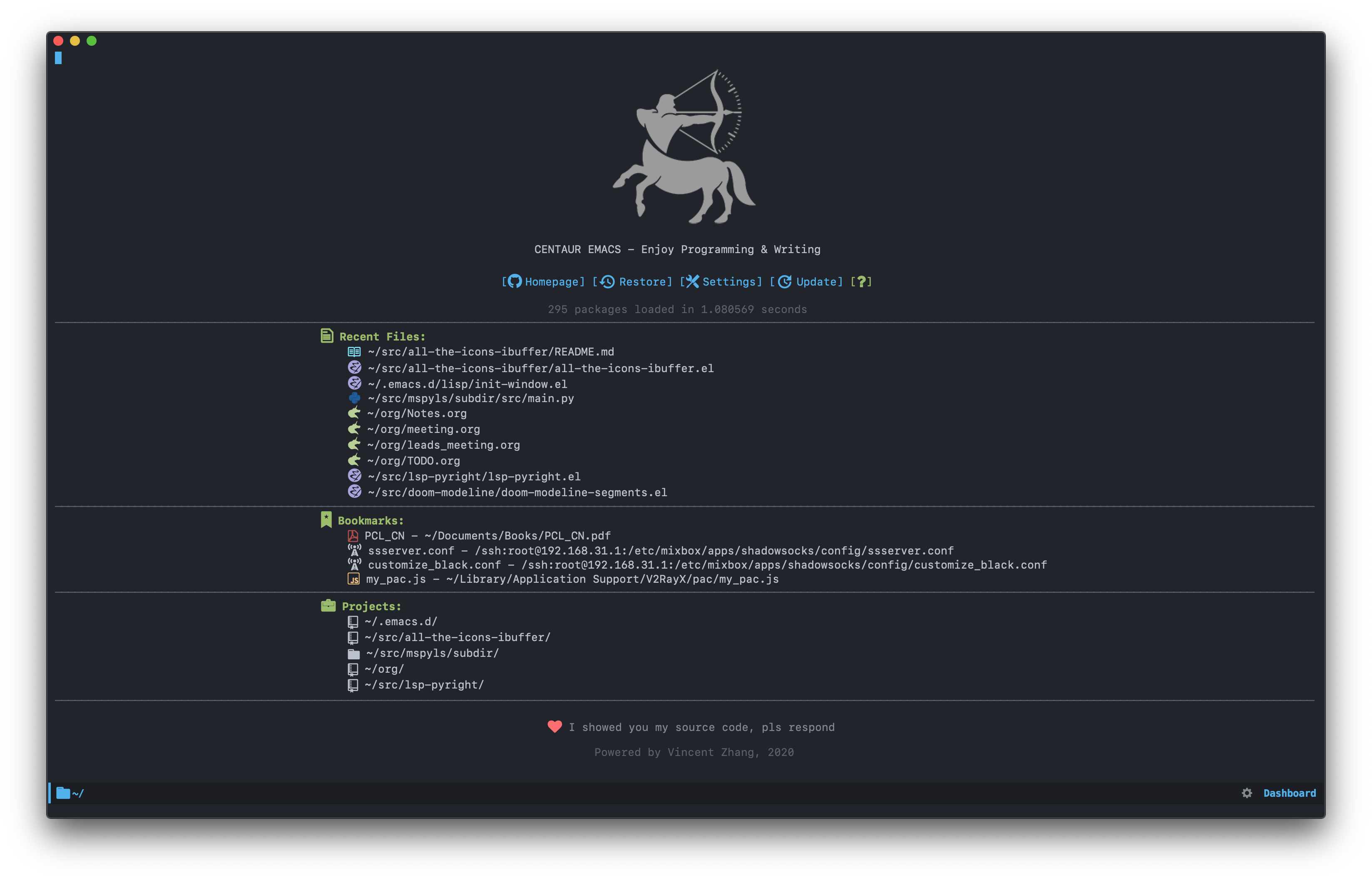
How do I use the Centaur Dashboard?
The Centaur Dashboard enhances your Emacs startup experience:
- If
centaur-dashboardis enabled, it opens automatically at startup - Use
F2to reopen the dashboard anytime after startup - Press
?orhin the dashboard for help - Navigate with keybindings:
- Homepage:
H - Session:
O(restore) - Settings:
S - Update:
U - Recent Files:
r - Bookmarks:
m - Projects:
p - Refresh:
g - Quit:
q
- Homepage:
Does Centaur Emacs support Language Server Protocol (LSP)?
Yes, LSP is supported and enabled by default in Centaur Emacs:
- Default Client:
eglot - To disable LSP:
(setq centaur-lsp nil)
:warning: Important: You'll need to install appropriate language servers for your programming languages. Refer to eglot: connecting to a server for setup details.
How do I enable PlantUML in Org mode?
To enable PlantUML in Org mode:
- Download the PlantUML JAR file
- Add this configuration to your
custom.el:(setq org-plantuml-jar-path "/path/to/plantuml-x.x.x.jar")
Why are Emacs environment variables and exec-path different between GUI and terminal?
This is a common issue where GUI Emacs doesn't inherit the same environment as your shell:
:bulb: Solution: Set environment variables in system startup files like .profile, .bash_profile, or .zshenv.
Centaur Emacs will then recognize and import these environment variables properly.
See issue #33 for more details.
How do I view the keybindings?
You can use describe-personal-keybindings and which-key to view all keybindings.
:memo: Reference: See issue #169 for usage instructions.
💖 Support the Project
If you find Centaur Emacs helpful, consider supporting its development:
:coffee: Buy Me a Coffee:
Your support helps maintain and improve this project! :heart:
| Alipay | WeChat Pay |
|---|---|
 |
 |
International Donations: